
Marketers can build richer emails with the rich text editing toolbar in paragraph components and by attaching PDFs. Advanced data sources available in emails offer more personalization options. Pro-code email authors can create more sophisticated and deeply personalized messages with Handlebars scripting. To better control and enforce email layouts, marketing managers can lock and unlock elements of email templates. Then, to increase productivity without sacrificing consistency, marketers can share approved email templates outside of their marketing teams.
Where: These changes apply to Salesforce Enterprise and Unlimited editions with access to Marketing Cloud Next Growth or Advanced editions. They also apply when Salesforce Foundations is enabled. Your edition determines the options that you have.
Share Marketing-Approved Email Templates with Non-Marketing Users
To increase productivity without sacrificing brand consistency, marketers can now share approved email templates built in Marketing Cloud Next with sales reps and other users. After a marketer creates an email template, they can add it to a flow and lock or unlock specific components. Publishing the flow makes the email template available in an easy email composer that’s ready to use. An admin must turn on Distributed Marketing and Alerts in Setup, and adds the required Lightning components to record pages.
SEE ALSO | Salesforce Help: Distributed Marketing and Alerts Overview
SEE ALSO | Salesforce Help: Set Up Distributed Marketing and Alerts
Enforce Brand Standards with Email Template Locks
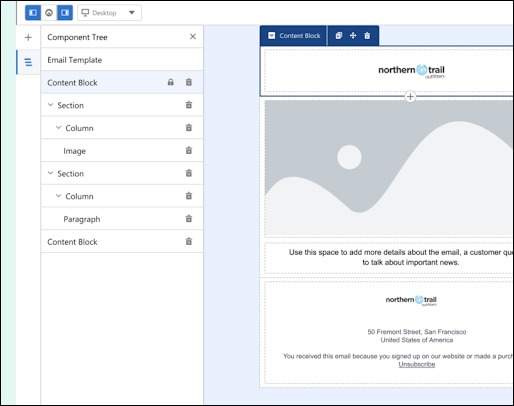
Marketing managers can now ensure brand consistency by locking specific elements on an email template. Protect critical content—such as subject lines, headers, and legal disclaimers—and prevent accidental changes by authors. While fixed elements remain secure, authors retain the flexibility to customize unlocked areas. Visual indicators in the component tree clearly show which sections are non-editable.
SEE ALSO | Salesforce Help: Create an Email Template in Marketing Cloud Next
Personalize Email Messages with Advanced Data Sources
Get more flexibility in personalizing email content with expanded data source support for segment data, Apex classes, and lookup data graphs. Reference Data 360 segment data for data-driven email targeting. Use Apex Classes to pass complex, structured data, such as entire order collections, directly from Flow to your messages, and then build fast, highly personalized transactional messages like order confirmations using that data. Define specialized lookup data graphs that use non-profile data from Data 360, such as product catalogs, to complement the default data graph or unified individual.
SEE ALSO | Salesforce Help: Manage Data Sources for Personalization
Attach PDF Documents to Marketing Cloud Next Emails
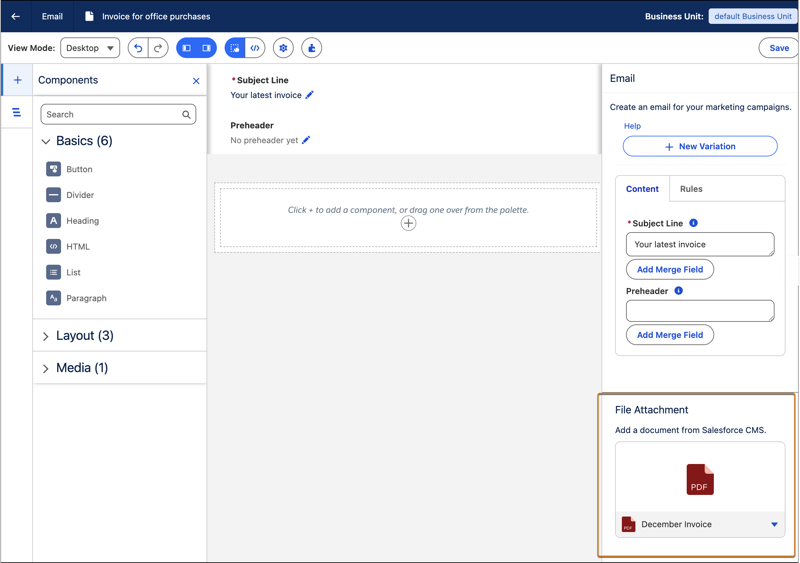
Marketers can now include important business documents such as terms of service, whitepapers, or invoices in emails. In the Property panel, select a PDF from Salesforce CMS that’s 5 MB or less, and attach it to your email.
SEE ALSO | Salesforce Help: Create CMS Content
SEE ALSO | Salesforce Help: Create an Email in Marketing Cloud Next
Get Greater Control Over Email Content with Low-Code Scripting
For sophisticated content personalization and detailed control over message content, use the industry-standard Handlebars templating language. Designer-developers and advanced marketers can access this low-code scripting language from Code View while they build emails. Convert existing emails to code and then write, view, and edit scripts that add conditional logic or perform lookups for relevant data. As you author, the code view provides syntax validation, inline coding assistance, and search.
SEE ALSO | Salesforce Help: Create an Email in Code View in Marketing Cloud Next
SEE ALSO | Salesforce Developers: Create an Email in Marketing Cloud Next
Style Email Content by Using the Enhanced Rich Text Editor
We added more granular control over text styling and spacing for email layouts. Enhancements include emojis, font families, sizes, and line heights; text and background colors; block quotes and horizontal lines.