
Marketers can create campaigns even faster with enhancements that add grounding, branding, content refinement, and previews to the conversation experience. They can also turn one-way email broadcasts into dynamic, two-way interactions.
Where: These changes apply to Salesforce Enterprise and Unlimited editions with Marketing Cloud Next Growth or Advanced editions and Marketing Cloud Next for Marketing Cloud Engagement and the Agentforce Employee Agent add-on. They also apply to these editions when Salesforce Foundations is enabled. Your edition determines the options that you have.
Draft and Preview Briefs and Campaigns in an Agentforce Conversation
With the campaign experience in an Agentforce conversation, marketers can preview campaigns directly in the brief, and they can return to the brief to refine structure and content before saving the campaign. To support these changes, we’ve added the Campaign Preview Refinement agent topic and Refine Campaign Preview action. We’ve also updated the Save Campaign and Generate Campaign from Brief flows and the Draft Campaign from Brief Prompt template. Related flows also now include improved error handling and campaign preview steps.
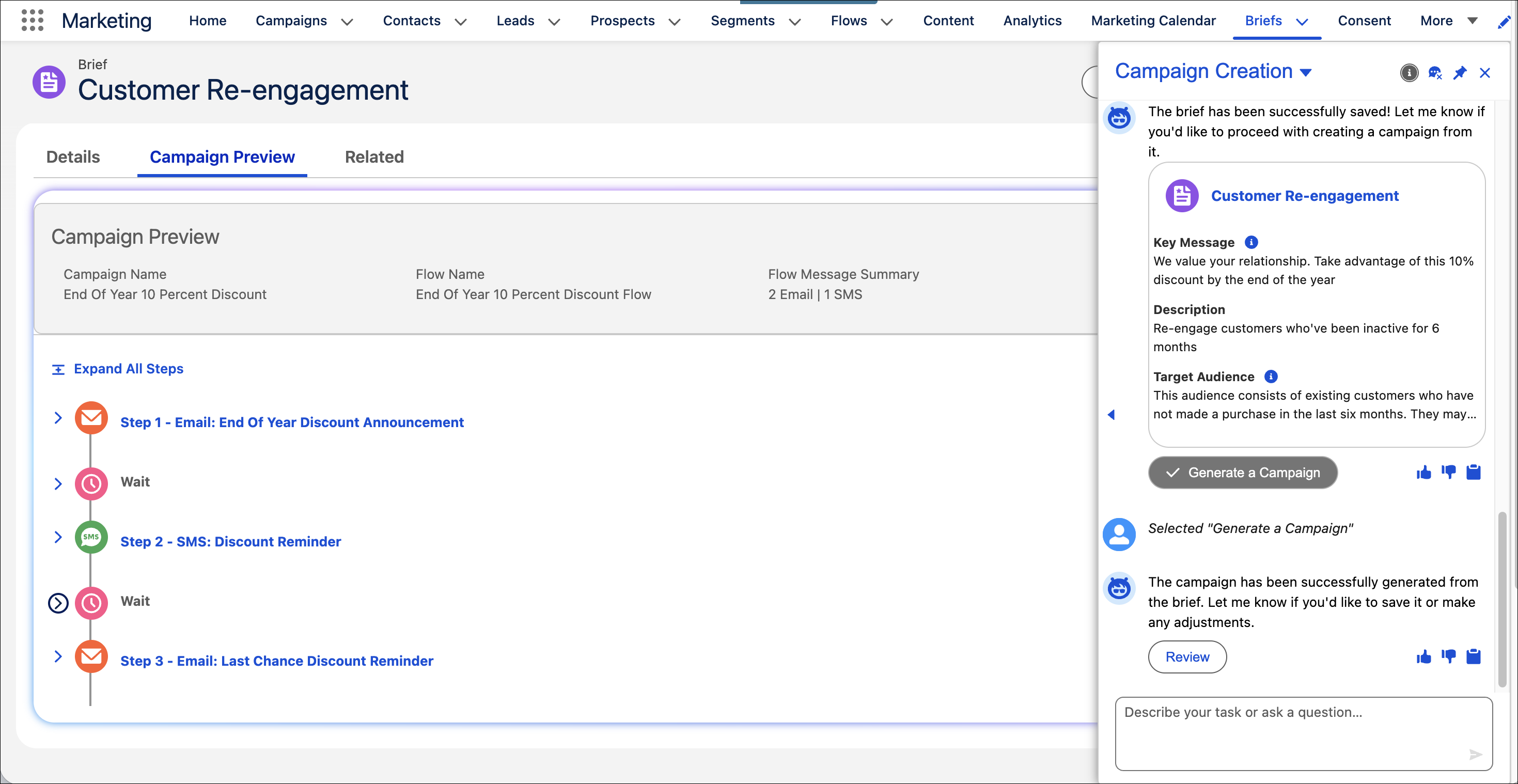
How: To get started, from Agentforce Builder, deploy the Campaign Creation agent. If you’ve already deployed the Campaign Creation agent, topics, or actions in Agent Builder, redeploy them to get the latest changes. Review any customizations that you made to the agent in case you want to make similar changes to the latest version.
SEE ALSO | Salesforce Help: Agentforce in Marketing Cloud Next
Engage Customers with Conversational Email
Turn one-way email broadcasts into dynamic, two-way interactions. Conversational Email engages customers through responsive, threaded conversations that are powered by Agentforce agents. Capture high-intent replies, resolve customer queries, and deliver personalized support, without leaving the Salesforce platform. Flow Builder enhancements, including Wait Until Response, and conversation forwarding enable customers to convert any existing one-way campaigns to two-way campaigns.
How: Use Campaign Agent to easily create two-way conversational campaigns. Provide a user utterance or select an option in the campaign brief, and Campaign Agent generates a preview of a standard two-way email and SMS campaign. It automatically includes the flow elements needed to support two-way conversations with the Default Agent.
Draft Marketing Briefs Based on Existing Strategic Documents
To ground a campaign brief in existing content, upload documents, such as PDFs or Word files, into Salesforce Files and mention them in your prompt. The agent automatically processes the file grounding, generates the brief, and adds a link to the source documents in the new brief record.
SEE ALSO | Salesforce Help: Agentforce in Marketing Cloud Next
SEE ALSO | Salesforce Help: Upload Files
Generate Briefs and Campaign Previews Grounded in the Related Brand
When Agentforce drafts a campaign preview, it now uses the tone and identity of the brand that’s related to the brief. Get more relevant campaign drafts that require fewer manual edits.
Add Campaign Context with Brief Grounding
Add essential context with additional fields to ground your campaign. A custom agent can include primary campaign goal and KPI, priority, calls to action, and guardrails. These additional grounding fields ensure the agent provides targeted and strategic decisions to reduce generic responses.