
Use the new lightning-empty-state component to add meaningful
visuals and content to your components that show empty states. This component displays the
latest Salesforce Lightning Design System (SLDS) empty state illustration and correctly sizes
it for the container, simplifying your UI development. The SVG illustrations automatically
adjust to the user's selected theme, and can adapt to dark mode in SLDS 2 themes, for a
consistent look and feel across your app. The new lightning-illustration
component displays the same set of illustrations without text.
Where: This feature applies to Lightning Experience. The component must run in a Salesforce org to display the illustrations.

lightning-empty-state and lightning-illustration
components are a pilot or beta service that is subject to the Beta Services Terms at Agreements - Salesforce.com or a written Unified Pilot Agreement if executed by
Customer, and applicable terms in the Product Terms Directory. Use of this pilot or beta service is at the
Customer's sole discretion.Why: Use the lightning-empty-state component wherever you expect a
container to display data, such as records or tasks, but there’s no data to populate it. There
can be several reasons why there’s no data, and now you can find just the right illustration
to provide context and lighten the mood. The lightning-empty-state component
also provides a title, description, and call-to-action buttons so you can provide more clarity
or lead users to the next step of their journey. You can also depict an empty state without an
illustration, title, or call-to-action button. Only the description is required.
How: Include the <lightning-empty-state> tag in your Lightning web
component and pass the illustration name and title by using attributes. Pass the description
and cta (call-to-action) by using slots. See the illustration names and usage information in
the Lightning Component Reference
. See the SLDS 2
site for images of the
illustrations and extensive information about the Empty State design.
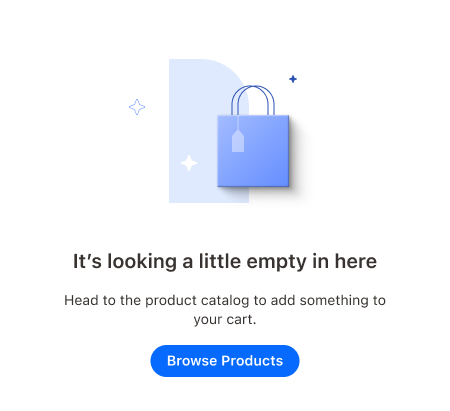
This example shows an empty cart illustration along with a Browse Products call-to-action button with the brand variant.
<!-- myEmptyState.html -->
<!-- With illustration and action -->
<lightning-empty-state
  illustration-name="cart:noitems"
  title="It's looking a little empty in here">
  <p slot="description">Head to the product catalog to add something to your cart.</p>
  <lightning-button
   variant="brand"
   label="Browse Products"
   slot="cta"
   onclick={handleCtaClick}>
  </lightning-button>
</lightning-empty-state>
The button handler in the component's JavaScript file carries out the action.
import { LightningElement } from "lwc";

export default class MyEmptyState extends LightningElement {
  handleCtaClick(event) {
    // go to the Products tab
  }
}
The same myEmptyState example component can run in both SLDS 1 and SLDS 2
themes. The lightning-empty-state component automatically detects the SLDS
version of the theme and presents the correct version of the illustration.
In SLDS 2 themes, this component code produces this empty state depiction with an empty cart illustration.
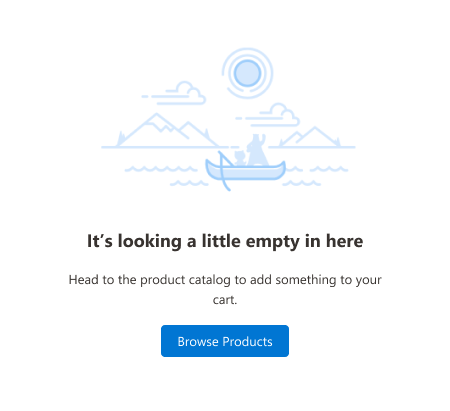
For SLDS 1 themes, the same component produces this empty state depiction with a “gone fishing” illustration.
The lightning-illustration component can display the same empty state
illustrations without descriptive text or buttons. We’re working on more illustrations to use
with this component.
This example component shows only the empty cart illustration in SLDS 2 themes and the gone fishing illustration in SLDS 1 themes.
<!-- myIllustration.html -->
<lightning-illustration
  illustration-name="cart:noitems"
  alternative-text="Shopping cart is empty">
</lightning-illustration>