
If a third party serves your custom domain and your org uses Salesforce Edge Network, reduce your effort and the risk of downtime during Salesforce maintenance. Work with your third-party provider to update the domain’s target host name to your org’s My Domain login URL, which continues to work when your Salesforce instance changes. The current target host name works until your instance name or Hyperforce cell changes. We recommend that you update the target host name before your next org migration.
Where: This change applies to Salesforce Sites and Aura, LWR, and Visualforce sites accessed through Lightning Experience and Salesforce Classic in Enterprise, Performance, and Unlimited editions. This change applies only to custom domains with the domain configuration “Use a third-party service or CDN to serve the domain.”
Why: Custom domains serve your Digital Experiences or Salesforce Sites on a domain that you own, such as https://www.example.com. When a third-party service or content delivery network (CDN) serves your custom domain, the target host name routes your domain traffic to your Salesforce org. If that host name changes, your custom domain stops working until your third party updates the domain configuration to match.
Until you update your target host name to your My Domain URL, that host name contains your Salesforce instance or Hyperforce cell, which can change during an org migration. My Domain login URLs continue to work when those values change.
For this change, a backend process publishes a Salesforce Edge Network configuration. That
process appears in the Setup Audit Trail as Publish Edge For Byo Cdn Releasable
Action.
How: To get the target host name for your custom domain, in Setup, find and select Domains. Then click the name of your domain.
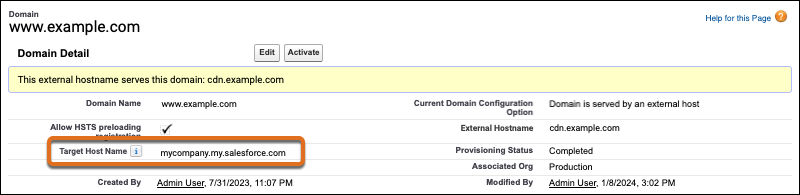
Work with your third-party provider to update the domain’s target host name to the value in the Target Host Name field.