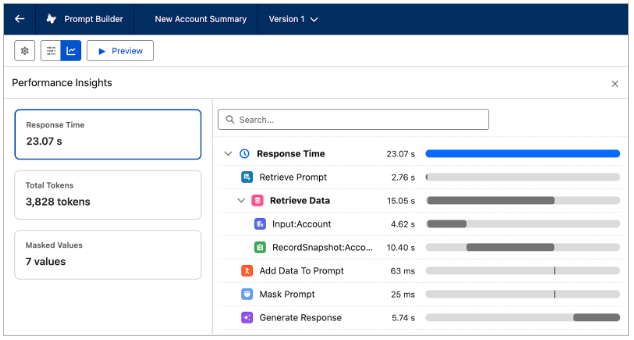
Understand how your prompt runs with the centralized Performance Insights panel. View generation metrics such as response time, token usage, and masked values in one place while testing your prompt templates.
Where: This change applies to Lightning Experience in Enterprise, Performance, and Unlimited editions with the Einstein for Sales, Einstein for Service, or Einstein Platform add-on.
When: This change is available starting the week of March 9, 2026.
Why: Use the panel to analyze latency, review total token usage (input and output), and see which fields are masked before sending data to the model. You can also drill into metrics like response time to see a breakdown of the steps contributing to overall generation time, including data retrieval, prompt hydration, summarization, masking, and response generation. This visibility helps you optimize performance and better estimate token-related costs.
How: In Prompt Builder, run Preview on a prompt template. Then open the Performance Insights panel to Preview settings to view response time, token usage, and masked values. Click a metric to see a detailed breakdown within the panel.