
Introducing more granular visibility into user behavior with new user interruption events. Navigate between sessions easily from within the session page, and inspect session data with a 3-layer drill-down view. New breadcrumb navigation, bulk transcript downloads, and standardized date filters align Optimization and Analytics dashboards.
Optimization and Voice Agent Observability
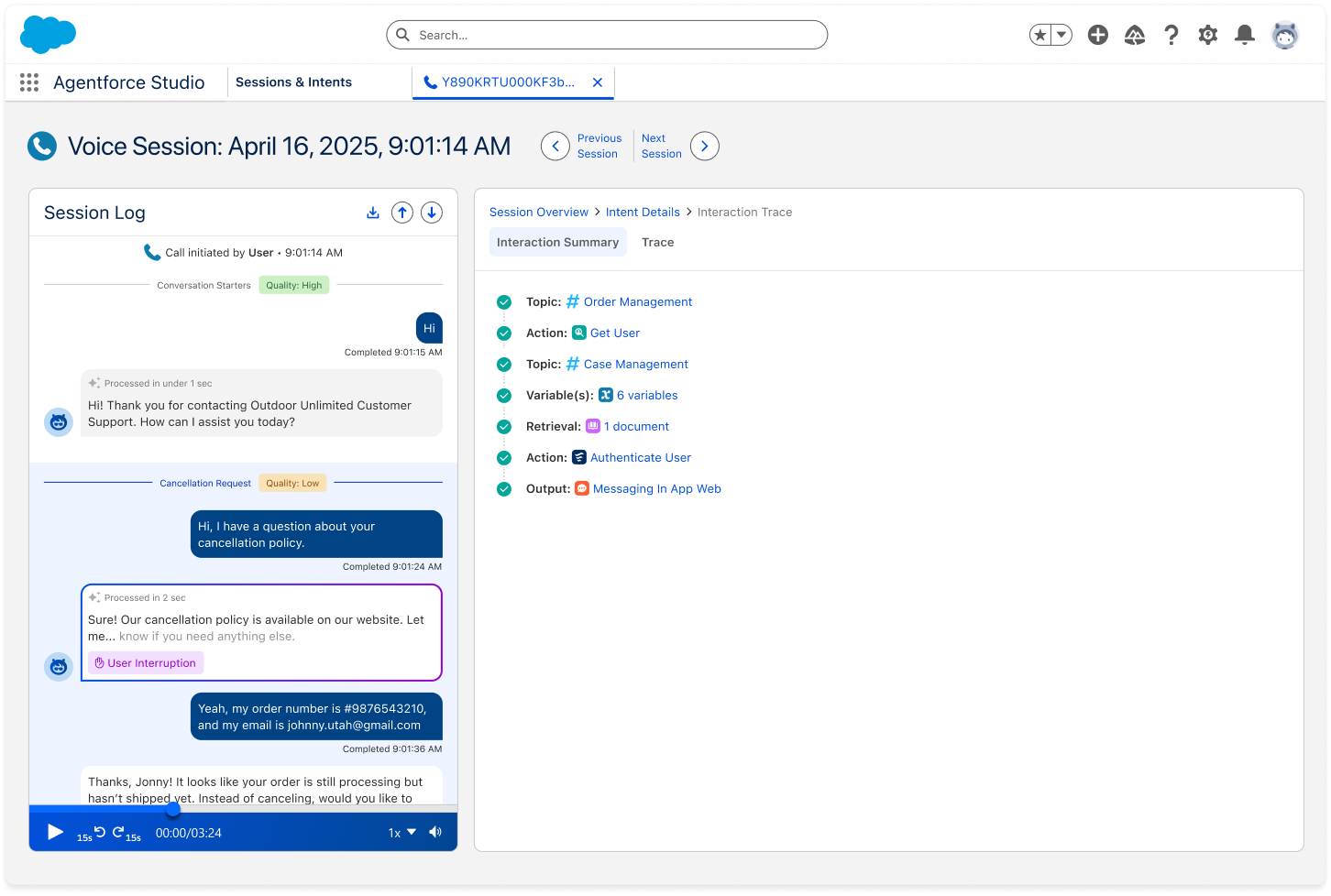
- Track User Interruptions: Gain insight into conversation flow with interruption visibility at both the session and interaction levels. Currently available for Agentforce Voice Sessions.
- Agent processing time: The session page now includes the agent's reasoning and acting time in response to the user's request.
- Seamless Navigation: Use the new breadcrumb view to easily drill down from the session view into its intents and granular interactions. Use the Previous/Next buttons to move between sessions directly from the session view. The navigation order is defined by your active filters from the Sessions & Intents tables.
- Bulk Transcript Downloads: The CSV transcript export limit has been removed. You can download all of your filtered sessions from the Sessions & Intents table.
- Global filter addition: Filter sessions according to channel type (for example, Agent Builder or Testing Center).
Analytics
- Standardized date filter between Analytics and Optimization: Click a topic or intent from the Analytics dashboard to jump into the Optimization view with the applied date filter.
- New metrics added to the Semantic Data Model (SDM): Interruption Rate and Interruption Count (for voice agents) capture how often users talk over or interrupt the agent during the session. Stickiness Rate gives insight into the share of users with repeated daily use of the agent.
Where: These changes apply to Agentforce in Lightning Experience in Enterprise and Unlimited editions with the Einstein for Sales, Einstein for Platform, or Einstein for Service add-on.
When: These features are available starting March 16, 2026.
Why: These enhancements provide visibility into user interruptions and conversational friction. The new breadcrumb navigation and synchronized analytics filters allow seamless transition from high-level session view to granular interaction data and align the view between the different dashboards.
Who: To access Agent Optimization and the new metrics, users need the Access Agentforce Optimization and Data Cloud User permission sets. To view and drill down from the Analytics dashboard, users also require the CRM Analytics User or Einstein Analytics Plus permission set.
How: Navigate to Agentforce Studio and in the Optimization dashboard go to the Sessions & Intents page. Use the improved UI to drill into sessions granularly and inspect their different levels.
SEE ALSO | Salesforce Help: About Agent Optimization, Set Up Agent Optimization, Set Up Agent Analytics, Data Model and Calculated Fields for Agent Analytics