
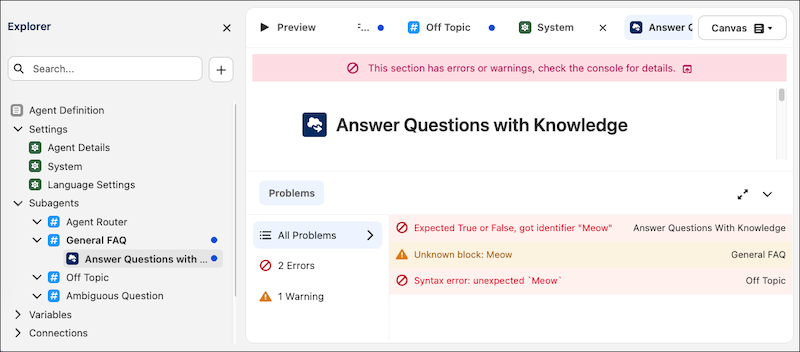
Troubleshoot your agents more effectively with the new console in Agentforce Builder. The console includes a list of errors and warnings that could interfere with your agent’s performance, such as syntax errors or unexpected values. We also introduced more features that streamline the agent development process, including utility referencing in Canvas view and autocomplete in Script view.
Where: This change applies to Lightning Experience in Enterprise, Performance, Unlimited, and Developer Editions with Foundations or Agentforce 1 Editions.
When: This change is available starting the week of April 6, 2026.
How: Open an agent in the new Agentforce Builder. To address a problem quickly, click an error or warning in the console in Canvas or Script view. The builder opens the element or line with the issue in the view that you’re currently in.
To reference an existing utility in Canvas view, enter the @ symbol, select Actions, and then select the utility.
To use autocomplete in Script view, enter the @ symbol and then use the arrow keys to find the resource that you want to reference. Use the Tab or Enter key to select the resource.