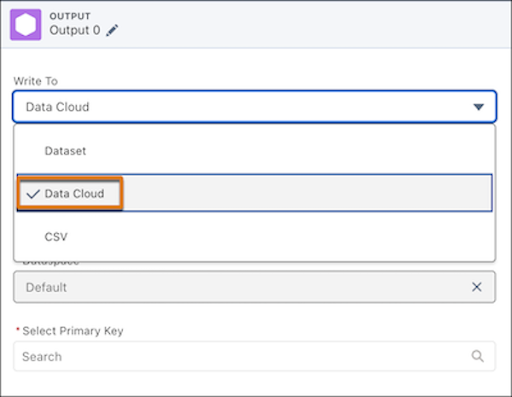
Take advantage of the latest Data 360 features while retaining the functionality of CRM Analytics recipes. Write and schedule your custom CRM Analytics recipes to output your transformed data directly to Data 360 data lake objects (DLO). Then you can use your CRM Analytics data to create calculated insights, semantic models, and Data 360 reports and dashboards. This feature, now generally available, includes a change since the last release: Users can now select a category on the DLO.
Where: This change applies to CRM Analytics in Lightning Experience and Salesforce Classic. CRM Analytics and Data 360 are available for an extra cost in Enterprise, Performance, and Unlimited editions.
Why: For example, prevent churn with a DLO built from your transformed CRM Analytics recipe that calculates a Churn Risk Score for each customer. Calculate the score from factors like case escalations and declining purchases, and add it to the unified profile. Then, create a high-risk customer segment in Data 360 to start a Marketing Cloud retention journey.
How: From Setup, in the Quick Find box, enter and select Analytics, then select Settings. Select Enable CRM Analytics recipe to write output dataset to Data Cloud and then save your changes.
In Data Manager, in the recipe editor, specify Data Cloud as the Write To value in your output node.