
Allow users to see data in dashboards and insights only for the territories they’re assigned to in Territory Management 2.0. Reference the territory hierarchy from your dataset security predicates. Previously, you could only reference user data. This feature is now generally available.
Where: This change applies to CRM Analytics in Lightning Experience and Salesforce Classic. CRM Analytics is available for an extra cost in Enterprise, Performance, and Unlimited editions.
How: In the recipe or dataflow that defines the dataset, add a flattened territory hierarchy (multivalued dimension) for each row. For example:
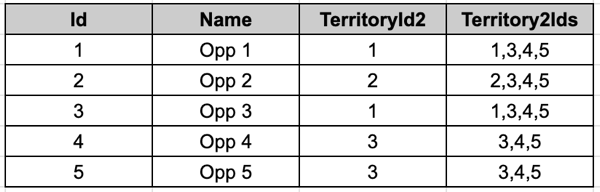
Then, include this security predicate filter in the output node:
‘Territory2.TerritoryIDs’ in [“$UserTerritory2Ids”]: