
Improve Write to Data 360 Output Performance with Optimized Append, Upsert, and Delete Actions (Beta)
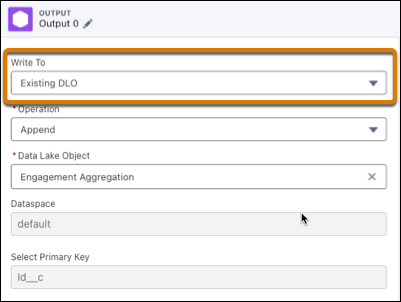
Decrease processing time when writing to Data 360 by overwriting existing Data Lake Objects (DLO) using optimized output operations. Instead of processing all rows of the output data, the optimized append, upsert, and delete actions run incrementally on subsets of the output data, resulting in faster runs.
Where: This change applies to CRM Analytics in Lightning Experience and Salesforce Classic. CRM Analytics is available for an extra cost in Enterprise, Performance, and Unlimited editions.

Note Write to Data Cloud Optimized Output is a pilot or beta service that is subject
to the Beta Services Terms at Agreements - Salesforce.com or a written Unified
Pilot Agreement if executed by Customer, and applicable terms in the Product Terms
Directory. Use of this pilot or beta service is at the Customer's sole
discretion.
How: In the output node, select Data Cloud and then Existing DLO. Then select the operation you want to use.
The output data must contain a primary key field.