
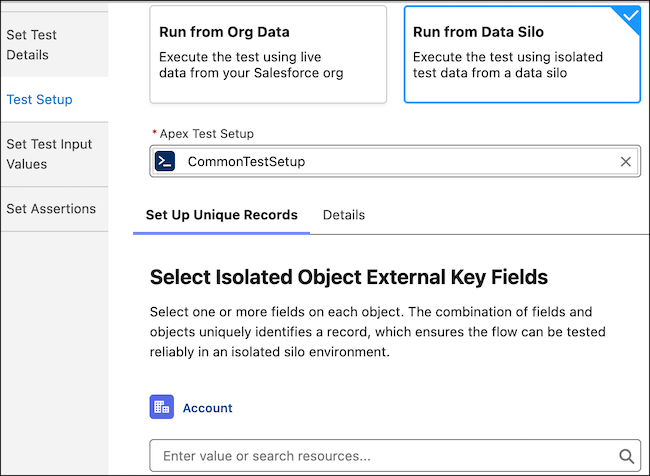
Run flow tests without affecting your org’s data. Use isolated test data with Apex Test Setup in record-triggered and autolaunched flows, and Set Test Input Values for autolaunched flow variables. Flow tests require predictable data. When you use org data for testing, anyone can change that data and your tests can start to fail. Record IDs differ between sandbox and production, so tests that pass in one environment can fail when you deploy to another. We added a way to create isolated test data when the test runs, just like Apex Test Setup creates data at run time. Your flow test data stays consistent so you can deploy it across environments. Isolated test data is available only for record-triggered and autolaunched flows.
Where: This change applies to Lightning Experience in Professional, Enterprise, Performance, Unlimited, and Developer editions.
When: This feature is available starting in April 2026.
Why: Add isolated test data so that tests use dedicated, reusable data. Tests stay reliable because the system matches records using the field values you choose (for example, email or phone), not internal IDs that change between runs. You select which fields uniquely identify each record, so tests run consistently and are easier to maintain. Flow tests use test data that you define in Apex. The test run rolls back, so your org’s live data isn’t changed.
Run flow tests for autolaunched flows in addition to record-triggered flows.
How: In Flow Builder, click View Tests, then click Create.
To use isolated test data, click Test Setup. For Apex Test Setup, select an existing Apex class. Then select key fields to identify unique records in the isolated test data.

To create a flow test for an autolaunched flow, click Set Test Input Values.