
See what’s new with GraphQL API.
- Get the current user’s User record
- Get the currently logged-in user’s User record data, such as the user’s ID or name. You can request any fields that are available on the User record.
- This example queries the ID and name of the current user.
This sample response includes the requested ID and name of the current user.{ uiapi { currentUser{ Id Name { value } } } }{ "data": { "uiapi": { "currentUser": { "Id": "005xx000001X7sHAAS", "Name": { "value": "User‘s Name" } } } }, "errors": [], "extensions": {} } - Get page layout metadata for objects
- Get object layouts, including sections, rows, items, and polymorphic components. Pass
recordLayoutsin theuiapifield and get theLayoutConnectiontype with record layout results.This schema is for
recordLayouts.type UIAPI { recordLayouts( objectApiName: String! recordTypeIds: [Id!] layoutConfigs: [LayoutConfig!] layoutType: LayoutType formFactor: FormFactor mode: LayoutMode first: Int after: String ): LayoutConnection } input LayoutConfig {recordTypeId: ID!, formFactor: FormFactor, mode: LayoutMode } - This example gets the layout for the account object.
{ uiapi { recordLayouts(objectApiName: "Account") { edges { node { id layoutType mode objectApiName recordTypeId sections { heading columns rows collapsible layoutRows { layoutItems { label required editableForNew editableForUpdate uiBehavior layoutComponents { apiName componentType } } } } } } pageInfo { hasNextPage endCursor } totalCount } } } - This example is the abbreviated response.
{ "data": { "uiapi": { "recordLayouts": { "edges": [ { "node": { "id": "00hLT000001awTWYAY", "layoutType": "FULL", "mode": "VIEW", "objectApiName": "Account", "recordTypeId": "012LT000000aFiEYAU", "sections": [ { "heading": "Account Information", "columns": 2, "rows": 18, "collapsible": false, "layoutRows": [ { "layoutItems": [ { "label": "Account Owner", "required": false, "editableForNew": false, "editableForUpdate": false, "uiBehavior": "EDIT", "layoutComponents": [ { "apiName": "OwnerId", "componentType": "FIELD" } ] } ] } ] } ] } } ], "pageInfo": { "hasNextPage": false, "endCursor": "djE6NQ==" }, "totalCount": 6 } } }, "errors": [], "extensions": {} } - Create, update, or delete record data with mutations (generally available)
- GraphQL mutations, which is now generally available, includes some changes since the
beta release.
- The
RecordUpdatePayloadtype includes aRecordfield that defines the fields that you want the response to return. For example, use this mutation query to update a contact record and specify the ID and name fields that you want the response to return.
This example is the response.mutation ContactUpdateExample{ uiapi { ContactUpdate(input: { Contact: { FirstName: "Sam" LastName: "Smith" } Id: "003RM000008AAAAAA4" }) { Record { Id FirstName { value } LastName { value } } } } }
Previously, the{ "data": { "uiapi": { "ContactUpdate": { "Record": { "Id": "003RM000008AAAAAA4", "FirstName": { "value": "Sam" }, "LastName": { "value": "Smith" } } } } }, "errors": [] }RecordUpdatePayloadincluded asuccessfield that returnedtrueorfalse. - Mutations are available via the GraphQL wire adapter. Use the new
executeMutationmethod from thelightning/graphqlmodule. See New and Changed Modules for Lightning Web Components for more information.
- The
- Update the last viewed date on records that you query
- Query objects with the new
updateMRUargument set totrue, which also updates theLastViewedDatefield on the records that the query returns. - This example queries accounts with their IDs and names. The query also updates the
LastViewedDatefields on the account records.
This example is the response.query accounts { uiapi { query { Account (updateMRU:true){ edges { node { Id Name { value } } } } } } }{ "data": { "uiapi": { "query": { "Account": { "edges": [ { "node": { "Id": "0015f000007wCAWAA2", "Name": { "value": "Enfield Tennis Academy" } } }, { "node": { "Id": "0015f000007vRRVAA2", "Name": { "value": "Ennet House" } } } ] } } } } } - Improved Documentation
- We made these improvements to the Reference section of the GraphQL API developer guide.
- Reference content shows only the latest API version, so you don’t need to select the
API version of the reference from a dropdown menu.
GraphQL reference information changes infrequently. If needed, you can find reference changes organized by API version in the GraphQL API Reference Change Log.
- Reference information now follows the OpenAPI Specification (OAS) standard for REST
APIs.
You can download the OAS from the new user interface.
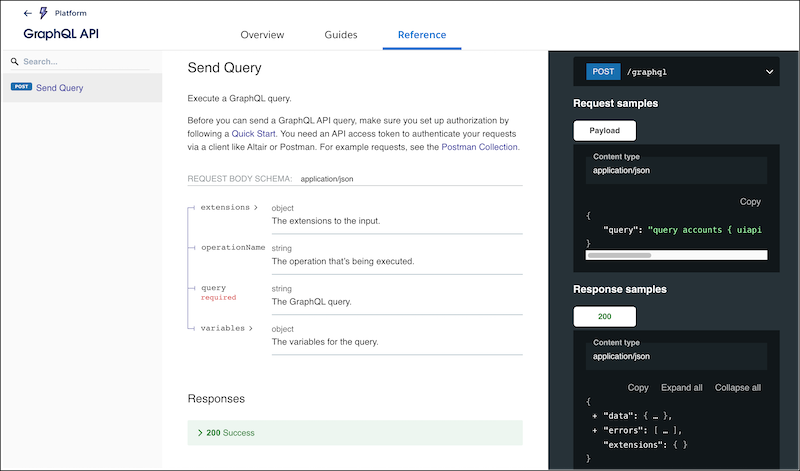
- The user interface for reference content provides more streamlined navigation and clearer data structures by using a three-panel layout for navigation, details, and examples.
- Reference content shows only the latest API version, so you don’t need to select the
API version of the reference from a dropdown menu.