---
schema_version: "1"
id: e7a97b0a62b280184f216f60e3b3aad1f5ccb0a2b14968d943d5bad7d2e25365
title: View the Field Access Summary in Object Manager
collection: admin
version: current
locale: en-us
portal_url: https://docs.salesforce.com/admin/current/en-us/platform/264-0-0/users_field_perms_summary.md
canonical_url: https://help.salesforce.com/s/articleView?id=platform.users_field_perms_summary.htm&release=264.0.0&type=5
source_site: help.salesforce.com
content_type: documentation
content_hash: b34dad6154df4b0312ab3a09b0bc42f10aa80ae6b13414aa41b89fe33aba45da
description: See the permission sets, permission set groups, and profiles that grant access to a specific field, and the level of access granted.
products:
- Security
- Salesforce Platform
release: "264"
---
# View the Field Access Summary in Object Manager
See the permission sets, permission set groups, and profiles that grant access to a specific field, and the level of access granted.
### Required Editions
Available in: Lightning Experience
Available in: Professional, Enterprise, Performance, Unlimited, Developer, and Database.com Editions
User Permissions Needed
To access Object Manager:
View Setup and Configuration

Note The Field Access Summary is available only for fields that support field permissions.
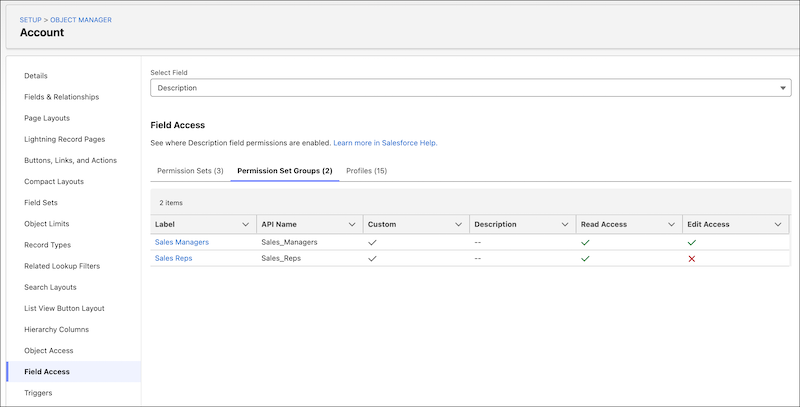
1. In Object Manager, select an object.
2. In the sidebar, click **Field Access**.
3. In the dropdown, select a field.
4. Click the tabs to see all permission sets, permission set groups, and profiles that have field permissions enabled for the field.
#### See Also
- [Manage Object Access in Object Manager](https://help.salesforce.com/s/articleView?id=platform.perm_object_access_summary.htm&release=264.0.0&type=5 "See the permission sets, permission set groups, and profiles that grant access to an object, and the level of access granted. You can also update the object permissions enabled in custom permission sets and profiles.")
- [View a User’s Access Summary](https://help.salesforce.com/s/articleView?id=platform.users_access_summary.htm&release=264.0.0&type=5 "To make managing permissions and troubleshooting access easier, in the User Access Summary, you can see a consolidated view of a user’s key details and assigned permissions and tabs. You can also manage the user’s assigned permission sets, permission set groups, public groups, and queues.")