---
schema_version: "1"
id: 9fda6f8eb2376ba0539026fe1b0b5d18cf3c9282b8cdaf6d047c0dc6b04af9a6
title: Update Content Based on a Document Range from a Process
collection: admin
version: current
locale: en-us
portal_url: https://docs.salesforce.com/admin/current/en-us/platform/264-0-0/process_action_quip_document_range.md
canonical_url: https://help.salesforce.com/s/articleView?id=platform.process_action_quip_document_range.htm&release=264.0.0&type=5
source_site: help.salesforce.com
content_type: documentation
content_hash: bf7c4f6613e5e5d41ffaa836130a3e0ad76f2c2a1732191063d573f7ddbeb8be
description: Edit or add content to a defined template section, called a document range, when something changes in Salesforce.
products:
- Flow Builder
- Salesforce Platform
release: "264"
---
# Update Content Based on a Document Range from a Process
Edit or add content to a defined template section, called a document range, when something changes in Salesforce.
### Required Editions
Available in: Lightning Experience
User Permissions Needed
To create, edit, or view processes:
Manage Flow
AND
View All Data

Important Support and updates for Process Builder have ended as of December 31, 2025. This means that support won't be provided for any process and bugs in the Process Builder product won't be fixed. See [Workflow Rules & Process Builder End of Support](https://help.salesforce.com/s/articleView?id=001096524&type=1&language=en_US).
After December 31, 2025, existing processes continue to run, and you can activate, deactivate, and edit them; however, we recommend using Flow Builder. To migrate existing processes, plan your [switch to Flow Builder](https://help.salesforce.com/s/articleView?id=platform.flow_migrate_to_flow_learning_map.htm&release=264.0.0&type=5 "Flow Builder combines the capabilities of workflow rules and Process Builder in a single point-and-click tool, making it easier to create a triggered process. If you created triggered processes with workflow rules or Process Builder, use the Migrate to Flow tool to move them to Flow Builder. Start by migrating and testing in a sandbox environment before moving your new flows to production.") and use the [Migrate to Flow](https://help.salesforce.com/s/articleView?id=platform.flow_migrate_to_flow.htm&release=264.0.0&type=5 "Use the Migrate to Flow tool to convert your Process Builder processes and workflow rules into Flow Builder, including scheduled actions. The tool also supports partial migration of processes for most actions.") tool. For new automations, create flows in [Flow Builder](https://help.salesforce.com/s/articleView?id=platform.flow.htm&release=264.0.0&type=5 "Automation reduces repetitive work and helps your team complete tasks faster and more accurately. With Flow Builder, you can build simple or complex automations, forms, and guided experiences with no code. You can add forms to Salesforce pages and Experience sites, and launch flows using buttons, record triggers, or schedules.").
Document ranges are supported only in documents and templates. To see your highlighted document ranges, use a template.
After you create a Quip action and select **Edit Document** or **Copy with Live Paste**, fill in the relevant fields to add the action to your process.
1. To add new content to a document based on a document range, select the Edit Document action.
1. Under Location for New Content, select a document range placement. You can choose to add content after a document range, before it, or you can replace it.
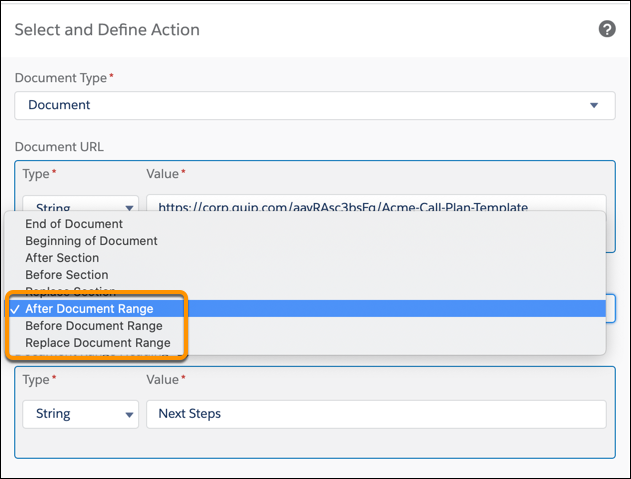
2. Enter the document range heading. This is the heading text in your template that marks the start of a document range.
3. Enter your new content and save the action.
2. To live paste existing content to a template, select the Copy with Live Paste action.
1. Choose whether you want to copy content based on an anchor link or document range content type.
2. Enter the URL of the template or anchor link you want to copy content from.
3. To live paste content based on document range, select a document range placement. You can choose to paste your copied content after a document range, before it, or you can replace it.
4. Enter the URL of the template where you want to paste your copied content.
5. Enter the document range heading of the target template that you want to use to place your copied content.
6. Save the action.

Note To replace the existing Process Builder processes and Workflow Rules with flows before Process Builder and Workflow Rules reach [end of support](https://help.salesforce.com/s/articleView?id=001096524&type=1&language=en_US), see [Quip Actions in Flow Builder](https://help.salesforce.com/s/articleView?id=xcloud.quip_automation_flow.htm&type=5&language=en_US).