---
schema_version: "1"
id: e1875c70e1931d23e5fea73a12cc884162f1a969d8fb6ea21d971fc961364cea
title: Create a Named Credential for the Tooling API
collection: admin
version: current
locale: en-us
portal_url: https://docs.salesforce.com/admin/current/en-us/platform/264-0-0/perm_uapa_create_a_named_credential.md
canonical_url: https://help.salesforce.com/s/articleView?id=platform.perm_uapa_create_a_named_credential.htm&release=264.0.0&type=5
source_site: help.salesforce.com
content_type: documentation
content_hash: cd1008b77b45a0723b5729fa7a58f43af989f6cc15e4cec3847cdb37b4f4f060
description: To work correctly, the credential that you create must have the API name Tooling_API_Credential.
products:
- Security
- Salesforce Platform
release: "264"
---
# Create a Named Credential for the Tooling API
To work correctly, the credential that you create must have the API name Tooling\_API\_Credential.
### Required Editions
Available in: all editions except Starter
User Permissions Needed
To create named credentials
Customize Applications
To complete this task, you need the value of the callback URL in the authentication provider created in the [Create an Authentication Provider for the Tooling API](https://help.salesforce.com/s/articleView?id=platform.perm_uapa_create_auth_provider.htm&release=264.0.0&type=5 "Create an authentication provider to facilitate authentication with Salesforce.") task.
1. From Setup, in the Quick Find box, enter Named Credentials, and then select it.
2. Click the dropdown next to **New** and select **New Legacy**.
3. Enter the values:
1. Label: Tooling API Credential
2. Name: Auto-populates as Tooling\_API\_Credential
3. URL: The domain from the callback URL that shows in the authentication provider. For example, if the callback URL is https://www.example.com/services/authcallback/PermhelperAuth, then the domain is https://www.example.com.
4. Identity Type: Per User
5. Authentication Protocol: OAuth 2.0
6. Authentication Provider: The authentication provider created in the [Create an Authentication Provider for the Tooling API](https://help.salesforce.com/s/articleView?id=platform.perm_uapa_create_auth_provider.htm&release=264.0.0&type=5 "Create an authentication provider to facilitate authentication with Salesforce.") task.
7. Scope: refresh\_token full
4. Select the Callout Options.
1. Select the checkboxes for Generate Authorization Header and Allow Merge Fields in HTTP Body. Leave the other fields blank.
5. Save your changes.
You’re prompted to log into your org.
6. Log in at the prompt.
7. At the connected app authorization screen, click **Allow**.
When you’re redirected back to the Named Credential screen, the Administration Authentication Status field shows Authenticated as (your login).

Example
**Named Credential Example with URL and Scope Highlighted**
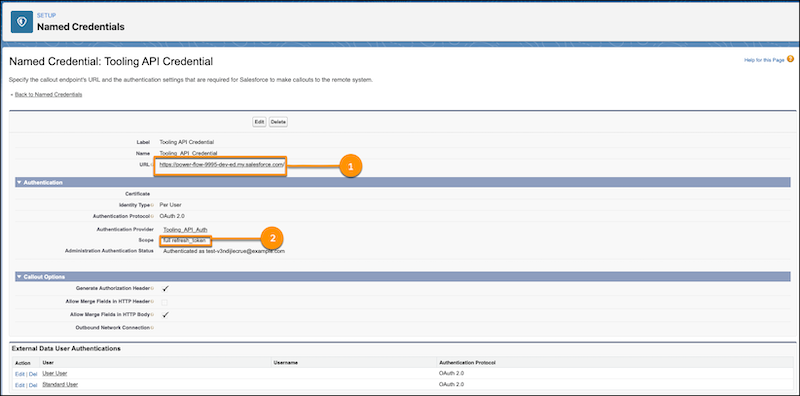
(1) The URL with the domain value. (2) The scope.
Continue to [Create a Permission Set to Use the Named Credential](https://help.salesforce.com/s/articleView?id=platform.perm_uapa_create_a_permset.htm&release=264.0.0&type=5 "Create a custom permission set to enable users to use the Tooling API for the User Access and Permissions Assistant. You can assign this permission set to any users who use the app.").