---
schema_version: "1"
id: 870b0ce79c4272525f7ee825db7f15916124a7ccaaf4634657176bbb6f727daa
title: Manage Object Access in Object Manager
collection: admin
version: current
locale: en-us
portal_url: https://docs.salesforce.com/admin/current/en-us/platform/264-0-0/perm_object_access_summary.md
canonical_url: https://help.salesforce.com/s/articleView?id=platform.perm_object_access_summary.htm&release=264.0.0&type=5
source_site: help.salesforce.com
content_type: documentation
content_hash: d6dfed767db676ba8d9734494721c56afde123f1ca094c1a8dfa412b02cd8f3d
description: See the permission sets, permission set groups, and profiles that grant access to an object, and the level of access granted. You can also update the object permissions enabled in custom permission sets and profiles.
products:
- Security
- Salesforce Platform
release: "264"
---
# Manage Object Access in Object Manager
See the permission sets, permission set groups, and profiles that grant access to an object, and the level of access granted. You can also update the object permissions enabled in custom permission sets and profiles.
### Required Editions
Available in: Lightning Experience
Available in: all editions
User Permissions Needed
To access Object Manager:
View Setup and Configuration

Note The Object Access Summary is available only for objects that support object permissions.
1. In Object Manager, select an object.
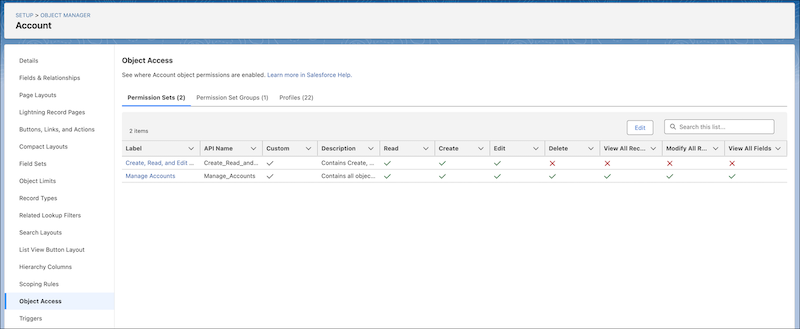
2. In the sidebar, click **Object Access**.
3. Click the tabs to see all permission sets, permission set groups, and profiles that have object permissions enabled for the object. To update object permissions in custom permission sets and custom profiles, click **Edit** on their tabs.
#### See Also
- [Manage Permissions in the Permission Set and Permission Set Group Access Summaries](https://help.salesforce.com/s/articleView?id=platform.perm_sets_summary_page.htm&release=264.0.0&type=5 "To help you manage your users’ permissions, you can see and update all object, user, field, and custom permissions that are enabled for a permission set or permission set group in its summary page. You can also manage which permission set groups the permission set is included in and vice versa.")
- [View a User’s Access Summary](https://help.salesforce.com/s/articleView?id=platform.users_access_summary.htm&release=264.0.0&type=5 "To make managing permissions and troubleshooting access easier, in the User Access Summary, you can see a consolidated view of a user’s key details and assigned permissions and tabs. You can also manage the user’s assigned permission sets, permission set groups, public groups, and queues.")
- [View the Field Access Summary in Object Manager](https://help.salesforce.com/s/articleView?id=platform.users_field_perms_summary.htm&release=264.0.0&type=5 "See the permission sets, permission set groups, and profiles that grant access to a specific field, and the level of access granted.")