---
schema_version: "1"
id: 98d87b25ab59beeec4c12723a9c2f394148cb36941cf624cf018f9690d73aeae
title: View Orchestration Runs
collection: admin
version: current
locale: en-us
portal_url: https://docs.salesforce.com/admin/current/en-us/platform/264-0-0/orchestrator_manage_view_orchestrations.md
canonical_url: https://help.salesforce.com/s/articleView?id=platform.orchestrator_manage_view_orchestrations.htm&release=264.0.0&type=5
source_site: help.salesforce.com
content_type: documentation
content_hash: 01cd0d1ece579ebd01bd9c0d3b5daa1c672914e63cf26f6de8731098ba0a9e0e
description: Use the Orchestration Runs list view to see all in-progress, canceled, and completed orchestration runs in your org. Access orchestration details and history through the orchestration runs list view.
products:
- Flow Builder
- Salesforce Platform
release: "264"
---
# View Orchestration Runs
Use the Orchestration Runs list view to see all in-progress, canceled, and completed orchestration runs in your org. Access orchestration details and history through the orchestration runs list view.
### Required Editions
1. In the App Launcher, find and select **Orchestration Runs**.
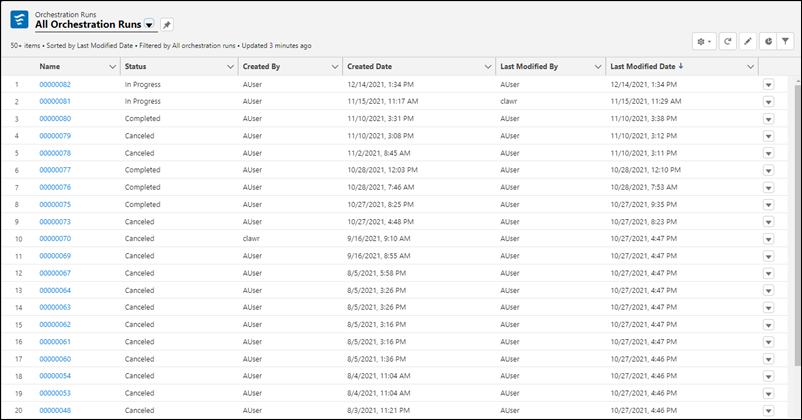
2. To see details for a specific orchestration run, on the All Orchestration Runs list view, click the link for an orchestration, and then click the **Related** tab.
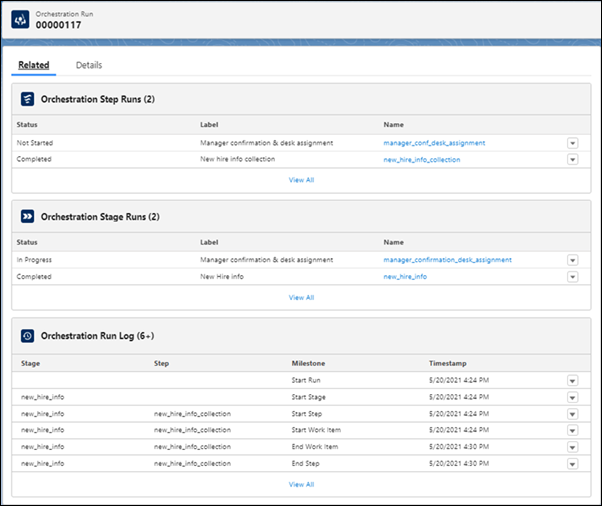
3. To see the full orchestration run history, under **Orchestration Run Log**, click **View All**.
- **[Add Comments to the Orchestration Run Log](https://help.salesforce.com/s/articleView?id=platform.orchestrator_manage_add_comments_to_run_log.htm&release=264.0.0&type=5)**
Add custom comments to the Orchestration Run Log using variables in flows called by orchestration steps.
- **[Add a Comments Column to the Orchestration Run Log](https://help.salesforce.com/s/articleView?id=platform.orchestrator_manage_add_comments_column_to_run_log.htm&release=264.0.0&type=5)**
Add comments from flows called by orchestration steps to the Orchestration Run Log to customize log information.