---
schema_version: "1"
id: af726d4adad9f3d4596ee659213a5cb7ff499309bdb0f1633aedc9a79c48b7b5
title: Determine Flow Usage in an Orchestration Version
collection: admin
version: current
locale: en-us
portal_url: https://docs.salesforce.com/admin/current/en-us/platform/264-0-0/orchestrator_manage_orchestration_flow_usage.md
canonical_url: https://help.salesforce.com/s/articleView?id=platform.orchestrator_manage_orchestration_flow_usage.htm&release=264.0.0&type=5
source_site: help.salesforce.com
content_type: documentation
content_hash: 783f3bc78d0682c2380c386dd7646819eb9d79d778213603ce9e98c3f15579dd
description: Orchestration versions use flows to run interactive and background steps. Orchestration version stages and steps can use flows to evaluate complex criteria. Those criteria can determine when a background, interactive step, or MuleSoft step starts and when to mark a stage or interactive step as completed. View the flows that an orchestration version uses to understand the relationships between an orchestration version and the flows it references.
products:
- Flow Builder
- Salesforce Platform
release: "264"
---
# Determine Flow Usage in an Orchestration Version
Orchestration versions use flows to run interactive and background steps. Orchestration version stages and steps can use flows to evaluate complex criteria. Those criteria can determine when a background, interactive step, or MuleSoft step starts and when to mark a stage or interactive step as completed. View the flows that an orchestration version uses to understand the relationships between an orchestration version and the flows it references.
### Required Editions
To view usage details on the Orchestrations tab in the Automation Lightning
app
Manage Flow
The Uses Flows list depends on whether the selected orchestration version was created in your org. If Salesforce or a managed package provided the orchestration version, then the Uses Flows list contains no items.
1. On the navigation bar, click .
2. In the search box, enter automation, and then select **Automation**.
The Automation app opens.
3. Select the **Orchestrations** tab, click an orchestration label, and then select the **Versions** tab.
The Orchestration page opens and shows a list of versions for the selected orchestration.
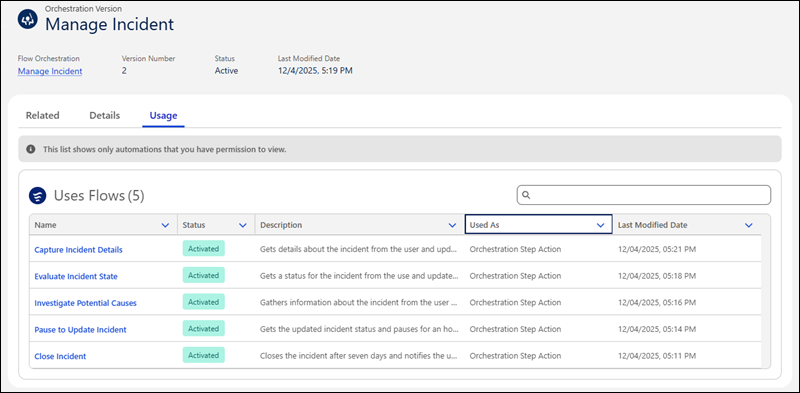
4. Click the link of an orchestration version name, and then select the **Usage** tab.
The tab shows the flows that the orchestration version uses.