---
schema_version: "1"
id: e3884157112f5f6836ac81db6a8db3f0e5930c752e1cc4cbbd33dd09d384ad1f
title: External IDs and OData Entity Keys
collection: admin
version: current
locale: en-us
portal_url: https://docs.salesforce.com/admin/current/en-us/platform/264-0-0/odata_external_id_entity_key.md
canonical_url: https://help.salesforce.com/s/articleView?id=platform.odata_external_id_entity_key.htm&release=264.0.0&type=5
source_site: help.salesforce.com
content_type: documentation
content_hash: 5a0e2df3441034ab04c07c7de4e1ed16c29dfdc348cd7180d8aa79579038d5d9
description: When you access external data with the OData 2.0, 4.0, or 4.01 adapter for Salesforce Connect, the values of the External ID standard field on an external object are derived according to the entity key that’s defined in the OData service metadata document.
products:
- Salesforce Platform
- Security
release: "264"
---
# External IDs and OData Entity Keys
When you access external data with the OData 2.0, 4.0, or 4.01 adapter for Salesforce Connect, the values of the External ID standard field on an external object are derived according to the entity key that’s defined in the OData service metadata document.
### Required Editions
Available in: both Salesforce Classic and Lightning Experience (not for high-data-volume
external objects)
Available in: Developer Edition
Available for an extra cost
in: Enterprise, Performance, and Unlimited
Editions
Each external object has an External ID standard field. Its values uniquely identify each external object record in your org. When the external object is the parent in an external lookup relationship, the External ID standard field is used to identify the child records.

Important Don’t use sensitive data as the values of the External ID standard field or fields designated as name fields, because Salesforce sometimes stores those values.
- External lookup relationship fields on child records store and display the External ID values of the parent records.
- For internal use only, Salesforce stores the External ID value of each row that’s retrieved from the external system. This behavior doesn’t apply to external objects that are associated with high-data-volume external data sources.
This list view for the Order\_Detail external object displays External ID values.
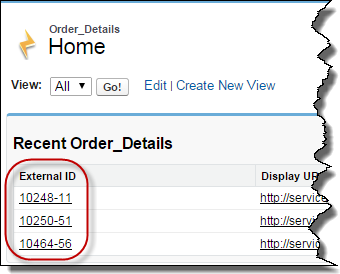
Each External ID value is derived according to the entity key that’s defined in the OData service metadata document of the remote data service (OData producer). The entity key is formed from a subset of the entity type’s properties.
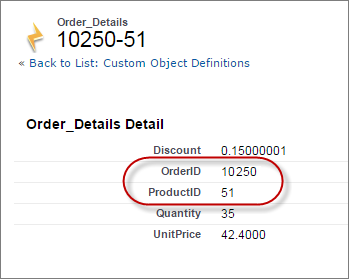
This excerpt from an OData service metadata document shows that the External ID values for the Order\_Detail external object are derived from the OrderID and ProductID properties.
```
...
```
This record detail page displays the OrderID and ProductID fields. Their values are combined to create the value of the External ID standard field.
If you enable writable external objects, determine whether the external system requires write operations to specify values for the entity keys. For example, many external systems generate values for entity keys when new external object records are created in Salesforce. If your external system requires write operations to specify values for entity keys, ensure that External ID standard field values and entity key values don’t contradict each other. For each write operation, include either the External ID standard field value or the custom field values that form the entity key, but never both.
#### See Also
- [OData Adapters for Salesforce Connect](https://help.salesforce.com/s/articleView?id=platform.odata_adapter_about.htm&release=264.0.0&type=5 "Connect to your back office for a complete view of your business. With the OData 2.0, 4.0, or 4.01 adapter, Salesforce Connect uses Open Data Protocol Version 2.0, Version 4.0, or Version 4.01 to access data that’s stored outside Salesforce.")
- [Writable External Objects in Salesforce Connect](https://help.salesforce.com/s/articleView?id=platform.platform_connect_considerations_writable_external_objects.htm&release=264.0.0&type=5 "Select Writable External Objects when you define an external data source and use Salesforce Connect external objects to create, update, and delete data. External objects are read only by default.")