---
schema_version: "1"
id: 6abefcb3127190fd070a21f6a2698ec127eaeb1eeff48b496fb6a95814184dbb
title: Strategy Builder Generate Element
collection: admin
version: current
locale: en-us
portal_url: https://docs.salesforce.com/admin/current/en-us/platform/264-0-0/nba_strategy_elements_generate.md
canonical_url: https://help.salesforce.com/s/articleView?id=platform.nba_strategy_elements_generate.htm&release=264.0.0&type=5
source_site: help.salesforce.com
content_type: documentation
content_hash: ba5528f486d9fd0ba4e739fd200f544f1340aa3d9b876cedc5b30d7efdcee1ab
description: With the Generate element, you can dynamically generate personalized recommendations where a large number of possibilities makes it inconvenient to create recommendations manually. The Generate element allows you to create in-memory, on-the-fly recommendations, either from an external data source or from other Salesforce objects.
products:
- Flow Builder
- Salesforce Platform
release: "264"
---
# Strategy Builder Generate Element
With the Generate element, you can dynamically generate personalized recommendations where a large number of possibilities makes it inconvenient to create recommendations manually. The Generate element allows you to create in-memory, on-the-fly recommendations, either from an external data source or from other Salesforce objects.
### Required Editions
| Field | Description |
| --- | --- |
| Label | The name of the element as it appears on the canvas. |
| API Name | The API name of the element. The API name must be unique. |
| Description | Optional description of the element and how it works within the strategy. |
| Apex Action | Search or select an Apex action, which calls an Apex class. An Apex class must have a method marked as an invocable method in order to appear as an Apex action in declarative tools like Strategy Builder. |
| Argument | Specify one or more parameters for the selected Apex action. |

Example Assume that your company has a large catalog of products and you use a screen flow to recommend accessories to your customers based on their past product purchases. Instead of creating a single, static recommendation for each individual accessory, you can maintain that information in the Account or Product object in Salesforce. Or you can store information in external data sources like Commerce or a SQL database. Use a Generate element with an Apex invocable action to call the Apex class and generate accessory recommendations dynamically for your strategy.

Example
Suppose you want to show a service agent a list of key accounts to follow up with after a set number of days has passed since the previous contact. With the Generate element, you can call an Apex action that makes a SOQL query for Account where the Owner is the logged-in user (the agent). This query identifies the accounts who were last contacted more than, say, 90 days ago. Next Best Action returns the relevant accounts in the form of recommendations. The strategy can be as simple as the Generate element with an Output element.
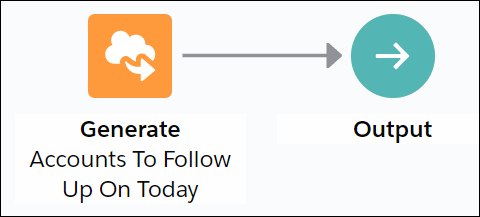
When you configure the Generate element, select **Accounts to Follow Up Today** as the Apex action and specify **$User.id** as an input parameter.
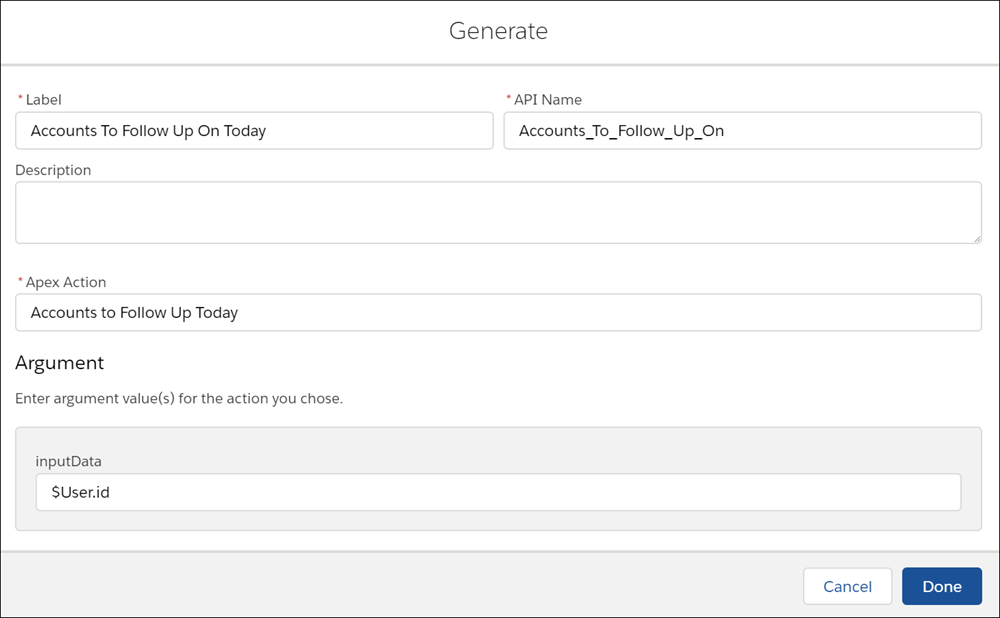
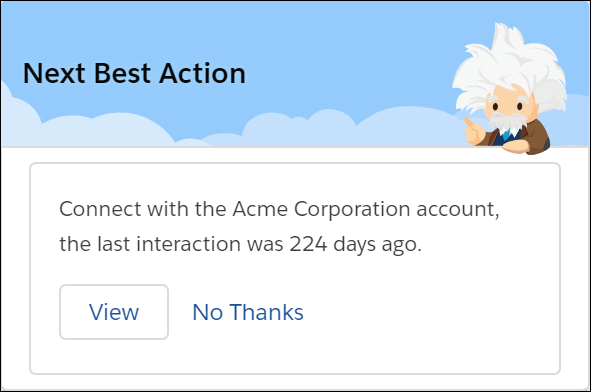
The Generate element calls the `getAccounts` invocable method in the `Generate_GetAccountsToFollowUp` Apex class. This method retrieves the relevant accounts and creates a list of recommendations. The recommendation description includes the name of the account (`account.Name`) and the number of days since the last contact (`daysSinceLastContact`).
```
global class Generate_GetAccountsToFollowUp {
@InvocableMethod(label='Accounts to Follow Up Today'
description='Recommend accounts the current user should follow up on today')
global static List> getAccounts(List inputData){
List> outputs = new List>();
Integer daysSinceLastContact;
Account[] accounts = [SELECT Name, Description, LastContactDate__c, OwnerId FROM Account WHERE OwnerId = :inputData[0]];
List recs = new List();
for (Account account:accounts) {
if (account.LastContactDate__c != null){
daysSinceLastContact = account.LastContactDate__c.daysBetween(date.today());
if (daysSinceLastContact > 90){
Recommendation rec = new Recommendation(
Name = account.Name,
Description = 'Connect with the ' + account.Name + ' account, the last interaction was '+ daysSinceLastContact + ' days ago.',
//Pre-req: Create a screen flow with the name simpleFlow
ActionReference = 'simpleFlow',
AcceptanceLabel = 'View'
);
recs.add(rec);
}
}
}
outputs.add(recs);
return outputs;
}
}
```
When you execute the strategy, the resulting recommendation includes the name of the account and the number of days since the last contact with them.
## Usage
The Generate element requires an Apex action marked as an invocable method.
```
@InvocableMethod(
label='Related Wikipedia Pages'
description='Recommend wikipages that are related to the named input wikipage')
```
The Generate element can pass any number of inputs to the Apex action, either as lists or a list of lists of primitives, sObjects, and user-defined Apex objects. To provide more than one input, the input parameter must be a list or a list of lists of a user-defined Apex object (for example, a custom class called `DataContainer`).
```
List relatedTo
```
OR
```
global class DataContainer {
@InvocableVariable
public string accountId;
}
____
global static List> invocableMethod(List inputData)
```
The Generate element returns a list of recommendations. Invocable methods support returning either a list of an sObject type or a list of lists of an sObject type. Since the Enhance element operates not on a single recommendation but on a list of recommendations, the method must return a `List>`.
```
global static List> invocableMethod(List inputData)
```
#### See Also
- [Strategy Builder Enhance Element](https://help.salesforce.com/s/articleView?id=platform.nba_strategy_elements_enhance.htm&release=264.0.0&type=5 "Get AI-driven predictions from services such as Einstein Discovery and Einstein Prediction Builder to enhance Next Best Action recommendations with additional information, such as propensity scores. The Enhance element allows you to modify a set of recommendations on the fly, every time a strategy is executed. These recommendations can be static and live as records in Salesforce, or dynamic and sourced from external data sources or other Salesforce objects.")
- [Apex Action Element](https://help.salesforce.com/s/articleView?id=platform.flow_ref_elements_apex_invocable.htm&release=264.0.0&type=5 "Call an Apex class. An Apex class functions as an Apex action only if one of its methods includes the @InvocableMethod annotation.")