---
schema_version: "1"
id: 0ec082f5e244003e7b34b72d23d73a07c71c41b5a3eecd876103a9f7152916e3
title: Strategy Builder Enhance Element
collection: admin
version: current
locale: en-us
portal_url: https://docs.salesforce.com/admin/current/en-us/platform/264-0-0/nba_strategy_elements_enhance.md
canonical_url: https://help.salesforce.com/s/articleView?id=platform.nba_strategy_elements_enhance.htm&release=264.0.0&type=5
source_site: help.salesforce.com
content_type: documentation
content_hash: 438484e2658700d0bd37b62b7555483a7675b9afbff7b95e9c41906af8a6e101
description: Get AI-driven predictions from services such as Einstein Discovery and Einstein Prediction Builder to enhance Next Best Action recommendations with additional information, such as propensity scores. The Enhance element allows you to modify a set of recommendations on the fly, every time a strategy is executed. These recommendations can be static and live as records in Salesforce, or dynamic and sourced from external data sources or other Salesforce objects.
products:
- Flow Builder
- Salesforce Platform
release: "264"
---
# Strategy Builder Enhance Element
Get AI-driven predictions from services such as Einstein Discovery and Einstein Prediction Builder to enhance Next Best Action recommendations with additional information, such as propensity scores. The Enhance element allows you to modify a set of recommendations on the fly, every time a strategy is executed. These recommendations can be static and live as records in Salesforce, or dynamic and sourced from external data sources or other Salesforce objects.
### Required Editions
| Field | Description |
| --- | --- |
| Label | The name of the element as it appears on the canvas. |
| API Name | The API name of the element. The API name must be unique. |
| Description | Optional description of the element and how it works within the strategy. |
| Apex Action | Search or select an Apex action, which calls an Apex class. An Apex class must have a method marked as an invocable method to appear as an Apex action in declarative tools like Strategy Builder. |
| Argument | Specify one or more parameters for the selected Apex action. |

Example Assume that your company integrates separate data sources from the manufacturers of products your business sells. Those data sources include information about the current availability of each item (in stock, back ordered, or unavailable). You can connect an Enhance element to your strategy’s Load or Generate element to provide that information to users in the recommendation.

Example You can use the Enhance element to calculate a discount percentage for your customers based on how long your company has managed their account. Or you can use it to A/B test two branches of recommendations.
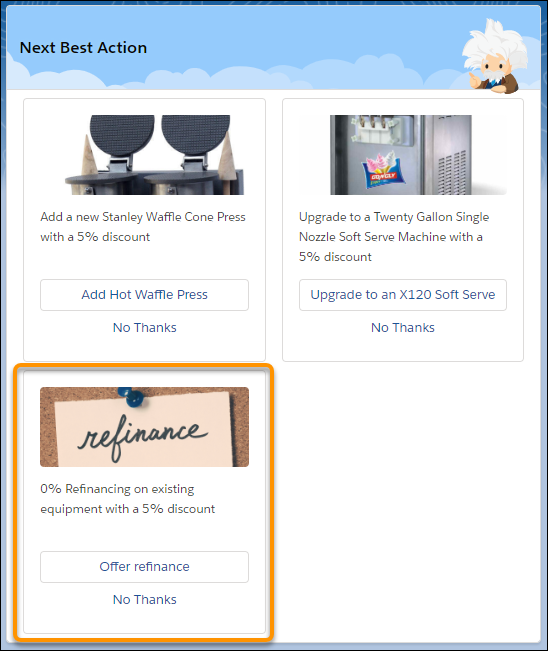

Example Suppose you use Next Best Action to provide upsell recommendations. You want to add a 5% discount to your product recommendations for those customers who have been with your company for more than one year. Customers of more than two years get a 10% discount, customers of more than five years get a 20% discount, and so on. Use the Enhance element to call an Apex action that performs a SOQL query. The query retrieves the Account age and appends it to the description of all incoming recommendations.
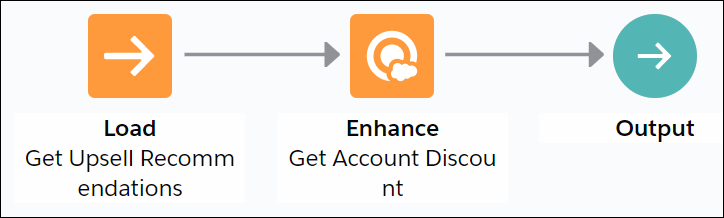
The strategy used with an Enhance element can be as simple as Load -> Enhance -> Output. All recommendations the Load element retrieves or loads are passed as a list of recommendations to the underlying invocable method.
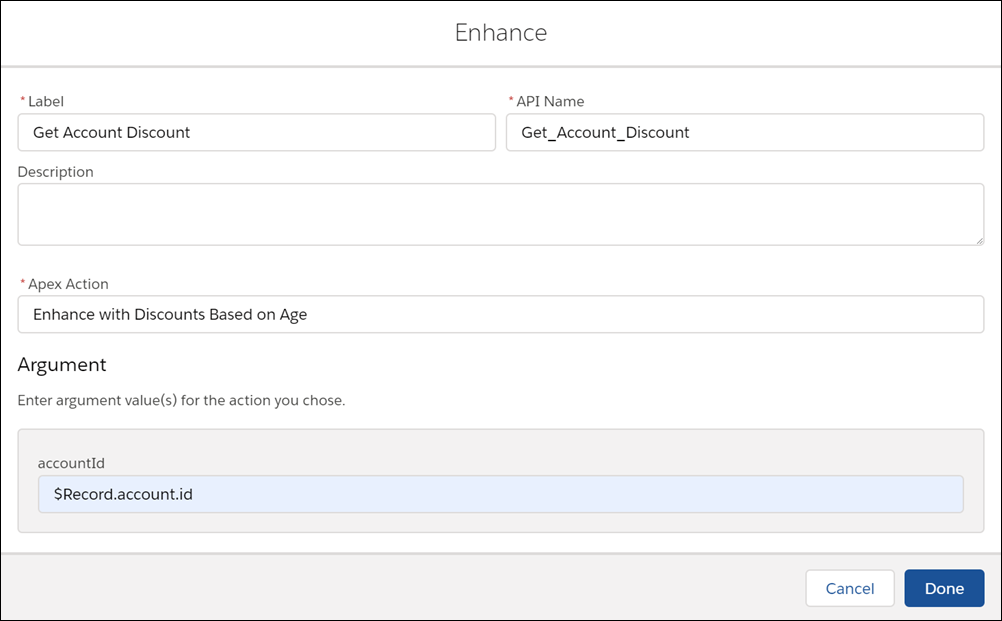
When configuring the Enhance element, select **Enhance with Discounts Based on Age** as the Apex action and specify **$Record.id** as the input parameter.
The Enhance element in turn calls the `getDiscounts` invocable method in the `Enhance_GetAccountDiscount` class. Notice how the description of each recommendation has a discount value appended to it `(r.Description + ‘ with a 5% discount’)`.
```
global class Enhance_GetAccountDiscount {
@InvocableMethod(label='Enhance with Discounts Based on Age' description='Returns an enhanced set of recommendations with appropriate discounts')
global static List> getDiscounts(List inputData){
List recommendations = inputData[0].recommendations;
List> outputs = new List>();
Account[] accounts = [SELECT Name, Description,CreatedDate, id FROM Account WHERE id = :inputData[0].accountId];
Double ageAccountMonths = accounts[0].CreatedDate.date().monthsBetween(date.today());
Double ageAccount = ageAccountMonths/12;
List returnedRecommendations = new List();
for (Recommendation r:recommendations){
if(ageAccount > 1){
r.Description = r.Description + ' with a 5% discount';
}
else if (ageAccount > 2){
r.Description = r.Description + ' with a 10% discount';
}
else if (ageAccount > 5){
r.Description = r.Description + ' with a 20% discount';
}
returnedRecommendations.add(r);
}
outputs.add(returnedRecommendations);
return outputs;
}
}
```
## Usage
The Enhance element requires an Apex action marked as an invocable method.
```
@InvocableMethod(
label='Enhance with Discounts Based on Age'
description='Returns an enhanced set of recommendations with appropriate discounts')
```
Use the Enhance element in combination with the Strategy Builder Load or Generate element.
The Enhance element can pass any number of inputs to the Apex action. The input parameter must be a list or a list of lists of a user-defined Apex object (for example, a custom class called `DataContainer`). The user-defined Apex object must include a `List` variable. The `List` variable is automatically defined with the recommendations that pass into the Enhance element.
```
global class DataContainer {
@InvocableVariable
public string accountId;
@InvocableVariable
public List recommendations;
}
________
global static List> invocableMethod(List inputData)
```
The Enhance element returns a list of recommendations, `List>`. These recommendation enhancements exist only in memory and don’t persist after the strategy is executed.
```
global static List> invocableMethod(List inputData)
```
#### See Also
- [Strategy Builder Generate Element](https://help.salesforce.com/s/articleView?id=platform.nba_strategy_elements_generate.htm&release=264.0.0&type=5 "With the Generate element, you can dynamically generate personalized recommendations where a large number of possibilities makes it inconvenient to create recommendations manually. The Generate element allows you to create in-memory, on-the-fly recommendations, either from an external data source or from other Salesforce objects.")
- [Strategy Builder Load Element](https://help.salesforce.com/s/articleView?id=platform.nba_strategy_elements_load.htm&release=264.0.0&type=5 "Load is the first element in a strategy branch. Load and filter the records of a Recommendation object. Or load and filter the records of any object, and convert them into recommendations at the end of the strategy using the Map element. Your load elements determine which of your recommendations are evaluated when your strategy executes.")
- [Apex Action Element](https://help.salesforce.com/s/articleView?id=platform.flow_ref_elements_apex_invocable.htm&release=264.0.0&type=5 "Call an Apex class. An Apex class functions as an Apex action only if one of its methods includes the @InvocableMethod annotation.")