---
schema_version: "1"
id: 9c1ee4486c238a55a748c8ab72184b6dfd752944c1c92af594f07a7549193d16
title: Link Holidays to a Service Territory
collection: admin
version: current
locale: en-us
portal_url: https://docs.salesforce.com/admin/current/en-us/platform/264-0-0/ls_link_holidays_to_service_territory.md
canonical_url: https://help.salesforce.com/s/articleView?id=platform.ls_link_holidays_to_service_territory.htm&release=264.0.0&type=5
source_site: help.salesforce.com
content_type: documentation
content_hash: ec678da7b264b6670f269ab04ca247cc548ea687207972c5ecfd193e38ac861e
description: Link the holidays that you created to a service territory.
products:
- Scheduler
- Salesforce Platform
release: "264"
---
# Link Holidays to a Service Territory
Link the holidays that you created to a service territory.
### Required Editions
Available in: Lightning Experience.
Available in: Enterprise and Unlimited Editions
User Permissions Needed
To link holidays to a service territory:
View Setup and Configuration
To view holidays:
View Setup and Configuration
1. Click the **Service Territories** tab, and then select a service territory.
2. Click **New** for Upcoming Holidays.
3. If you want to view the complete list of holidays (upcoming and elapsed), click **View All**.
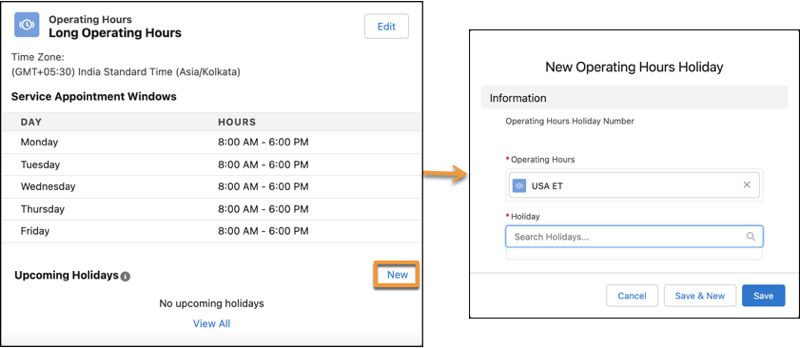
4. In the Holiday field, enter the name of the holiday, and then select the holiday.
Holidays linked to service territories are associated with the service territories' operating hours. To link a holiday directly to the operating hours, in the Related tab of an operating hours instance, click **New** for Operating Hours Holiday.
5. Save your changes.