---
schema_version: "1"
id: b50288f92e0cd6080605c3520530e42886ba96ac8a6daae9af7cb6fc15c86010
title: Turn On Debugging and Testing Flows as Another User
collection: admin
version: current
locale: en-us
portal_url: https://docs.salesforce.com/admin/current/en-us/platform/264-0-0/flow_test_debug_as_another_user.md
canonical_url: https://help.salesforce.com/s/articleView?id=platform.flow_test_debug_as_another_user.htm&release=264.0.0&type=5
source_site: help.salesforce.com
content_type: documentation
content_hash: d3e3cb82ac44572ae5d50eb0580167cb19ca1179a4afa36eaa874ae691997fdb
description: Turn on this org-wide setting once so that admins can debug or test flows as a specific user.
products:
  - Flow Builder
  - Salesforce Platform
release: "264"
---
# Turn On Debugging and Testing Flows as Another User

Turn on this org-wide setting once so that admins can debug or test flows as a specific user.

### Required Editions

<table class="slds-table slds-table_bordered slds-max-medium-table_stacked slds-m-bottom_small edition"><colgroup><col></colgroup><tbody><tr class=""><td class="slds-cell-wrap" style="vertical-align:top;"><a href="https://help.salesforce.com/s/articleView?id=platform.flow_ref_supported_editions.htm&amp;release=264.0.0&amp;type=5" title="Learn about the editions and user interfaces that support Flow Builder. Some Flow Builder features integrate with other Salesforce products that require additional licenses.">View supported editions.</a></td></tr></tbody></table>

<table class="slds-table slds-table_bordered slds-max-medium-table_stacked slds-m-bottom_small ">
        <colgroup>
          <col style="width:50%">
          <col style="width:50%">
        </colgroup>
        <thead class="slds-text-title_caps ">
          <tr class="">
            <th scope="colgroup" class="slds-cell-wrap" colspan="2" style="text-align:center;vertical-align:top;" id="d349748e59">User Permissions
              Needed</th>
          </tr>
        </thead>
        <tbody>
          <tr class="">
            <td data-label="User Permissions Needed" class="slds-cell-wrap" style="vertical-align:top;" headers="d349748e59 ">To edit process automation settings:</td>

            <td class="slds-cell-wrap" style="vertical-align:top;" headers="d349748e59 ">Customize Application</td>

          </tr>
          <tr class="">
            <td data-label="User Permissions Needed" class="slds-cell-wrap" style="vertical-align:top;" headers="d349748e59 ">To create, update, and delete flow list views:</td>

            <td class="slds-cell-wrap" style="vertical-align:top;" headers="d349748e59 ">Manage Flow</td>

          </tr>
        </tbody>
      </table>

This setting is available only in sandbox environments. After you turn it on, users with the **Manage Flow** and **View All Data** permissions can select the running user when they debug a flow with the Flow Builder debugger or run a test scenario.

1. From Setup, in the Quick Find box, enter Process, and then click **Process Automation Settings**.
2. Turn on **Let admins debug flows as other users**.
3. Save your work.
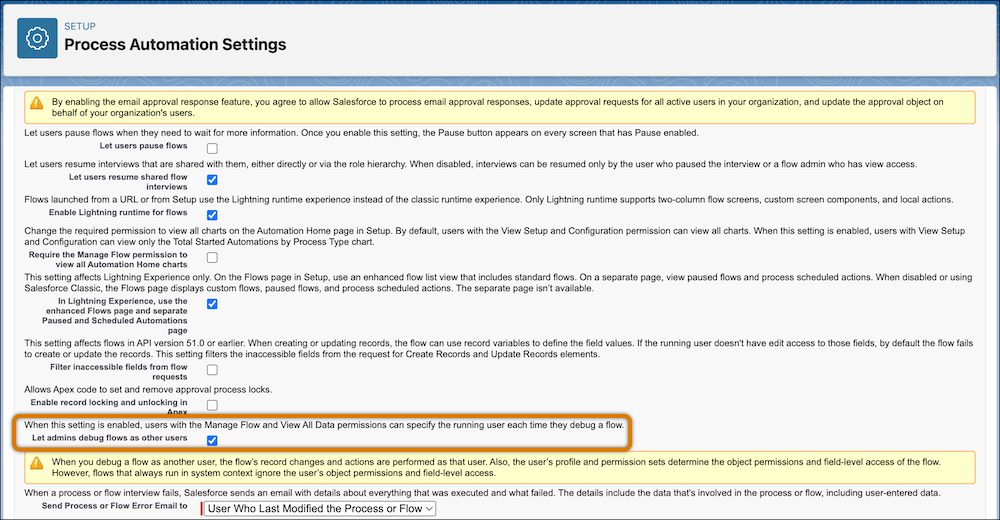
    
    ![Let admins debug flows as other users enabled and highlighted in process automation settings.](https://sf-zdocs-cdn-prod.zoominsoftware.com/tdta-platform-platform_automation-264-0-0-production-enus/60568438-ec7e-4665-acd1-7c80dcbe60d5/platform_automation/images/flow/process_automation_debug_flow_as_another_user.png)
    
    ![Warning](https://sf-zdocs-cdn-prod.zoominsoftware.com/tdta-platform-platform_automation-264-0-0-production-enus/60568438-ec7e-4665-acd1-7c80dcbe60d5/images/icon_warning.png)
    
    Warning When you debug or test a flow as another user, the flow makes record changes and performs actions as that user. Also, the user’s profile and permission sets determine the object permissions and field-level access of the flow. However, flows that always run in the system context ignore the user’s object permissions and field-level access.