---
schema_version: "1"
id: 4108034cc3fa6aa7e1e617c7ae2bb5a5178ee7745b26486d8b909c49b190d07a
title: Lightning Runtime vs. Classic Runtime for Flows
collection: admin
version: current
locale: en-us
portal_url: https://docs.salesforce.com/admin/current/en-us/platform/264-0-0/flow_distribute_runtime.md
canonical_url: https://help.salesforce.com/s/articleView?id=platform.flow_distribute_runtime.htm&release=264.0.0&type=5
source_site: help.salesforce.com
content_type: documentation
content_hash: b580b15d649e56ce6f55d814a99002f28daf11e6143f15c8f314ca51efcb9dc0
description: Depending on how a flow is distributed, users see either the Classic runtime or Lightning runtime UI when they run the flow. Like its name suggests, Lightning runtime looks and feels like Lightning Experience.
products:
  - Flow Builder
  - Salesforce Platform
release: "264"
---
# Lightning Runtime vs. Classic Runtime for Flows

Depending on how a flow is distributed, users see either the Classic runtime or Lightning runtime UI when they run the flow. Like its name suggests, Lightning runtime looks and feels like Lightning Experience.

### Required Editions

<table class="slds-table slds-table_bordered slds-max-medium-table_stacked slds-m-bottom_small edition"><colgroup><col></colgroup><tbody><tr class=""><td class="slds-cell-wrap" style="vertical-align:top;"><a href="https://help.salesforce.com/s/articleView?id=platform.flow_ref_supported_editions.htm&amp;release=264.0.0&amp;type=5" title="Learn about the editions and user interfaces that support Flow Builder. Some Flow Builder features integrate with other Salesforce products that require additional licenses.">View supported editions.</a></td></tr></tbody></table>

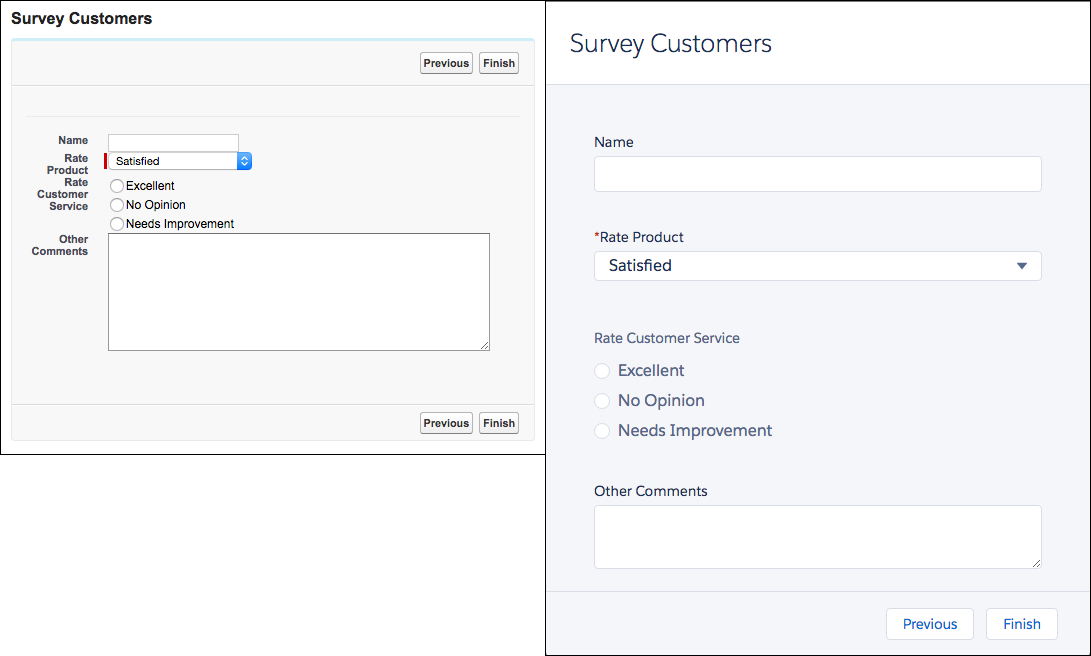
Here’s the same flow rendered in Classic runtime (left) and Lightning runtime (right).
![Compare Classic runtime to Lightning runtime](https://sf-zdocs-cdn-prod.zoominsoftware.com/tdta-platform-platform_automation-264-0-0-production-enus/60568438-ec7e-4665-acd1-7c80dcbe60d5/platform_automation/images/flow/flow_runtimes.png)

## How to Switch to Lightning Runtime for All Flows

From Setup, enter Process Automation Settings in the Quick Find box, then select Process Automation Settings. Select Enable Lightning runtime for flows and save your changes.

## Which Runtime Experience Do My Users See?

Flows that run from a Visualforce component always use Classic runtime. Flows that run from a Lightning page, flow action, or custom Aura component always use Lightning runtime. All other methods depend on whether Lightning runtime has been enabled in your org’s Process Automation settings.

This table summarizes which runtime experience your users see based on how you distribute the flow.

<table class="slds-table slds-table_bordered slds-max-medium-table_stacked slds-m-bottom_small ">
        <colgroup>
          <col style="width:33.33333333333333%">
          <col style="width:33.33333333333333%">
          <col style="width:33.33333333333333%">
        </colgroup>
        <thead class="slds-text-title_caps ">
          <tr class="">
            <th scope="col" class="slds-cell-wrap" rowspan="2" style="vertical-align:top;" id="d358142e91">Flow Distribution Method</th>
            <th scope="colgroup" class="slds-cell-wrap" colspan="2" style="text-align:center;vertical-align:top;" id="d358142e94">When Lightning Runtime for Flows
              is</th>
          </tr>
          <tr class="">
            <th scope="col" class="slds-cell-wrap" style="text-align:center;vertical-align:top;" id="d358142e100">Not selected</th>
            <th scope="col" class="slds-cell-wrap" style="text-align:center;vertical-align:top;" id="d358142e103">Selected</th>
          </tr>
        </thead>
        <tbody>
          <tr class="">
            <td data-label="Not selected" class="slds-cell-wrap" style="vertical-align:top;" headers="d358142e91 ">Visualforce component</td>

            <td data-label="Selected" class="slds-cell-wrap" style="text-align:center;vertical-align:top;" headers="d358142e94 d358142e100 ">Classic runtime</td>

            <td class="slds-cell-wrap" style="text-align:center;vertical-align:top;" headers="d358142e94 d358142e103 ">Classic runtime</td>

          </tr>
          <tr class="">
            <td data-label="Not selected" class="slds-cell-wrap" style="vertical-align:top;" headers="d358142e91 ">Custom button</td>

            <td data-label="Selected" class="slds-cell-wrap" style="text-align:center;vertical-align:top;" headers="d358142e94 d358142e100 ">Classic runtime</td>

            <td class="slds-cell-wrap" style="text-align:center;vertical-align:top;" headers="d358142e94 d358142e103 ">Lightning runtime</td>

          </tr>
          <tr class="">
            <td data-label="Not selected" class="slds-cell-wrap" style="vertical-align:top;" headers="d358142e91 ">Custom link</td>

            <td data-label="Selected" class="slds-cell-wrap" style="text-align:center;vertical-align:top;" headers="d358142e94 d358142e100 ">Classic runtime</td>

            <td class="slds-cell-wrap" style="text-align:center;vertical-align:top;" headers="d358142e94 d358142e103 ">Lightning runtime</td>

          </tr>
          <tr class="">
            <td data-label="Not selected" class="slds-cell-wrap" style="vertical-align:top;" headers="d358142e91 ">Web tab</td>

            <td data-label="Selected" class="slds-cell-wrap" style="text-align:center;vertical-align:top;" headers="d358142e94 d358142e100 ">Classic runtime</td>

            <td class="slds-cell-wrap" style="text-align:center;vertical-align:top;" headers="d358142e94 d358142e103 ">Lightning runtime</td>

          </tr>
          <tr class="">
            <td data-label="Not selected" class="slds-cell-wrap" style="vertical-align:top;" headers="d358142e91 ">Direct link</td>

            <td data-label="Selected" class="slds-cell-wrap" style="text-align:center;vertical-align:top;" headers="d358142e94 d358142e100 ">Classic runtime</td>

            <td class="slds-cell-wrap" style="text-align:center;vertical-align:top;" headers="d358142e94 d358142e103 ">Lightning runtime</td>

          </tr>
          <tr class="">
            <td data-label="Not selected" class="slds-cell-wrap" style="vertical-align:top;" headers="d358142e91 ">Flow action</td>

            <td data-label="Selected" class="slds-cell-wrap" style="text-align:center;vertical-align:top;" headers="d358142e94 d358142e100 ">Lightning runtime</td>

            <td class="slds-cell-wrap" style="text-align:center;vertical-align:top;" headers="d358142e94 d358142e103 ">Lightning runtime</td>

          </tr>
          <tr class="">
            <td data-label="Not selected" class="slds-cell-wrap" style="vertical-align:top;" headers="d358142e91 ">Lightning page</td>

            <td data-label="Selected" class="slds-cell-wrap" style="text-align:center;vertical-align:top;" headers="d358142e94 d358142e100 ">Lightning runtime</td>

            <td class="slds-cell-wrap" style="text-align:center;vertical-align:top;" headers="d358142e94 d358142e103 ">Lightning runtime</td>

          </tr>
          <tr class="">
            <td data-label="Not selected" class="slds-cell-wrap" style="vertical-align:top;" headers="d358142e91 ">Custom Aura component</td>

            <td data-label="Selected" class="slds-cell-wrap" style="text-align:center;vertical-align:top;" headers="d358142e94 d358142e100 ">Lightning runtime</td>

            <td class="slds-cell-wrap" style="text-align:center;vertical-align:top;" headers="d358142e94 d358142e103 ">Lightning runtime</td>

          </tr>
        </tbody>
      </table>

#### See Also

- [Process Automation Settings](https://help.salesforce.com/s/articleView?id=platform.automation_about_settings.htm&release=264.0.0&type=5 "Salesforce provides various settings for platform automation to help customize and streamline business processes.")