---
schema_version: "1"
id: 552127bd06bb8f0dfd94c78b25f17783098452d85e1b123fa44ff25dea3b5134
title: Data Commit and Deployment
collection: admin
version: current
locale: en-us
portal_url: https://docs.salesforce.com/admin/current/en-us/platform/264-0-0/devops_center_data_deployment.md
canonical_url: https://help.salesforce.com/s/articleView?id=platform.devops_center_data_deployment.htm&release=264.0.0&type=5
source_site: help.salesforce.com
content_type: documentation
content_hash: 6c467a48c06e21a959fe6ccbb6b6d19522ddb8be7f8c8cb9d9cc9fb8ea012bfe
description: Maintain data integrity and keep dependencies intact by moving metadata and data together in a single work item. In Lifecycle Center, you can move configuration data between environments using the same commit and deploy flow that you use for metadata.
products:
- Salesforce Platform
release: "264"
---
# Data Commit and Deployment
Maintain data integrity and keep dependencies intact by moving metadata and data together in a single work item. In Lifecycle Center, you can move configuration data between environments using the same commit and deploy flow that you use for metadata.
### Required Editions
Available in: Lightning Experience
Available in: Professional (API access required), Enterprise, Performance, Unlimited, and Developer editions
When you commit data, Lifecycle Center stores the records as .csv files in your source control repository. Files are stored in a folder, usually dataset/. Each object has its own file, named with the object’s API name. For example, dataset/Account.csv.
Example repository structure:
```
/
dataset/
Account.csv
Contact.csv
CustomObject__c.csv
```
Lifecycle Center combines and applies updates from multiple commits to the .csv files based on these user actions.
| User Action | Lifecycle Center Action |
| --- | --- |
| Add a new record | Adds a row to the .csv file. |
| Add new columns | Adds columns to the header. Existing rows get empty values in the new columns. |
| Commit fewer columns than before | Updates only the specified columns. Other columns in the file remain unchanged. |
| Update an existing record | Replaces the row. The latest commit overwrites all previous values in that row. |
## Data Commit and Deployment Considerations
Review these requirements before you commit and deploy data:
- Use a unique External ID field to match records and prevent duplicates in the target org.
- Make sure that your External ID field contains only unique values. If the same ID appears twice in a file, the last processed row overwrites the first.
- Don’t leave the External ID field blank. Every record in your commit must have a valid identifier.
- Lifecycle Center supports up to 1,000 records per object type and 10,000 records total per commit.
- Save the data as UTF-8 .csv with comma (,) as the delimiter. Use the standard CSV escaping for fields that contain quotes or commas.
## View Data Changes in DX Inspector and Lifecycle Center
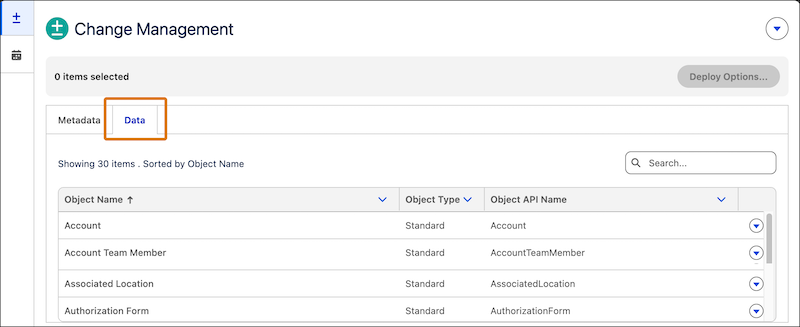
- Data to commit: In your development environment, open Change Management from DX Inspector. Then, go to the Data tab to see the data changes available for commit.
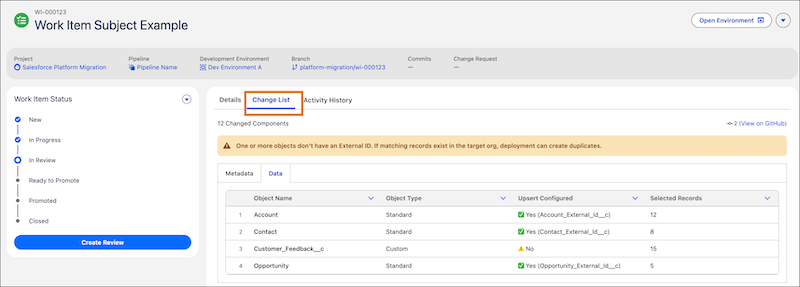
- Data to deploy: Open the work item record in Lifecycle Center, then click **Change List** to see the data changes included in that work item for deployment.
#### See Also
- [Commit Changes to Source Repository](https://help.salesforce.com/s/articleView?id=platform.devops_center_commit_changes.htm&release=264.0.0&type=5 "Commit changes to your source repository directly from the Change Management tab. After you make the changes, decide which changes to include for the work item and commit them to the Lifecycle Center project’s source control repository.")
- [Promote Work Items](https://help.salesforce.com/s/articleView?id=platform.devops_center_promote_work_items.htm&release=264.0.0&type=5 "Move your work items through a predefined sequence of pipeline stages, guiding them from development to production. ")