---
schema_version: "1"
id: 4bd0376eb56aa5fabc92a236dde11eb6b6d0a15b29c8379178403375a378c862
title: Custom Firewall Rule Expressions on the Salesforce CDN
collection: admin
version: current
locale: en-us
portal_url: https://docs.salesforce.com/admin/current/en-us/platform/264-0-0/community_builder_cdn_custom_firewall_rules.md
canonical_url: https://help.salesforce.com/s/articleView?id=platform.community_builder_cdn_custom_firewall_rules.htm&release=264.0.0&type=5
source_site: help.salesforce.com
content_type: documentation
content_hash: 1eca36a54454058f1575bbc47e85d577686c89c4194b21b5f4d10a28fae1114e
description: Custom web application firewall (WAF) rule expressions evaluate incoming traffic based on IP address, autonomous system number (ASN), or country. After you write an expression, choose whether to allow, block, or run a managed challenge on incoming traffic that matches the expression.
products:
- Salesforce Platform
- Security
release: "264"
---
# Custom Firewall Rule Expressions on the Salesforce CDN
Custom web application firewall (WAF) rule expressions evaluate incoming traffic based on IP address, autonomous system number (ASN), or country. After you write an expression, choose whether to allow, block, or run a managed challenge on incoming traffic that matches the expression.
### Required Editions
Available in: Lightning Experience
Available in: Enterprise, Performance, and Unlimited Editions.
To write expressions for custom WAF rules, go to the Salesforce CDN Settings page.
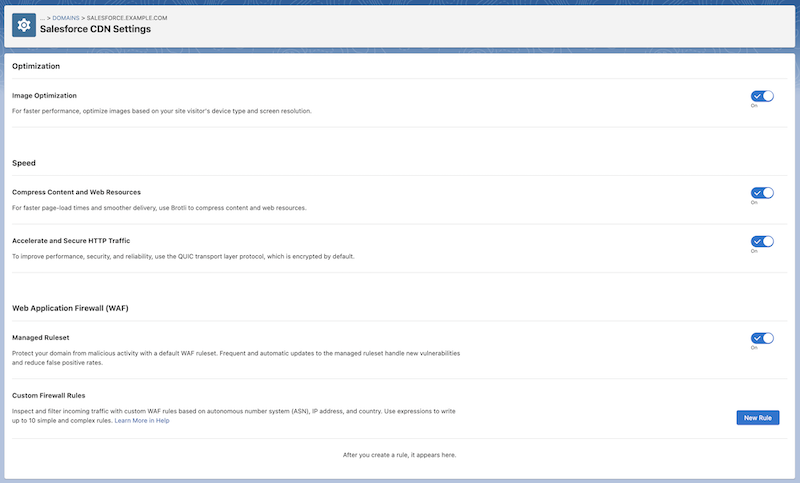

Note The Salesforce CDN Settings page is available for Commerce LWR stores or sites hosted on Experience Delivery that are provisioned with the Salesforce CDN partner. From the Domains page, the Current Domain Configuration Option column identifies which Salesforce CDN partner serves your domain.
From the Salesforce CDN Settings page, click **New Rule**, and write a simple or complex expression in the Condition field. A simple expression defines a value against which incoming traffic is evaluated. A complex expression combines one or more simple expressions to create more focused evaluations for incoming traffic.
A simple expression’s syntax has three components.
``

Example To allow traffic from a group of specific IP addresses, use the expression `ip.src in { 203.0.113.0 203.0.113.1 }`, and select **Allow** from the Action dropdown menu.
In this example, `ip.src` is the field, `in` is the comparison operator, and `{ 203.0.113.0 203.0.113.1 }` is the value.
To write a complex expression, combine one or more simple expressions using one of the logical operators `and`, `or`, or `not`.
``

Example To block traffic if the country is Germany and the visitor has a specific IP address, use the expression `(ip.src.country eq “DE”) and (ip.src eq 1.1.1.1)`, and then from the Action dropdown menu, select **Block**.
Be careful not to create complex expressions that are too restrictive. Overly restrictive custom WAF rules can unintentionally block a large number of potential visitors from accessing your site.
## Fields
The field specifies which of the incoming traffic’s properties to evaluate. For example, if you want to allow traffic from a certain country, use the `ip.src.country` field in your custom WAF rule.
| Field | Description |
| --- | --- |
| ip.src.asnum | Represents the integer representing the autonomous system number (ASN) associated with the site visitor’s IP address. |
| ip.src.country | Represents the two-letter country code in [ISO 3166-1 Alpha 2](https://www.iso.org/obp/ui/#search) format. |
| ip.src | Represents the IP packet’s source address. |
## Comparison Operators
The comparison operator defines how values must relate to actual request data for an expression to remain true.
| Operator Name | Operator Notation |
| --- | --- |
| Equal | eq |
| Not equal | ne |
| Value is within a set of values | in |

Note When you use the `in` operator, surround the value with curly brackets, and use a space to separate the items within the value. For example, `ip.src in { 203.0.113.0 203.0.113.1 }`.
## Values
The value represents the data associated with a field. To evaluate a rule, the value is compared with the data from the incoming traffic request.
The Salesforce CDN supports valid values for the `ip.src.asnum`, `ip.src.country`, and `ip.src fields`.