---
schema_version: "1"
id: f85c12e8af3de6b0c332a2ef8c7f89ebd0dec0b2dc7f47d52874d983d9c5acf0
title: Interpret Test Scenario Results in Test Mode (Beta)
collection: admin
version: current
locale: en-us
portal_url: https://docs.salesforce.com/admin/current/en-us/platform/264-0-0/automate_flow_test_mode_interpret_results.md
canonical_url: https://help.salesforce.com/s/articleView?id=platform.automate_flow_test_mode_interpret_results.htm&release=264.0.0&type=5
source_site: help.salesforce.com
content_type: documentation
content_hash: 30af7d9b8ea425f20b5bbcc59c627aeb0e1b57ff6754faf25ad950a5903e3168
description: In Test Mode, review the Details and Expected Results tabs after you run a test scenario, and troubleshoot failed assertions.
products:
- Flow Builder
- Salesforce Platform
release: "264"
---
# Interpret Test Scenario Results in Test Mode (Beta)
In Test Mode, review the Details and Expected Results tabs after you run a test scenario, and troubleshoot failed assertions.
### Required Editions
To open, edit, create, activate or
deactivate a flow using all flow types, elements, and features available in Flow
Builder, including Einstein and Agentforce for Flow:
Manage Flow

Note Test mode is a pilot or beta service that is subject to the Beta Services Terms at [Agreements - Salesforce.com](https://www.salesforce.com/company/legal/agreements/) or a written Unified Pilot Agreement if executed by Customer, and applicable terms in the [Product Terms Directory](https://ptd.salesforce.com/). Use of this pilot or beta service is at the Customer's sole discretion.
After a test scenario runs, review its results to confirm that the flow behaved as expected, or to find the cause of a failure. To set up and run a scenario first, see [Set Up and Run a Test Scenario (Beta)](https://help.salesforce.com/s/articleView?id=platform.automate_flow_test_mode_scenario.htm&release=264.0.0&type=5 "Configure test data and run options, and then run the scenario in Test Mode (beta).").
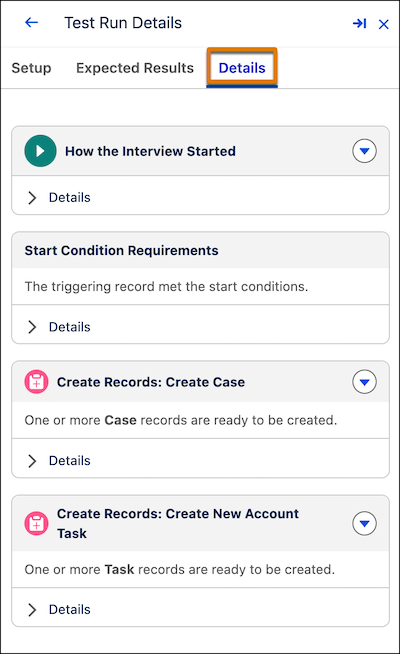
1. Review the **Details** tab.
The Details tab shows the run's execution path and any errors, similar to the Flow Builder debugger. For a manually evaluated scenario, this is the only results tab.
2. For an automatically evaluated scenario, click the **Expected Results** tab.
The Expected Results tab lists every assertion that you defined for the scenario.
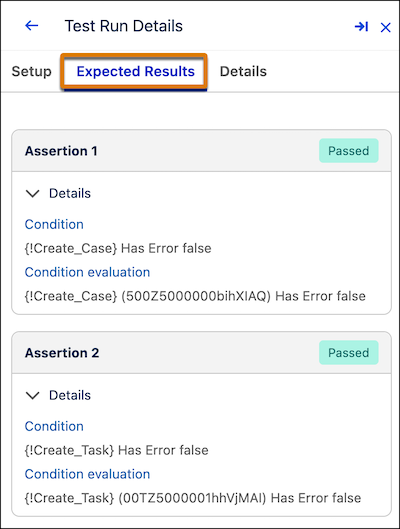
3. Expand an assertion to review its status, condition, and actual value.
The condition is the expression that you configured. The actual value is what the assertion evaluated to when the scenario ran. A scenario passes only when every assertion passes.
4. When an assertion fails, compare its condition and actual value to find the mismatch.
5. Fix the responsible element in the flow.
6. Open the test scenario, and click **Run Scenario** again to confirm the fix.
For the concepts behind assertions and expected results, see [Automated Flow Testing](https://help.salesforce.com/s/articleView?id=platform.automate_flow_test_record_data_cloud_triggered.htm&release=264.0.0&type=5 "Understand assertions, flow versions, and test data before you set up an automated test scenario through Test Mode (beta) or for a Data Cloud-triggered flow."). To interpret results for a Data Cloud-triggered flow test instead, see [Interpret Data Cloud-Triggered Flow Test Results](https://help.salesforce.com/s/articleView?id=platform.flow_test_interpret_results.htm&release=264.0.0&type=5 "Review the results of a Data Cloud-triggered flow test and troubleshoot failed assertions.").
#### See Also
- [Automated Flow Testing](https://help.salesforce.com/s/articleView?id=platform.automate_flow_test_record_data_cloud_triggered.htm&release=264.0.0&type=5 "Understand assertions, flow versions, and test data before you set up an automated test scenario through Test Mode (beta) or for a Data Cloud-triggered flow.")
- [Interpret Data Cloud-Triggered Flow Test Results](https://help.salesforce.com/s/articleView?id=platform.flow_test_interpret_results.htm&release=264.0.0&type=5 "Review the results of a Data Cloud-triggered flow test and troubleshoot failed assertions.")