---
schema_version: "1"
id: 7b48e7e734b4eba1b3683a984b93acc63d55a8db1f229b334b43cff0aea37f97
title: Turn On Flow Test Mode (Beta)
collection: admin
version: current
locale: en-us
portal_url: https://docs.salesforce.com/admin/current/en-us/platform/264-0-0/automate_flow_test_mode_enable.md
canonical_url: https://help.salesforce.com/s/articleView?id=platform.automate_flow_test_mode_enable.htm&release=264.0.0&type=5
source_site: help.salesforce.com
content_type: documentation
content_hash: cf16cb816ce613d2ab88691e8db0e2719f3cd5120ffdb2da2d5ecc85b59dc21f
description: Turn on flow Test Mode for your org so that users can test autolaunched and record-triggered flows in Flow Builder.
products:
  - Flow Builder
  - Salesforce Platform
release: "264"
---
# Turn On Flow Test Mode (Beta)

Turn on flow Test Mode for your org so that users can test autolaunched and record-triggered flows in Flow Builder.

### Required Editions

<table class="slds-table slds-table_bordered slds-max-medium-table_stacked slds-m-bottom_small edition"><colgroup><col></colgroup><tbody><tr class=""><td class="slds-cell-wrap" style="vertical-align:top;"><a href="https://help.salesforce.com/s/articleView?id=platform.flow_ref_supported_editions.htm&amp;release=264.0.0&amp;type=5" title="Learn about the editions and user interfaces that support Flow Builder. Some Flow Builder features integrate with other Salesforce products that require additional licenses.">View supported editions.</a></td></tr></tbody></table>

<table class="slds-table slds-table_bordered slds-max-medium-table_stacked slds-m-bottom_small permission">
        <colgroup>
          <col style="width:50%">
          <col style="width:50%">
        </colgroup>
        <thead class="slds-text-title_caps ">
          <tr class="">
            <th scope="colgroup" class="slds-cell-wrap" colspan="2" style="text-align:left;vertical-align:top;" id="d90010e59">User Permissions Needed</th>
          </tr>
        </thead>
        <tbody>
          <tr class="">
            <td data-label="User Permissions Needed" class="slds-cell-wrap" style="vertical-align:top;" headers="d90010e59 ">To open, edit, create, activate or
              deactivate a flow using all flow types, elements, and features available in Flow
              Builder, including Einstein and Agentforce for Flow:</td>

            <td class="slds-cell-wrap" style="vertical-align:top;" headers="d90010e59 ">Manage Flow</td>

          </tr>
        </tbody>
      </table>

![Note](https://sf-zdocs-cdn-prod.zoominsoftware.com/tdta-platform-platform_automation-264-0-0-production-enus/60568438-ec7e-4665-acd1-7c80dcbe60d5/images/icon_note.png)

Note Test mode is a pilot or beta service that is subject to the Beta Services Terms at [Agreements - Salesforce.com](https://www.salesforce.com/company/legal/agreements/) or a written Unified Pilot Agreement if executed by Customer, and applicable terms in the [Product Terms Directory](https://ptd.salesforce.com/). Use of this pilot or beta service is at the Customer's sole discretion.

1. From Setup, in the Quick Find box, enter Process, and then click **Process Automation Settings**.
2. Select **Enable Flow Test Mode (Beta)**.
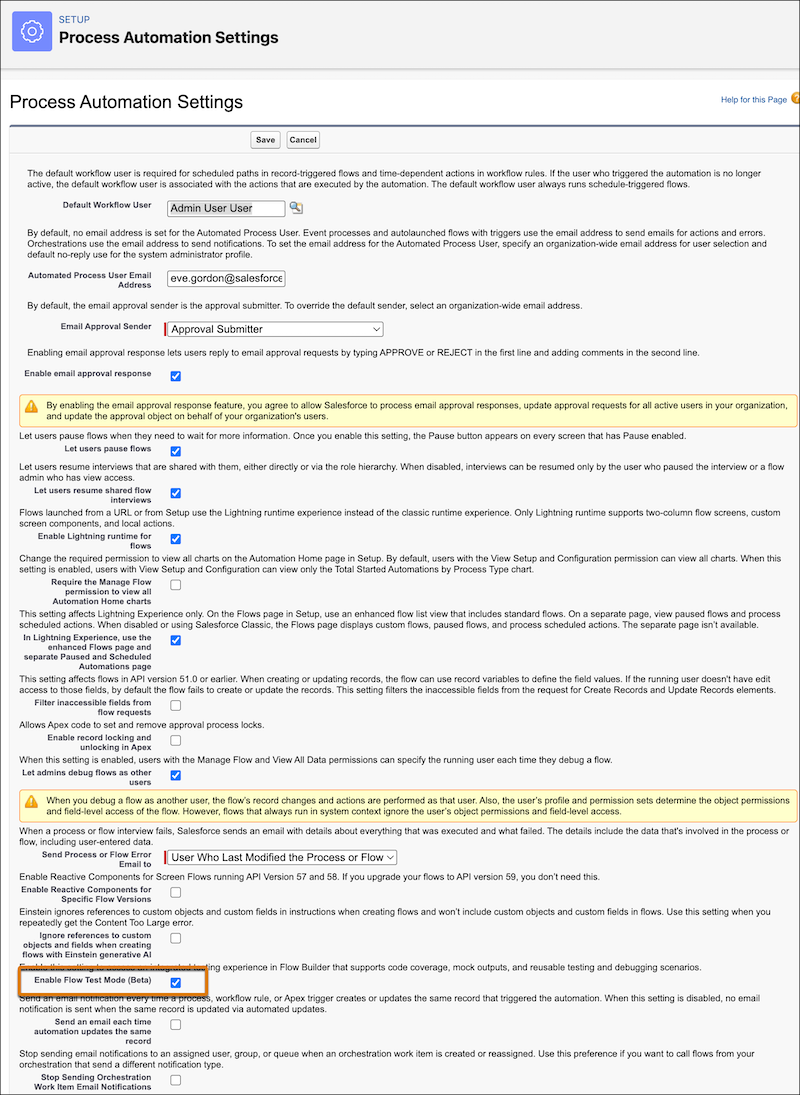
    
    ![Process automation settings page in Setup with Enable Test Mode highlighted](https://sf-zdocs-cdn-prod.zoominsoftware.com/tdta-platform-platform_automation-264-0-0-production-enus/60568438-ec7e-4665-acd1-7c80dcbe60d5/platform_automation/images/flow_test_mode_enable.png)