---
schema_version: "1"
id: d9ce0c623fa18a7085318ffa29d44a2d70b2aa0a824ff8049073e0a4e638b48d
title: Test a Flow with Mock Outputs (Beta)
collection: admin
version: current
locale: en-us
portal_url: https://docs.salesforce.com/admin/current/en-us/platform/264-0-0/automate_flow_test_mock_output.md
canonical_url: https://help.salesforce.com/s/articleView?id=platform.automate_flow_test_mock_output.htm&release=264.0.0&type=5
source_site: help.salesforce.com
content_type: documentation
content_hash: c848feae6e091bb9fe038fb73f35ecb7857a89f9ccd6e124556b8b0b69dc8953
description: Use mock outputs to test autolaunched and record-triggered flows without depending on external systems. Define predictable output values for action and subflow elements so your test scenarios validate flow logic instead of live callouts or subflow execution.
products:
- Flow Builder
- Salesforce Platform
release: "264"
---
# Test a Flow with Mock Outputs (Beta)
Use mock outputs to test autolaunched and record-triggered flows without depending on external systems. Define predictable output values for action and subflow elements so your test scenarios validate flow logic instead of live callouts or subflow execution.
### Required Editions
To open, edit, create, activate or
deactivate a flow using all flow types, elements, and features available in Flow
Builder, including Einstein and Agentforce for Flow:
Manage Flow

Note Mock outputs are a pilot or beta service that is subject to the Beta Services Terms at [Agreements - Salesforce.com](https://www.salesforce.com/company/legal/agreements/) or a written Unified Pilot Agreement if executed by Customer, and applicable terms in the [Product Terms Directory](https://ptd.salesforce.com/). Use of this pilot or beta service is at the Customer's sole discretion.
Before you configure mock outputs for a test scenario, make sure that:
- Your flow is an autolaunched flow or a record-triggered flow.
- Your flow contains at least one action element or subflow element.
With mock outputs, you can define what data an action or subflow element returns during a test run, without actually sending an external callout or running the referenced flow. This isolation keeps your test scenarios focused on the flow logic you're validating instead of on external dependencies. Learn more about test scenarios and assertions in [Automated Flow Testing](https://help.salesforce.com/s/articleView?id=platform.automate_flow_test_record_data_cloud_triggered.htm&release=264.0.0&type=5 "Understand assertions, flow versions, and test data before you set up an automated test scenario through Test Mode (beta) or for a Data Cloud-triggered flow.").
Examples of when to use mock outputs:
- A flow with an action element with an HTTP callout to an external API that are rate-limited or unavailable
- A flow with an action element that invokes an Apex method with complex dependencies
- A flow with a subflow element that you don't want to run in the test scenario.
To use mock outputs, follow these steps.
1. In Flow Builder, open the flow that you want to test.
2. Click **Test** to open Test Mode.
3. On the canvas, click an action element or subflow element that you want to use mock outputs for.
The element's properties panel opens.
4. Click the **Scenario Output** tab.
5. Click **Use Mock Output** to enable mock output for this element.
6. To stop using mock output for this element, click **Using Mock Output**.
7. For each output, enter the mock value, or copy the value from a previous debug run in the debug history.
8. (Optional) To test a fault or alternate path, set Path After Mock Output to the path that you want the flow to take after this element runs.
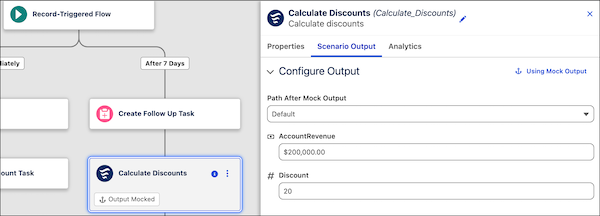
9. Repeat these steps for each action element or subflow element that run asynchronously in this test scenario.
10. Click **Save Scenario** to save your test scenario.
11. Click **Run Scenario** to run the scenario.
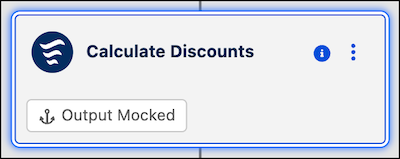
The test scenario runs using your mock output for each element for which you enabled mock output. The flow skips the element's normal execution and uses the values that you specified. On the canvas, mocked elements show an Output Mocked badge.
#### See Also
- [Set Up and Run a Test Scenario (Beta)](https://help.salesforce.com/s/articleView?id=platform.automate_flow_test_mode_scenario.htm&release=264.0.0&type=5 "Configure test data and run options, and then run the scenario in Test Mode (beta).")