---
schema_version: "1"
id: adf0b2f16218971d082dba1c35290d54c98150c01117c1da0dffa25462cd1dbe
title: Test a Flow with Isolated Test Data
collection: admin
version: current
locale: en-us
portal_url: https://docs.salesforce.com/admin/current/en-us/platform/264-0-0/automate_flow_test_isolated_test_data_task.md
canonical_url: https://help.salesforce.com/s/articleView?id=platform.automate_flow_test_isolated_test_data_task.htm&release=264.0.0&type=5
source_site: help.salesforce.com
content_type: documentation
content_hash: a408de83a6caa43d1b4523688ecdf7ca29ebd378d470d06c73b7362c7b42afa0
description: Test record-triggered and autolaunched flows using dedicated, reusable test data from an Apex class that includes a test setup method. After a test scenario runs, the isolated test data rolls back like an Apex unit test, so your org's live data stays as it was.
products:
- Flow Builder
- Salesforce Platform
release: "264"
---
# Test a Flow with Isolated Test Data
Test record-triggered and autolaunched flows using dedicated, reusable test data from an Apex class that includes a test setup method. After a test scenario runs, the isolated test data rolls back like an Apex unit test, so your org's live data stays as it was.
### Required Editions
To open, edit, create, activate or
deactivate a flow using all flow types, elements, and features available in Flow
Builder, including Einstein and Agentforce for Flow:
Manage Flow
When you use org data for testing, anyone can change that data and your tests can start to fail. Record IDs differ between sandbox and production, so tests that pass in one environment can fail when you deploy to another. Create isolated test data when the test scenario runs, just like Apex Test Setup creates data at run time. Your test data stays consistent so you can deploy it across environments.
To open a flow in Test Mode, see [Set Up and Run a Test Scenario (Beta)](https://help.salesforce.com/s/articleView?id=platform.automate_flow_test_mode_scenario.htm&release=264.0.0&type=5 "Configure test data and run options, and then run the scenario in Test Mode (beta).").
1. Create an Apex class with the `@isTest` annotation and a `@testSetup` method that inserts the records you want available during the test scenario.
For example, this Apex class creates test accounts. See [Using Apex Test Setup Methods](https://developer.salesforce.com/docs/atlas.en-us.apexcode.meta/apexcode/apex_testing_testsetup_using.htm).
```
@isTest
global class CommonTestSetup {
@testSetup
global static void setup() {
List accts = new List();
for (Integer i = 1; i <= 2; i++) {
accts.add(new Account(Name = 'Test Account ' + i));
}
insert accts;
}
}
```
When using isolated test data that’s in a data silo, your input record must reference a record that you created in your isolated test data. If the record doesn't exist in that data, you receive an error. Unlike a test scenario that uses org data, you can't customize the field values of an input record in isolated test data from Flow Builder. The record is selected in the isolated test data by its key fields and used as-is. In your Apex `@testSetup` method, populate all key fields. You select key fields later in these steps.
2. Open a record-triggered flow or autolaunched flow.
3. Click **Test** to enter Test Mode (beta).
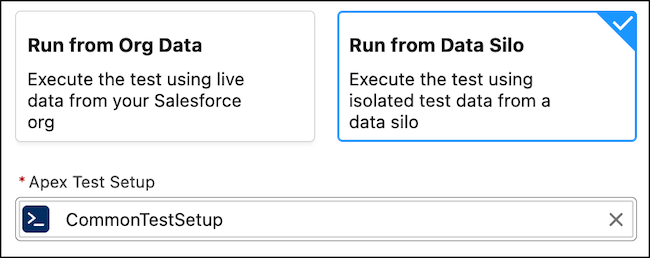
4. Turn on **Scenario Testing Automation**, then for Select Data Source, select **Run from Data Silo**.
The required Apex Test Setup field shows. Select the Apex `@testSetup` class that you created. The test scenario uses the Apex class as the data source, with rollback so your org data stays unchanged.
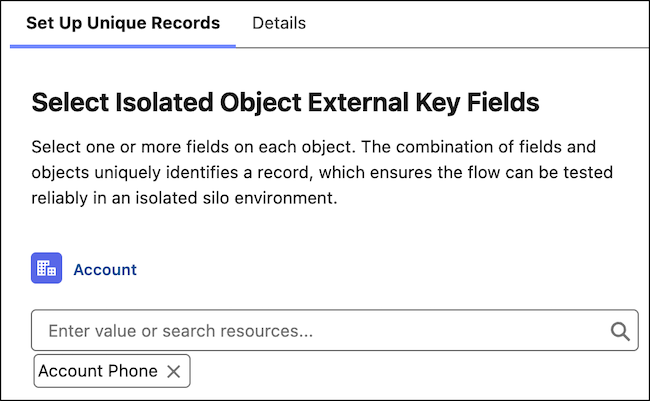
5. Select the key fields for each object used in the test scenario.
The isolated object external key fields identify unique records in the isolated test data. Because test record IDs change after every run, these key fields match input records to the isolated test data at run time. For example, use the `Phone` field as the key field to identify account records.
6. Set the triggering record or input values to match a record in your isolated test data.
7. For Expected Results (Assertions), configure any assertions, then click **Save Scenario** and **Run Scenario**.
The test scenario runs against the isolated test data in the data silo, instead of your live org data.
#### See Also
- [Testing Your Flow in Test Mode (Beta)](https://help.salesforce.com/s/articleView?id=platform.automate_flow_test_mode.htm&release=264.0.0&type=5 "Use Test Mode to configure, save, and run test scenarios for autolaunched and record-triggered flows. To use automated testing in Test Mode, turn on Scenario Testing Automation and add assertions to evaluate expected results automatically.")
- [_Apex Developer Guide_: Using Test Setup Methods](https://developer.salesforce.com/docs/atlas.en-us.apexcode.meta/apexcode/apex_testing_testsetup_using.htm)