---
schema_version: "1"
id: 1035bd09cfaebfe37ec7269aaa267a8ab39fc0566745d66d019f94869090215e
title: Send a Plain Text Email from a Flow
collection: admin
version: current
locale: en-us
portal_url: https://docs.salesforce.com/admin/current/en-us/platform/264-0-0/automate_flow_build_send_email_plain_text.md
canonical_url: https://help.salesforce.com/s/articleView?id=platform.automate_flow_build_send_email_plain_text.htm&release=264.0.0&type=5
source_site: help.salesforce.com
content_type: documentation
content_hash: dd8f643e1695733b6415c89b600d03a6bfee4ed037bccef1fd4ad5bafb8bb4d4
description: Send a quick internal plain text email from a flow. If you don't want any formatting or merge fields in your email, you can enter plain text right into a Send Email action in a flow. Your recipient can be any email address, including a secondary email address on a record.
products:
- Flow Builder
- Salesforce Platform
release: "264"
---
# Send a Plain Text Email from a Flow
Send a quick internal plain text email from a flow. If you don't want any formatting or merge fields in your email, you can enter plain text right into a Send Email action in a flow. Your recipient can be any email address, including a secondary email address on a record.
### Required Editions
To open, edit, create, activate or
deactivate a flow using all flow types, elements, and features available in Flow
Builder, including Einstein and Agentforce for Flow:
Manage Flow

Note You don't need to be an admin to have the Manage Flow permission. Ask your admin to add it to your profile or permission set.

Note If you want to send an email using the email body in the Send Email action, see [Send an Email from a Flow](https://help.salesforce.com/s/articleView?id=platform.automate_flow_build_send_email_from_a_flow.htm&release=264.0.0&type=5 "Compose your email's subject and body directly in the Send Email action element, without an email template. You can send to any email address and use merge fields from any object in your org.").

Important To send email from Salesforce, the Send Email action in Salesforce Flow requires domain-level and user-level email verification. Email delivery fails if either the user's email address or the email-sending domain is unverified. See [Requirements to Send Email from Salesforce](https://help.salesforce.com/s/articleView?id=xcloud.security_email_verification_requirements.htm&language=en_US&type=5).
1. Open the Flows list view.
- From the Automation app, select the **Flows** tab.
- From the **Flows** tab in any Lightning app, click the actions menu and select **Open Flow**.
- From Setup, in the Quick Find box, enter Flows, and then select **Flows**.
Note that the Automation app and Flows tab options don't require Setup access.
2. Create the type of flow that you want to use.
- From the Automation app, click **New**, then click the category, and then the flow type. For example, to create a record-triggered flow, click **Triggered** | **Record-Triggered Flow**.
- From Setup, click **New Flow**, then click the category, and then the flow type. For example, to create a screen flow, click **Screens** | **Screen Flow**..
3. Configure the Start element if needed for the flow type.
4. Click , and search for and click **Send Email**.
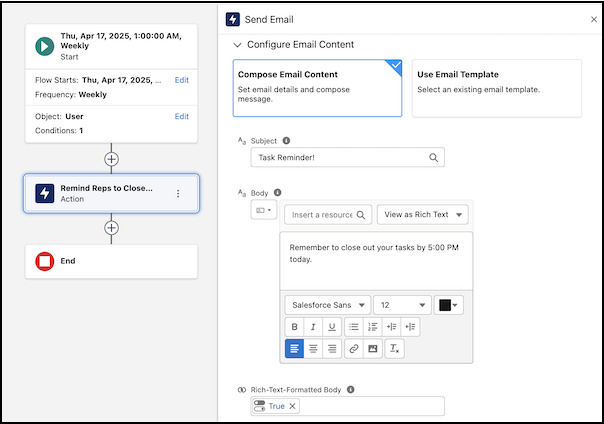
5. For Label, enter a name for your Send Email element. For example, Remind Reps to Close Tasks. Let the API name autofill.
6. For Recipient Addresses, search for and click the name of the resource that holds you recipient's email address. For example, click **Triggering User** and then **Email**.
7. For Subject, enter a subject for your email. For example, Task Reminder!.
8. For Body, enter the body for your email. For example, Remember to close out your tasks by 5:00 PM today..
9. For the Rich-Text-Formatted Body value, click **True**.
10. Save and name the flow.
11. To make sure that the flow works as expected, debug and test it by using different scenarios.
12. To start sending emails, activate the flow.

Important After migrating flows, always review and reconfigure the Send Email action to reference the new record IDs in the target Salesforce org. This step prevents broken references and makes sure that email delivery functions correctly after migration.