---
schema_version: "1"
id: 9a818ae10590a6fe9f0f936c4cfe803c0d50b11d58f1e11d5e1073c01799fc59
title: Create a Marketing App Extension
collection: admin
version: current
locale: en-us
portal_url: https://docs.salesforce.com/admin/current/en-us/mktg/264-0-0/pardot_external_activity_create.md
canonical_url: https://help.salesforce.com/s/articleView?id=mktg.pardot_external_activity_create.htm&release=264.0.0&type=5
source_site: help.salesforce.com
content_type: documentation
content_hash: 53acda2d08b9aa976eba50c9c53e10933fa85ae1d57651fe663840d3e7933b82
description: A marketing app extension represents a third-party app that you use to work with prospects outside of Account Engagement. We recommend setting up a marketing app extension for each third-party app that you use to interact with prospects and store data. For example, if you have a webinar provider, a video platform, and you send out surveys, set up an extension for each vendor.
products:
- Marketing
- Marketing Cloud Account Engagement
release: "264"
---
# Create a Marketing App Extension
A marketing app extension represents a third-party app that you use to work with prospects outside of Account Engagement. We recommend setting up a marketing app extension for each third-party app that you use to interact with prospects and store data. For example, if you have a webinar provider, a video platform, and you send out surveys, set up an extension for each vendor.
### Required Editions
Available in: Account Engagement Plus, Advanced, and Premium Editions
User Permissions Needed
To access Marketing Setup in Salesforce:
Customize Application
To access Marketing App Extension for the first time:
Manage Public List Views
Even if you only have one business unit, the extension must be assigned to a business unit and have associated activity or action types.
1. From Marketing Setup, select **Marketing App Extensions**.
2. Click **New** and enter a name for your extension.
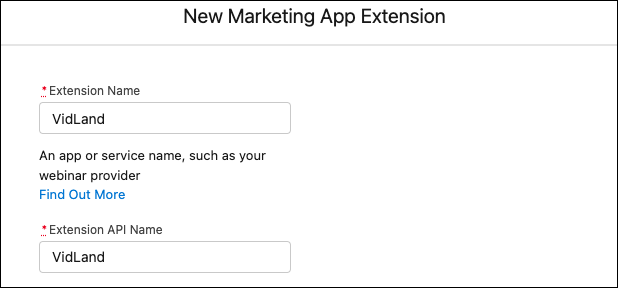
3. Enter an API name for your extension, or you can use the name generated when you enter the name of your extension.
4. If needed, enter a description for your extension for internal use.
5. To use the extension’s activities or actions in automations, select **Active in Automations**. You can always return to this step later to activate your extension.
6. Save your work.
You can create as many marketing app extensions as you want. The number of active extensions that you can have at one time depends on your edition. After you create an extension, assign the extension to a business unit.
#### See Also
- [How Marketing App Extensions Work](https://help.salesforce.com/s/articleView?id=mktg.pardot_extensions_overview.htm&release=264.0.0&type=5 "A marketing app extension represents a third-party app that you use with prospects. You can add activity types or action types to an extension to capture external prospect activity or make external actions available to use in Engagement Studio programs.")