---
schema_version: "1"
id: 75cbc9234c9d0ec622e4177a228ba343dde367f9397415d79762650a696f9dbc
title: Add an Activity Type to a Marketing App Extension
collection: admin
version: current
locale: en-us
portal_url: https://docs.salesforce.com/admin/current/en-us/mktg/264-0-0/pardot_external_activity_add_activity.md
canonical_url: https://help.salesforce.com/s/articleView?id=mktg.pardot_external_activity_add_activity.htm&release=264.0.0&type=5
source_site: help.salesforce.com
content_type: documentation
content_hash: 5efc3cf42c9b35d64dcd4f8f72a3c95e99095a4aea3c70095869cdd8991409fc
description: To capture prospect activity that happens externally, add an activity type to your marketing app extension.
products:
- Marketing
- Marketing Cloud Account Engagement
release: "264"
---
# Add an Activity Type to a Marketing App Extension
To capture prospect activity that happens externally, add an activity type to your marketing app extension.
### Required Editions
Available in: Account Engagement Plus, Advanced, and Premium Editions
User Permissions Needed
To access Marketing Setup in Salesforce:
Customize Application
1. Open a marketing app extension record, and click **Related**.
2. Next to Activity Types, click **New**.
3. Enter a name for the activity type.
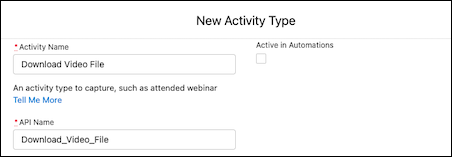
4. Enter an API name for your activity, or you can use the name that’s generated when you enter the name of your activity type.
5. If needed, enter a description for internal use.
6. Leave Active in Automations deselected for now.
After you complete the integration, return to this step to activate your activity.
7. Save your work.
Next, contact your developer to complete your integration.
#### See Also
- [External Activities: Next Steps](https://help.salesforce.com/s/articleView?id=mktg.pardot_external_activity_next_steps.htm&release=264.0.0&type=5 "After you set up a marketing app extension, assign it to a business unit, and add an activity type, it’s time to complete the integration. We recommend working with your developer to connect the activity types that you created to your third-party app or integration service.")