---
schema_version: "1"
id: 32491a4d94a4fdb5236c53270eb1faa51f92e713592c0aca039ceaad29f5c74a
title: Use Einstein Engagement Frequency
collection: admin
version: current
locale: en-us
portal_url: https://docs.salesforce.com/admin/current/en-us/mktg/264-0-0/pardot_einstein_engagement_frequency_use.md
canonical_url: https://help.salesforce.com/s/articleView?id=mktg.pardot_einstein_engagement_frequency_use.htm&release=264.0.0&type=5
source_site: help.salesforce.com
content_type: documentation
content_hash: 0b609b2944bae30d92d35f70a394b7733f0dffa94988aae89e0a0e7ac985da8e
description: You can filter prospects by using the Einstein Engagement Frequency (EEF) status in segmentation rules, automation rules, and Engagement Studio. The field is saved as an Account Engagement default field.
products:
- Marketing
- Marketing Cloud Account Engagement
release: "264"
---
# Use Einstein Engagement Frequency
You can filter prospects by using the Einstein Engagement Frequency (EEF) status in segmentation rules, automation rules, and Engagement Studio. The field is saved as an Account Engagement default field.
### Required Editions
Available in: Account Engagement Advanced and Premium Editions with Salesforce Enterprise, Performance, or Unlimited Edition
User Permissions Needed
To add an Einstein Engagement Frequency filter:
Account Engagement Administrator or Marketing
role
Pardot is now known as Marketing Cloud Account Engagement. We wish we could snap our fingers to update the name everywhere, but you can expect to see the previous name in a few places until we replace it, including in the app itself.
The Einstein Engagement Frequency field is stored as an Account Engagement default field, and is automatically added to the relevant locations when an admin enables the feature. You can sort or filter Prospect list views and create segmentation rules and automation rules.

Tip To get the most from EEF, we recommend creating three dynamic lists based on prospects’ frequency status. You can review the list members, quickly see how any members are in each group, or use the lists as recipients or suppression lists.
To use the filter in Engagement Studio, create a rule step and follow steps 3 through 5.
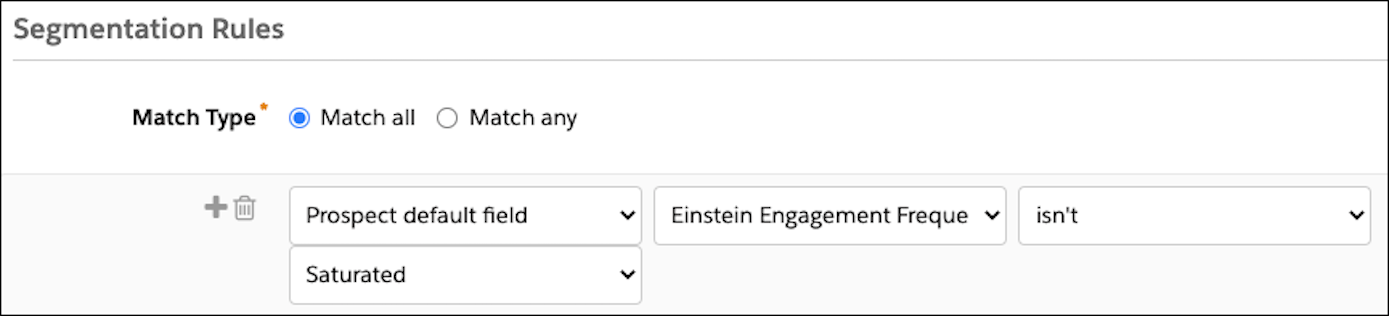
1. Create or open a segmentation rule or automation rule.
2. Add a rule.
3. In the first dropdown, select **Prospect default field**.
4. In the next dropdown, select **Einstein Engagement Frequency**.
5. Select an operator, and then choose a status value.
Options are undersaturated, on target, or oversaturated.
6. Save the rule.

Example Gina wants to create a segmentation rule that removes prospects who already receive the right number of emails. She selects the Einstein Engagement Frequency field, chooses the “isn’t” operator, and selects the Saturated status. Now she feels more confident that she doesn’t send too many emails to prospects who aren’t likely to engage with them.