---
schema_version: "1"
id: 309753ea526d5bac365af6c6282c2a8be844f9c89d60c25fb6da771b8c168cc3
title: Einstein Email Recommendations
collection: admin
version: current
locale: en-us
portal_url: https://docs.salesforce.com/admin/current/en-us/mktg/264-0-0/mc_pb_einstein_email_recommendations.md
canonical_url: https://help.salesforce.com/s/articleView?id=mktg.mc_pb_einstein_email_recommendations.htm&release=264.0.0&type=5
source_site: help.salesforce.com
content_type: documentation
content_hash: 5617263757152854cd422de7bd284a8d9a2120882bc25672136563f7783d1e90
description: Use Einstein Email Recommendations to observe customer behavior, build preference profiles, and deliver the next-best content or product. You can also refine recommendations to match your business rules. Recommendation content surfaces in placeholders for recommendations on your website.
products:
  - Marketing
  - Marketing Cloud Intelligence
release: "264"
---
# Einstein Email Recommendations

Use Einstein Email Recommendations to observe customer behavior, build preference profiles, and deliver the next-best content or product. You can also refine recommendations to match your business rules. Recommendation content surfaces in placeholders for recommendations on your website.

Email recommendations are delivered as a pre-built image and link pair and are activated when a user engages with the email. We refer to email recommendations as engagement recommendations, meaning the logic and scenarios are processed immediately before they see the recommendation.

The image in the recommendation is based on an HTML template that is used to style what a recommendation looks like. Each product or content recommendation is generated ahead of time and stored to ensure that the image is instantly available. By pre-processing displays and logic for each product or content recommendation, the most up-to-date recommendation is delivered without sacrificing performance when a subscriber engages with the email.

Here’s the required HTML that that is included in an email template for a block with two recommendations.

```
<a href="https://{MID}.recs.igodigital.com/rr/v2/HASH/l/1/%%emailaddr%%">
    <img src="https://{MID}.recs.igodigital.com/rr/v2/HASH/i/1/%%emailaddr%%">
</a>

<a href="https://{MID}.recs.igodigital.com/rr/v2/HASH/l/2/%%emailaddr%%">
    <img src="https://{MID}.recs.igodigital.com/rr/v2/HASH/i/2/%%emailaddr%%">
</a>
```

Here’s the HTML to create the image used in this call.

```
<div style="font-size:12px;color:black;width:150px; text-align:center;">
<img style="max-width:150px;" src="%%ImageLink%%" />

<p><b>%%ProductName%%</b></p>
%%[ if SalePrice < RegularPrice then ]%%
<s>Regular Price: %%RegularPrice%%</s>
<br/>

<span style="color:red;">Sale Price: %%SalePrice%%</span>
%%[ else ]%%
%%RegularPrice%%
%%[ endif ]%%
<p>%%Description%%</p>
</div>
```

This image shows an example of an image generated and called via the link in the email recommendations. The link redirects to the page on the site while tracking the click:
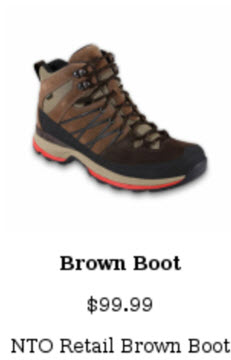
![Recommendation Image for a Boot](https://sf-zdocs-cdn-prod.zoominsoftware.com/tdta-mktg-mc_data_management_and_analytics-264-0-0-production-enus/7988f60d-cd94-4b42-8836-dc11773564b5/mc_data_management_and_analytics/images/mc_pb_rec_boot.jpg)

Each recommendation is an individual image. If you needed 4 recommendations in a call, the HTML must include 4 image and link pairs. The display of the recommendation is unified across the entire recommendation, so with engagement recommendations, all four recommendations use the same HTML and AMPscript. Because email recommendations are displayed as an image, consider the mobile responsiveness of the design.

For information about how recommendations are applied to messages, see [Multipliers for Marketing Cloud Engagement](https://www.salesforce.com/marketing/sms-ratio-updates/).

- **[Einstein Email Recommendations Dashboard](https://help.salesforce.com/s/articleView?id=mktg.mc_pb_einstein_email_recommendations_dashboard.htm&release=264.0.0&type=5)**  
    The email recommendations dashboard in Einstein Recommendations displays a list of available recommendations. From here, you can create, edit, or delete a recommendation.
- **[Create Einstein Email Recommendations](https://help.salesforce.com/s/articleView?id=mktg.mc_pb_create_einstein_email_recommendation.htm&release=264.0.0&type=5)**  
    To create Einstein Email Recommendations, set up the customer profile privacy. Then the system generates generic recommendations from the scenarios you configured.
- **[Supported Fonts](https://help.salesforce.com/s/articleView?id=mktg.mc_pb_eer_supported_fonts.htm&release=264.0.0&type=5)**  
    Einstein Email Recommendations supports multiple fonts.
- **[Einstein Recommendations](https://help.salesforce.com/s/articleView?id=mktg.mc_pb_personalization_builder.htm&release=264.0.0&type=5)**  
    Einstein Recommendations deliver the next-best product, content, or offer to every individual through product and content recommendations for email and web. Every customer interaction is an insight. With every click, download, view, and purchase, customers are giving data about their preferences. Einstein Recommendations combine user behavior with algorithms and your unique business rules to build a user profile of affinities. Use that profile to determine the most-relevant content and products for each customer in real time. Hyperforce doesn’t support using email or web recommendations.