---
schema_version: "1"
id: 2c6d13fb6b444e947bc031d54b508415831702f230e4a4d3bb98695b235ce174
title: Share Dashboard Pages and Widgets via Email
collection: admin
version: current
locale: en-us
portal_url: https://docs.salesforce.com/admin/current/en-us/mktg/264-0-0/mc_dat_share_email.md
canonical_url: https://help.salesforce.com/s/articleView?id=mktg.mc_dat_share_email.htm&release=264.0.0&type=5
source_site: help.salesforce.com
content_type: documentation
content_hash: 68b3e2ddf1865678a71b41786e3b0982c55060de5e77c0487f4bccda1de503db
description: You can share widgets and pages via email to collaborate with colleagues and clients.
products:
- Marketing
- Marketing Cloud Intelligence
release: "264"
---
# Share Dashboard Pages and Widgets via Email
You can share widgets and pages via email to collaborate with colleagues and clients.
### Required Editions
Available in: Intelligence Reports and Intelligence Reports Advanced
User Permissions Needed
To share dashboard pages and widgets in email:
Access, View & Export, Schedule, Create & Edit
1. Select the dashboard page or widget that you want to share.
2. Click **Share**, and then click **Email**.
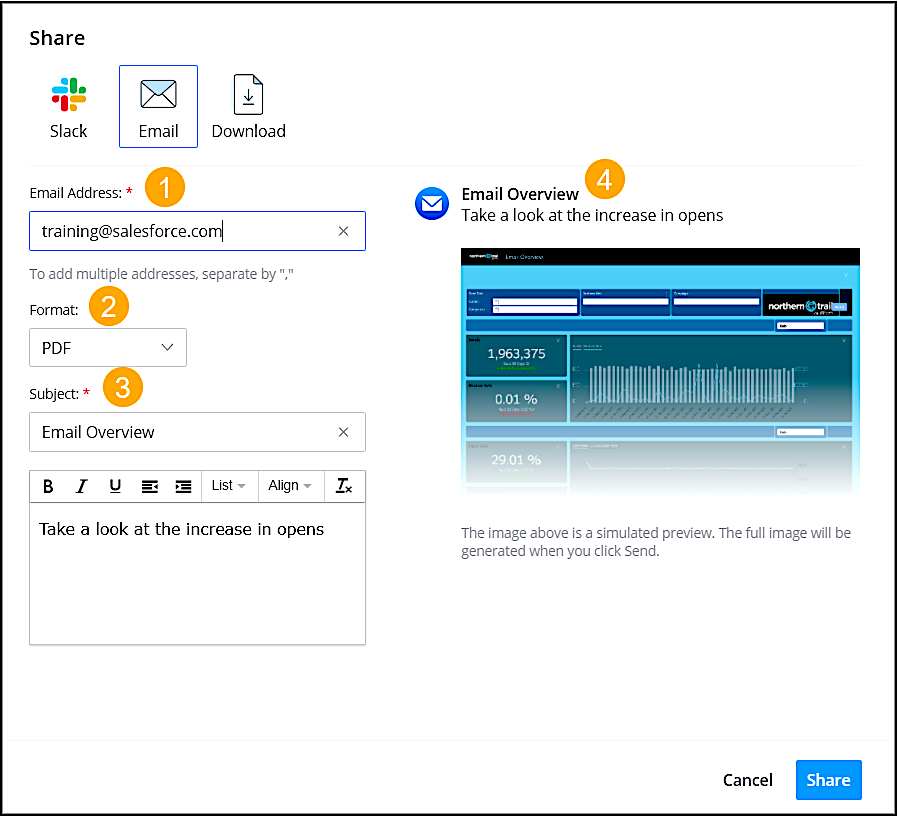
Enter the recipient’s email address (1), and select the format (2). Enter the subject (3). The name of the dashboard or page is used by default. Preview what you’re sending (4).
3. Click **Send**.