---
schema_version: "1"
id: c78351715ca8d897d1aa1a52446895839159f714fb9be85fc9196cc2a8df4de8
title: Apply Pivot Transformers in Marketing Cloud Intelligence
collection: admin
version: current
locale: en-us
portal_url: https://docs.salesforce.com/admin/current/en-us/mktg/264-0-0/dato_data_streams_tc_transformers_pivot_apply.md
canonical_url: https://help.salesforce.com/s/articleView?id=mktg.dato_data_streams_tc_transformers_pivot_apply.htm&release=264.0.0&type=5
source_site: help.salesforce.com
content_type: documentation
content_hash: 46f4055c115876709bd2acbb3e93195380d3d011a104368dd220365e2275fdcc
description: The pivot transformer can transform values from selected columns into new individual columns, which then contain aggregated values for the measurements.
products:
  - Marketing
  - Marketing Cloud Intelligence
release: "264"
---
# Apply Pivot Transformers in Marketing Cloud Intelligence

The pivot transformer can transform values from selected columns into new individual columns, which then contain aggregated values for the measurements.

### Required Editions

<table class="slds-table slds-table_bordered slds-max-medium-table_stacked slds-m-bottom_small permission">
        <colgroup>
          <col style="width:50%">
          <col style="width:50%">
        </colgroup>
        <thead class="slds-text-title_caps ">
          <tr class="">
            <th scope="colgroup" class="slds-cell-wrap" colspan="2" style="text-align:center;vertical-align:top;" id="d57054e38">User Permissions Needed</th>
          </tr>
        </thead>
        <tbody>
          <tr class="">
            <td data-label="User Permissions Needed" class="slds-cell-wrap" style="vertical-align:top;" headers="d57054e38 ">To apply transformers:</td>

            <td class="slds-cell-wrap" style="vertical-align:top;" headers="d57054e38 ">Admin</td>

          </tr>
        </tbody>
      </table>

1. From the **Connect & Mix** tab, select **Data Streams**, and then **Data Streams List**.
2. Create a data stream, or edit an existing one.
3. In the **Preview Source** screen, click **Edit Transformers**.
4. In the **Add Transformers** area, next to the **Pivot Transformer**, click the blue plus icon.
5. In the **Pivot Column** field, select the column that you want to serve as the X. You can only select one column.
6. In the **Value Column** field, select the column that you want to serve as the Y. You can only select one column.
7. Click **Done**.

Example

Original file:

<table class="slds-table slds-table_bordered slds-max-medium-table_stacked slds-m-bottom_small ">
        <colgroup>
          <col style="width:33.33333333333333%">
          <col style="width:33.33333333333333%">
          <col style="width:33.33333333333333%">
        </colgroup>
        <tbody>
          <tr class="">
            <td class="slds-cell-wrap" style="vertical-align:top;">Day</td>

            <td class="slds-cell-wrap" style="vertical-align:top;">Measurement</td>

            <td class="slds-cell-wrap" style="vertical-align:top;">Value</td>

          </tr>
          <tr class="">
            <td class="slds-cell-wrap" style="vertical-align:top;">
              <p style="margin-bottom:0;">3/5/2017</p>
            </td>

            <td class="slds-cell-wrap" style="vertical-align:top;">
              <p style="margin-bottom:0;">Media Cost</p>
            </td>

            <td class="slds-cell-wrap" style="vertical-align:top;">
              <p style="margin-bottom:0;">$43.50</p>
            </td>

          </tr>
          <tr class="">
            <td class="slds-cell-wrap" style="vertical-align:top;">
              <p style="margin-bottom:0;">3/5/2017</p>
            </td>

            <td class="slds-cell-wrap" style="vertical-align:top;">Impressions</td>

            <td class="slds-cell-wrap" style="vertical-align:top;">300</td>

          </tr>
          <tr class="">
            <td class="slds-cell-wrap" style="vertical-align:top;">
              <p style="margin-bottom:0;">4/5/2017</p>
            </td>

            <td class="slds-cell-wrap" style="vertical-align:top;">
              <p style="margin-bottom:0;">Media Cost</p>
            </td>

            <td class="slds-cell-wrap" style="vertical-align:top;">
              <p style="margin-bottom:0;">$37.20</p>
            </td>

          </tr>
          <tr class="">
            <td class="slds-cell-wrap" style="vertical-align:top;">
              <p style="margin-bottom:0;">4/5/2017</p>
            </td>

            <td class="slds-cell-wrap" style="vertical-align:top;">
              <p style="margin-bottom:0;">Impressions</p>
            </td>

            <td class="slds-cell-wrap" style="vertical-align:top;">260</td>

          </tr>
          <tr class="">
            <td class="slds-cell-wrap" style="vertical-align:top;">
              <p style="margin-bottom:0;">5/5/2017</p>
            </td>

            <td class="slds-cell-wrap" style="vertical-align:top;">
              <p style="margin-bottom:0;">Media Cost</p>
            </td>

            <td class="slds-cell-wrap" style="vertical-align:top;">
              <p style="margin-bottom:0;">$52.00</p>
            </td>

          </tr>
          <tr class="">
            <td class="slds-cell-wrap" style="vertical-align:top;">
              <p style="margin-bottom:0;">5/5/2017</p>
            </td>

            <td class="slds-cell-wrap" style="vertical-align:top;">Impressions</td>

            <td class="slds-cell-wrap" style="vertical-align:top;">400</td>

          </tr>
        </tbody>
      </table>

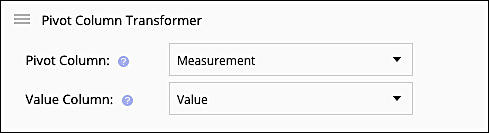
The pivot transformer applied to the file:
![Pivot transformer example Measurement/Value](https://sf-zdocs-cdn-prod.zoominsoftware.com/tdta-mktg-salesforce_datorama-264-0-0-production-enus/d38a342d-dd4a-4af8-8343-f372280a75dd/salesforce_datorama/images/data/data_streams_pivot_trans.png)

The result:

<table class="slds-table slds-table_bordered slds-max-medium-table_stacked slds-m-bottom_small ">
        <colgroup>
          <col style="width:33.33333333333333%">
          <col style="width:33.33333333333333%">
          <col style="width:33.33333333333333%">
        </colgroup>
        <tbody>
          <tr class="">
            <td class="slds-cell-wrap" style="vertical-align:top;">
              <p style="margin-bottom:0;">Day</p>
            </td>

            <td class="slds-cell-wrap" style="vertical-align:top;">Impressions</td>

            <td class="slds-cell-wrap" style="vertical-align:top;">
              <p style="margin-bottom:0;">Media Cost</p>
            </td>

          </tr>
          <tr class="">
            <td class="slds-cell-wrap" style="vertical-align:top;">
              <p style="margin-bottom:0;">3/5/2017</p>
            </td>

            <td class="slds-cell-wrap" style="vertical-align:top;">300</td>

            <td class="slds-cell-wrap" style="vertical-align:top;">
              <p style="margin-bottom:0;">$43.50</p>
            </td>

          </tr>
          <tr class="">
            <td class="slds-cell-wrap" style="vertical-align:top;">
              <p style="margin-bottom:0;">4/5/2017</p>
            </td>

            <td class="slds-cell-wrap" style="vertical-align:top;">260</td>

            <td class="slds-cell-wrap" style="vertical-align:top;">
              <p style="margin-bottom:0;">$37.20</p>
            </td>

          </tr>
          <tr class="">
            <td class="slds-cell-wrap" style="vertical-align:top;">
              <p style="margin-bottom:0;">5/5/2017</p>
            </td>

            <td class="slds-cell-wrap" style="vertical-align:top;">400</td>

            <td class="slds-cell-wrap" style="vertical-align:top;">
              <p style="margin-bottom:0;">$52.00</p>
            </td>

          </tr>
        </tbody>
      </table>