
Define your branches and branch hierarchy by creating branch unit records.
Required Editions
| Available in: Lightning Experience |
| Available in: Professional, Enterprise, and Unlimited Editions where Financial Services Cloud is enabled |
A branch unit record stores information about a specific branch office, location, or organizational unit. You can define a hierarchy of branch units by using the Parent Branch field. You can optionally assign a user or contact to each branch unit as the branch manager.
Branch unit records can relate to Service Territory records to integrate with Service Cloud. They can also relate to account records to capture additional information about each branch, such as partner account information.
To create a new branch unit record:
- From the Branch Management Console App, select Branch Units from the dropdown menu.
- On the Branch Units tab, click New.
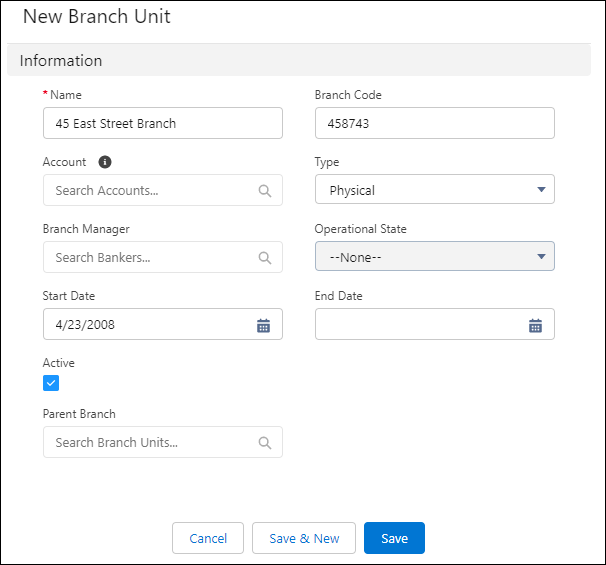
- In the New Branch Unit window, enter a unique Name.
- If the branch relates to an account, like an account representing a partner that runs the branch of business, search for and select an account.
- (Optional) Specify values for the Branch Code, Type, Branch Manager, Operational State, Start Data, End Date, and Parent Branch. If you specify the dates, make sure that today’s date is within the start and end dates for the new branch to be immediately usable.
- Click Active to activate the new branch, then click Save

Note A branch unit can be selected by a banker only if the branch unit business member and
branch unit are set to active.