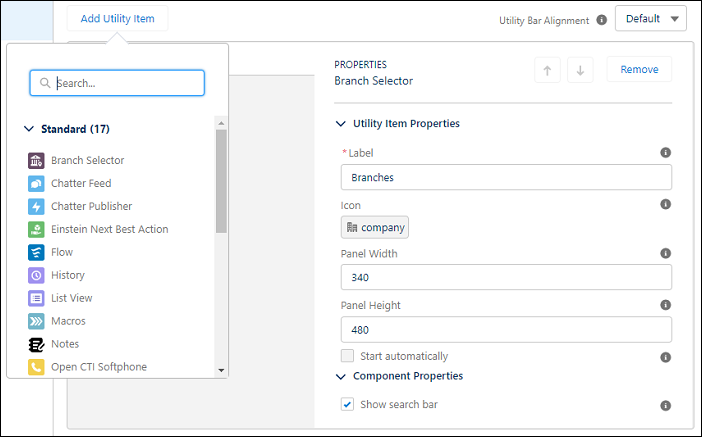
Place the Branch Selector utility bar component in your Salesforce app to let bankers
choose their current branch while working. Give users the flexibility to search for and add new
branches or remove branches that are no longer relevant to them.
Required Editions
| Available in: Lightning Experience |
| Available in: Professional, Enterprise, and Unlimited Editions
where Financial Services Cloud is enabled |
| User Permissions Needed |
| To use Branch Management: |
Financial Services Cloud Extension OR FSC Sales
|
-
From Setup, enter App Manager in Quick Find. Then select
App Manager.
-
Edit an existing Lightning app or click New Lightning App.
-
In the left-hand menu, click Utility Items (Desktop Only).
-
Click Add Utility Item and select Branch
Selector.
-
(Optional) Edit the Utility Item Properties.
-
Select to allow users to search for and assign themselves to active branches.
Users can search for all active branches. When a user adds themselves to a branch where they
don’t have an active Branch Unit Business Member record, one is automatically created for them
and set to active.
-
Click Save.