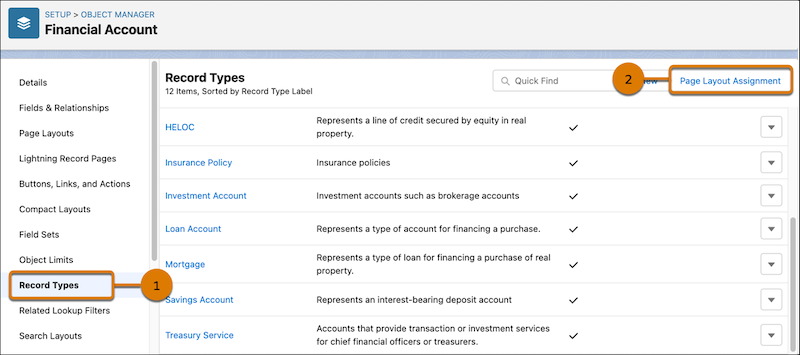
The Financial Account object includes the new Treasury Service record type to support
commercial banking needs. This record type has a customized page layout that provides an optimal
display of the record type information. This customized page layout is available to the
Relationship Manager by default and can be added to other profiles as needed.
Required Editions
| Available in: Lightning Experience |
| Available in: Professional, Enterprise, and Unlimited Editions
where Financial Services Cloud is enabled |
 This is a Financial Services Cloud managed package feature.
Follow these steps to assign the custom page to other profiles.
-
From Setup, open Object Manager.
-
Open Financial Account and then click Record Types (1).
-
Click Page Layout Assignment (2) and then Edit
Assignment.
-
For the Treasury Service record type, select the cell for the profile to which the page
layout is to be added.
-
In Page Layout To Use, select Financial Account (Treasury Service)
Layout.
-
Save your changes.