---
schema_version: "1"
id: 99e829d61b0fc471e30f1cf60f5c4642cc5256b11a70eded4705d7c1b663deac
title: Show Fields from Multiple Objects on One ARC Node
collection: admin
version: current
locale: en-us
portal_url: https://docs.salesforce.com/admin/current/en-us/ind/264-0-0/fsc_admin_arc_show_fields_objects.md
canonical_url: https://help.salesforce.com/s/articleView?id=ind.fsc_admin_arc_show_fields_objects.htm&release=264.0.0&type=5
source_site: help.salesforce.com
content_type: documentation
content_hash: 2f4322fd7a227a323afbcdf8d0cdb11767b5393e9556587eb363ba9493e6de5b
description: On an ARC Graph node, show fields from objects that share a lookup relationship to the node object. Find the objects that have a lookup relationship to the node object on the Display tab in the show field picklist.
products:
- Industry Solutions
- Cross Cloud
release: "264"
---
# Show Fields from Multiple Objects on One ARC Node
On an ARC Graph node, show fields from objects that share a lookup relationship to the node object. Find the objects that have a lookup relationship to the node object on the Display tab in the show field picklist.
### Required Editions
Showing fields from multiple objects on one node gives your users more information about their clients in one, unified view.
1. From Setup, in the Quick Find box, enter Actionable Relationship Center, and then select **Actionable Relationship Center**.
2. Click **New Relationship Graph** or edit an existing graph.
3. Create a node or select an existing node.
4. Click the **Display** tab.
1. Under Card Information, for Show Field, select a related object.
5. Configure the ARC graph and save your changes.

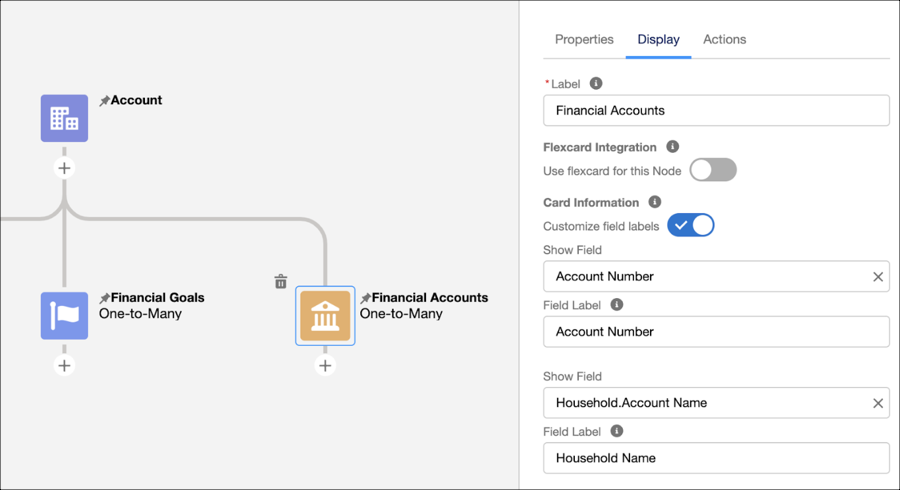
Example In Financial Services, you can create an ARC graph to show your users important details about a person, using the person account object. Then you can add a node that shows the financial accounts for the person. This graph can help your users know to which household each financial account is related. On the Financial Account node, select Household object, and then select Account Name.
#### See Also
- [_Salesforce Help_: Object Relationships Overview](https://help.salesforce.com/s/articleView?id=platform.overview_of_custom_object_relationships.htm&type=5&language=en_US)
- [Create a Relationship Graph in Actionable Relationship Center](https://help.salesforce.com/s/articleView?id=ind.fsc_admin_arc_create_relationship_graph.htm&release=264.0.0&type=5 "Show how records relate to each other.")