---
schema_version: "1"
id: 98b3fc9d391102c08acc5ecd1f0ae6355d59c7cc54e1e8f19159c0ff7e6a8e75
title: Add ARC Relationship Graph Component to Record Pages
collection: admin
version: current
locale: en-us
portal_url: https://docs.salesforce.com/admin/current/en-us/ind/264-0-0/fsc_admin_arc_relationship_graph.md
canonical_url: https://help.salesforce.com/s/articleView?id=ind.fsc_admin_arc_relationship_graph.htm&release=264.0.0&type=5
source_site: help.salesforce.com
content_type: documentation
content_hash: 204ede0f9342ae10e76e00f660403fbf239851e2d99b3fb4d9bce3712c115074
description: Add a relationship graphs to record pages to show relationships between records.
products:
  - Industry Solutions
  - Cross Cloud
release: "264"
---
# Add ARC Relationship Graph Component to Record Pages

Add a relationship graphs to record pages to show relationships between records.

### Required Editions

<table class="slds-table slds-table_bordered slds-max-medium-table_stacked slds-m-bottom_small edition"><colgroup><col></colgroup><tbody><tr class=""><td class="slds-cell-wrap" style="vertical-align:top;"><a href="https://help.salesforce.com/s/articleView?id=ind.arc_editions_security_permissions.htm&amp;release=264.0.0&amp;type=5" title="Review the supported products and editions for Actionable Relationship Center (ARC). Then learn about how your product handles permissions and how to assign them.">View supported product editions.</a></td></tr></tbody></table>

<table class="slds-table slds-table_bordered slds-max-medium-table_stacked slds-m-bottom_small permission">
        <colgroup>
          <col style="width:50%">
          <col style="width:50%">
        </colgroup>
        <thead class="slds-text-title_caps ">
          <tr class="">
            <th scope="colgroup" class="slds-cell-wrap" colspan="2" style="text-align:center;vertical-align:top;" id="d3192e63">User Permissions Needed</th>
          </tr>
        </thead>
        <tbody>
          <tr class="">
            <td data-label="User Permissions Needed" class="slds-cell-wrap" style="vertical-align:top;" headers="d3192e63 ">To add the ARC Relationship Graph component to a record page:</td>

            <td class="slds-cell-wrap" style="vertical-align:top;" headers="d3192e63 ">
              <p>
                <span>
                  <a href="https://help.salesforce.com/s/articleView?id=ind.arc_editions_security_permissions.htm&amp;release=264.0.0&amp;type=5" title="Review the supported products and editions for Actionable Relationship Center (ARC). Then learn about how your product handles permissions and how to assign them.">View
                    permissions information.</a>
                </span>
              </p>
              <p>AND</p>
              <p style="margin-bottom:0;">Customize Application user permission</p>
            </td>

          </tr>
        </tbody>
      </table>

1. In Lighting App Builder, on the record page that you're editing, add a Tabs component to the page. A default set of tabs is added.
2. Click **Add Tab** in the Tabs component properties to add a new tab.
3. Click the new tab and customize the Tab Label. Then click **Done**.
4. Select the new tab on the canvas to add ARC components.
    1. Drag **ARC Relationship Graph** component from the Components panel to the new tab in the Lightning page.
5. Configure the graph in the properties pane.
    1. Enter a Label.
    2. Select a Relationship Graph with the same root node as the object record page.
    3. Select Component Visibility.
6. Save your changes.
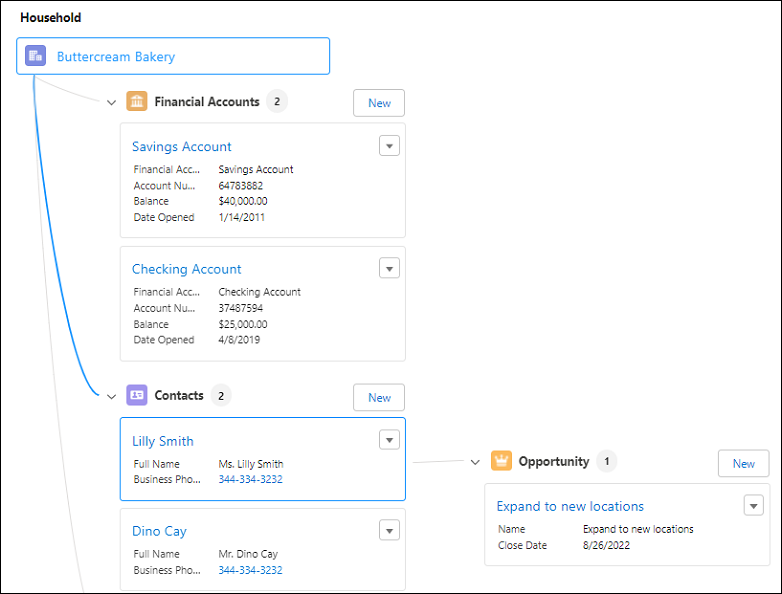
![ARC Relationship Graph](https://sf-zdocs-cdn-prod.zoominsoftware.com/tdta-ind-actionable_relationship_center-264-0-0-production-enus/5ec6d51b-691d-4c36-ae40-37976553d701/resources-product/images/feature_arc/arc_relationship_graph.PNG)

#### See Also

- [_Salesforce Help_: Add and Customize Tabs on Lightning Pages Using the Lightning App Builder](https://help.salesforce.com/s/articleView?id=platform.lightning_app_builder_customize_lex_pages_add_tabs.htm&type=5&language=en_US)
- [_Salesforce Help_: Dynamic Lightning Pages](https://help.salesforce.com/s/articleView?id=platform.lightning_page_components_visibility.htm&type=5&language=en_US)