---
schema_version: "1"
id: fe0f9b35a195067435d35a9735cbbc20fdfde7d0f1687c492a414863ab308966
title: Consolidate Duplicate Records in an ARC Graph
collection: admin
version: current
locale: en-us
portal_url: https://docs.salesforce.com/admin/current/en-us/ind/264-0-0/fsc_admin_arc_duplicate_records.md
canonical_url: https://help.salesforce.com/s/articleView?id=ind.fsc_admin_arc_duplicate_records.htm&release=264.0.0&type=5
source_site: help.salesforce.com
content_type: documentation
content_hash: b16f96fde15c2a54066f6ff40e705bbadf98760a46b1e2ac1e12d88a8e59f8f2
description: When you build a node using the many to many relationship type, one record can exist on multiple junction objects. Select to collapse the duplicate records into a single record card when the graph loads on a record page.
products:
  - Industry Solutions
  - Cross Cloud
release: "264"
---
# Consolidate Duplicate Records in an ARC Graph

When you build a node using the many to many relationship type, one record can exist on multiple junction objects. Select to collapse the duplicate records into a single record card when the graph loads on a record page.

### Required Editions

<table class="slds-table slds-table_bordered slds-max-medium-table_stacked slds-m-bottom_small edition"><colgroup><col></colgroup><tbody><tr class=""><td class="slds-cell-wrap" style="vertical-align:top;"><a href="https://help.salesforce.com/s/articleView?id=ind.arc_editions_security_permissions.htm&amp;release=264.0.0&amp;type=5" title="Review the supported products and editions for Actionable Relationship Center (ARC). Then learn about how your product handles permissions and how to assign them.">View supported product editions.</a></td></tr></tbody></table>

<table class="slds-table slds-table_bordered slds-max-medium-table_stacked slds-m-bottom_small permission">
        <colgroup>
          <col style="width:50%">
          <col style="width:50%">
        </colgroup>
        <thead class="slds-text-title_caps ">
          <tr class="">
            <th scope="colgroup" class="slds-cell-wrap" colspan="2" style="text-align:center;vertical-align:top;" id="d2401e63">User Permissions Needed</th>
          </tr>
        </thead>
        <tbody>
          <tr class="">
            <td data-label="User Permissions Needed" class="slds-cell-wrap" style="vertical-align:top;" headers="d2401e63 ">To consolidate duplicate records in ARC graphs:</td>

            <td class="slds-cell-wrap" style="vertical-align:top;" headers="d2401e63 ">
              <span>
                <a href="https://help.salesforce.com/s/articleView?id=ind.arc_editions_security_permissions.htm&amp;release=264.0.0&amp;type=5" title="Review the supported products and editions for Actionable Relationship Center (ARC). Then learn about how your product handles permissions and how to assign them.">View
                  permissions information.</a>
              </span>
            </td>

          </tr>
        </tbody>
      </table>

There is a limit of 5 junction records per record when duplicate record is enabled.

If duplicate records is disabled, when the graph loads duplicate records are displayed as separate cards.

1. From Setup, in the Quick Find box, enter Relationship Graphs, and then select **Relationship Graphs**.
2. Click **New Relationship Graph** or edit an existing graph.
    
    ![Note](https://sf-zdocs-cdn-prod.zoominsoftware.com/tdta-ind-actionable_relationship_center-264-0-0-production-enus/5ec6d51b-691d-4c36-ae40-37976553d701/images/icon_note.png)
    
    Note On the Properties tab, Relationship Type Many-to-Many must be enabled to use Show Duplicate Records.
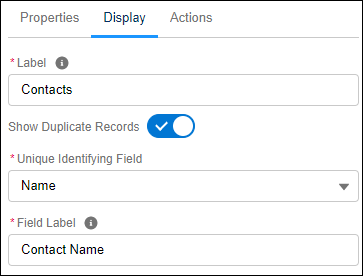
3. On the Display tab, select **Show Duplicate Records**.
    1. Below Unique Identifying Field, click **Select an Option** to select an identifying field that will be used to differentiate between junction objects records.
        
        In the Unique Identifying Field, the vales are from the Junction Object.
4. Configure the node Properties and Actions tabs and then save your graph.
    
    ![ARC Duplicate records](https://sf-zdocs-cdn-prod.zoominsoftware.com/tdta-ind-actionable_relationship_center-264-0-0-production-enus/5ec6d51b-691d-4c36-ae40-37976553d701/resources-product/images/feature_arc/arc_duplicate_records.PNG)