---
schema_version: "1"
id: 9ce08f4026016b91d6eb27c5ac0ff2c3b0261d5081e612ad500032dc68d2e357
title: Configure a Member Relationships Node
collection: admin
version: current
locale: en-us
portal_url: https://docs.salesforce.com/admin/current/en-us/ind/264-0-0/fsc_admin_arc_create_member_rel_node.md
canonical_url: https://help.salesforce.com/s/articleView?id=ind.fsc_admin_arc_create_member_rel_node.htm&release=264.0.0&type=5
source_site: help.salesforce.com
content_type: documentation
content_hash: eef5f83109cc646eaaf04291c3401d5c7cd7a915b00751f964101fe003bc3bc1
description: Lists accounts that are currently tied to a parent account. For example, a trust that holds assets for the household. The relationship (association type) is account-account relationship (member).
products:
- Financial Services
release: "264"
---
# Configure a Member Relationships Node
Lists accounts that are currently tied to a parent account. For example, a trust that holds assets for the household. The relationship (association type) is account-account relationship (member).
### Required Editions
Available in: Lightning Experience
Available in: Professional, Enterprise, and Unlimited Editions
User Permissions Needed
To create an ARC Relationship Graph:
Financial Services Cloud Extension OR FSC Sales
AND
Customize Application
1. From Setup, in the Quick Find box, enter Actionable Relationship Center, and then select **Actionable Relationship Center**.
2. Click **New Relationship Graph** or edit an existing graph.

Important The Root Node object must be Account to configure the Member Relationships Node.
3. Click the plus icon to add a child node.
4. On the Properties tab, configure the node properties as follows:
| Field Name | Field Value |
| --- | --- |
| Object | Account |
| Relationship Type | Many-to-Many |
| Junction Object | Account-Account Relationship |
| Parent Node Lookup Field | Account |
| Object Lookup Field | Related-Account |
5. Click **Filter** and define the following filter criteria:
| Field Name | Field Value |
| --- | --- |
| Apply filter to | Junction |
| Field | Association Type |
| Operator | equals |
| Value | Member |
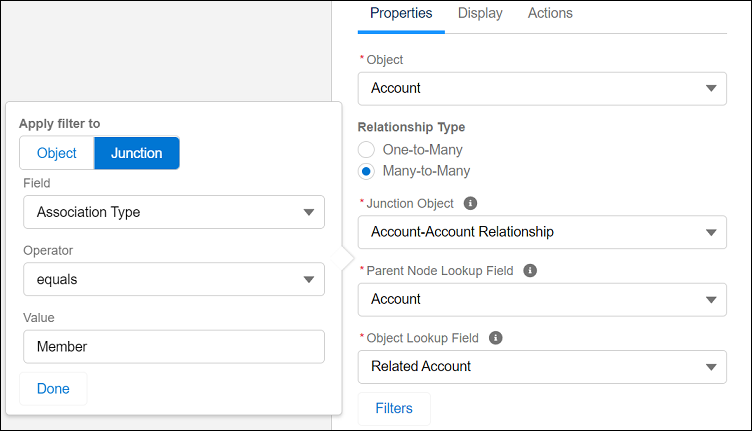
6. Click **Done**. Configure the node Display and Actions tabs.
7. Save your graph.
#### See Also
- [Create a Relationship Graph in ARC](https://help.salesforce.com/s/articleView?id=ind.fsc_admin_arc_create_relationship_graph.htm&type=5&language=en_US)