
Add Task Dependencies to Action Plans
Ensure that all tasks in an action plan are current and actionable by defining the prerequisite tasks that must be done prior to the successor tasks.
Required Editions
| Available in: Lightning Experience |
| Available in: Automotive Cloud, Consumer Goods Cloud, Education Cloud, Financial Services Cloud, Government Cloud with Lightning Scheduler, Health Cloud, Manufacturing Cloud, Nonprofit Cloud, and Public Sector Solutions. View edition availability. |
Create dependencies when adding a task to an action plan template. Select one or more prerequisite tasks from the Available Tasks list to create finish-to-start dependencies from those prerequisite tasks to the task being created.
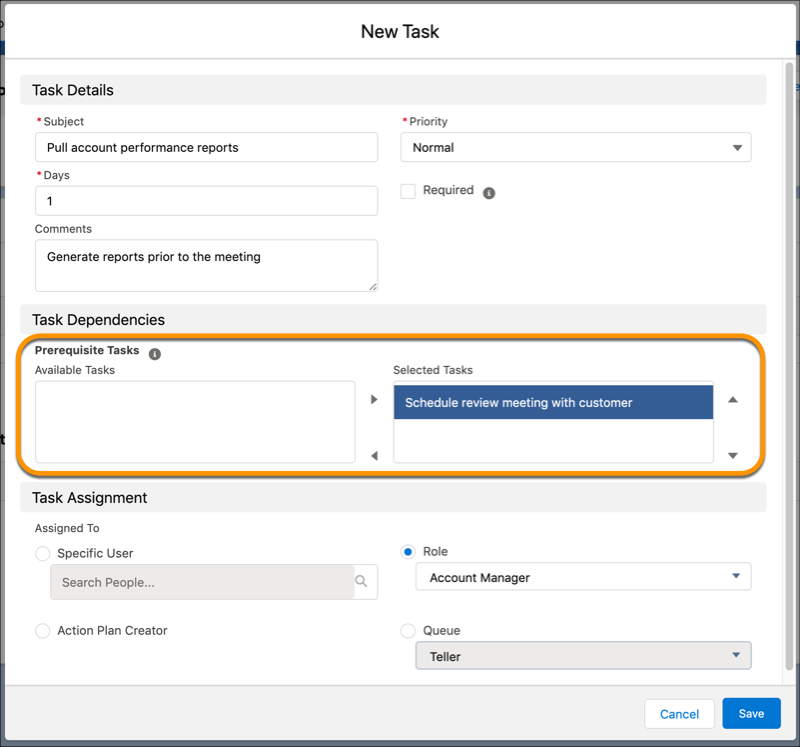
When an action plan is initially generated from the template, it creates only the tasks that have no dependencies. As prerequisite tasks get completed, their successor tasks are added to the plan.
You can edit the Assigned To field on a dependent task before its prerequisite tasks are complete. Assign resources to your plan upfront while the dependency logic stays intact. A successor task can start only after all its prerequisite tasks are complete.
A task can be dependent on up to three prerequisite tasks. A successor task is added to the action plan task list only after all its prerequisite tasks are completed.
A task can have up to 10 successor tasks. An action plan template can support a maximum of 24 task dependencies in a sequence. Be mindful of the task dependencies that you’re adding to an action plan template because that impacts the action plan creation time.
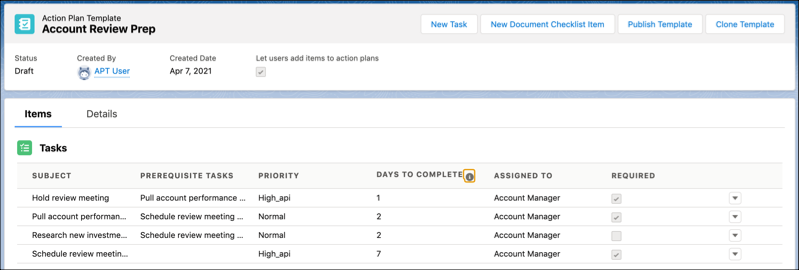
The Tasks list on the Action Plan Template page shows the prerequisites for each task. The Days to Complete value indicates the number of days to complete the task, and doesn’t include the days to complete the prerequisites.