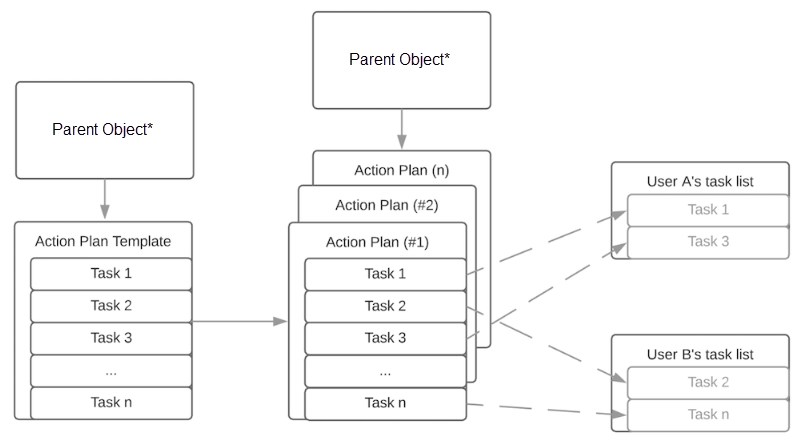
You can create an action plan template and its generated action plans for various objects, depending on the products and licenses available in your org. You can also create them for custom objects that have Activities enabled.
Required Editions
| Available in: Lightning Experience |
| Available in: Automotive Cloud, Consumer Goods Cloud, Education Cloud, Financial Services Cloud, Government Cloud with Lightning Scheduler, Health Cloud, Manufacturing Cloud, Nonprofit Cloud, and Public Sector Solutions. View edition availability. |
Here’s the Action Plans data model.
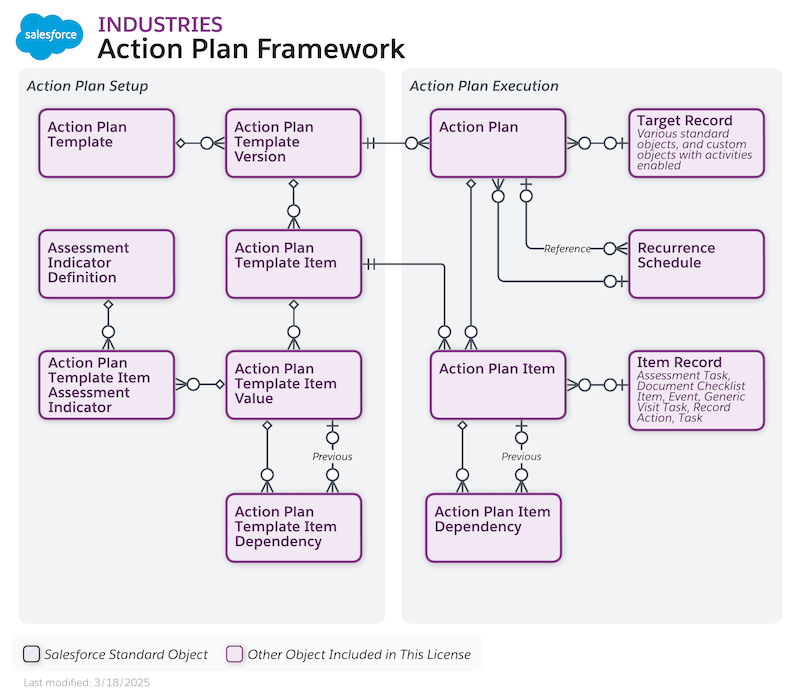
The types of items that can be included in an action plan template and its generated action plans include:
- Document Checklist Item (available when Financial Account is the target object)
- Task

Note Some Salesforce products support additional action plan item types.
Target objects are:
- Account (applicable to both Person Accounts and Business Accounts)
- Asset Account Participant
- Asset Contact Participant
- Asset Milestone
- Assets and Liabilities
- Benefit
- Benefit Assignment
- Business License Application
- Business Milestone
- Campaign
- Card
- Care Plan
- Case
- Claim
- Contact
- Contact Contact Relationship
- Contract
- Emergency Request
- Financial Account
- Financial Deal
- Financial Goal
- Financial Holding
- Fleet
- Goal Assignment
- Individual Application
- Insurance Policy
- Insurance Policy Coverage
- Interaction
- Job Position
- Lead
- Opportunity
- Person Education
- Person Life Event
- Position
- Preliminary Application Reference
- Program
- Public Complaint
- Record Alert
- Recruitment Requisition
- Regulatory Code Violation
- Residential Loan Application
- Violation Enforcement Action
- Vehicle
- Vlocity Scheduled Job
- Custom objects that have activities enabled
In an action plan template, assign each task or other item to a person, a role, a queue, or the action plan creator. When creating templates with the UI, the plan creator becomes the plan owner. When creating templates using the API, you can designate a plan owner different from the plan creator.