
Resolve commonly encountered problems while setting up or using the Customer Acquisition Management application. For each listed problem, a workaround or a probable cause of the issue is provided. In case you do not find your issues listed on this page, or the workaround provided does not work for you, contact Salesforce Support.
Initial Setup Issues
This section provides solutions to issues that you may encounter during the initial setup of Customer Acquisition Management application.
Unable to deploy profile and communities in a new org while setting up
Customer Acquisition Management. An error
message is displayed: A site with the same name already exists in
org
The error may be caused if there are two communities with the same URL. As communities created for Customer Acquisition Management do not have any suffixes in the URL, it may conflict with other communities in the target org with the same URL.
If communities are enabled in the target org, ensure that existing communities have suffixes appended to the base URL.
OmniScripts become unresponsive while setting up Customer Acquisition Management. The bill graph in Energy and Utilities Console may also not be visible.
The error may be caused due to Lightning Web Security. To disable Lightning Web Security, follow these steps:
-
Click Setup.
-
In Quick Find, enter Session Settings and click Session Settings under Security.
-
Under Lightning Web Security, deselect the Use Lightning Web Security for Lightning web components checkbox.
-
Save your changes.
Migration Issues
This section provides solutions to issues that you may encounter during the migration of Customer Acquisition Management application.
Post Migration Issues
This section provides the issues that you may encounter after you have completed the migration of Customer Acquisition Management application.
FlexCards may need to be reactivated after activating OmniScripts
FlexCards are sometimes deactivated after components are deployed in your org.
Manually reactivate the following components for Customer Acquisition Management:
-
VEEConsumerOfferDetails
-
VEEConsumerSelectedCommodityOfferDetails
-
VEEConsumerTestimonial
-
VEEConsumerFAQ
-
VEEConsumerAddOnOfferDetails
-
VEEConsumerSelectedCommodityOfferDetails
Refresh Platform cache job is failing
-
Change the namespace for your package.
-
Execute the following commands in an anonymous window:
Database.executeBatch(new vlocity_cmt.EPCFixCompiledAttributeOverrideBatchJob(), 1);delete [select Id from vlocity_cmt__CachedAPIResponse__c]; List<Id> productIds = new List<Id>(); for (Product2 prod : [ Select Id from Product2 where vlocity_cmt__ObjectTypeId__c != null or vlocity_cmt__ProductSpecId__c != null ]) { productIds.add(prod.Id); } Database.executeBatch(new vlocity_cmt.EPCProductAttribJSONBatchJob(productIds), 1);
Deployment of Sample Permission Sets and Permission Set Groups is failing
For OmniStudio-Enabled orgs, deployment of permission sets may conflict with the existing permission sets and permission set groups related to other apps in your org.
Remove the permission sets and permission set groups related to Large Account Sales Management and Utility Self Service Portal from your org, and then try deploying the permission sets for Customer Acquisition Management.
Troubleshoot Runtime Issues
Resolve common errors that occur when you run the Customer Acquisition Management app, such as missing prices, failed orders, and products that don't appear.
Unit Prices Aren’t Shown While Running GetBasketVip
Run Create Pricing Variables and Bundles job along with populate API Cache jobs in post-deployment steps. For more information, see Run Maintenance Jobs and Refresh the Application Cache for Energy & Utilities.
Premises and Service Points Aren’t Created While Running Full Flow
Make sure that the unauthenticated guest user profile has edit access to the distribution region for the premise object.
Unable to Process Basket While Creating Baskets or Getting Errors in Offer Details API
This error appears when there are problems in the products configuration. Make sure that the attachments URLs in products are correct.
While Submitting an Order
This error message appears:
Sorry, we have encountered a technical issue. Please contact your system administrator.-
The JSONResult class isn’t present in the input in the Create Cart API. From Vlocity CMT Administration tab, check your Industries CPQ configuration Settings and set CacheAPI.CreateCartFromContextKey to True. For more information, see Checking Your CPQ Configuration Settings and Response Format for Cart-Based APIs.
-
Make sure that the VEE unauthenticated guest users profiles object setting has Distribution Area enabled.
Error Message Mentions Access Issues in the JSON Payload
For example:
success":false,"result":{"success":false,"sessionKey":"c2c27bf49105e22f27e9ad4b90ad8c92","result":null,"errorCode":"INVOKE-500","error":"No calculation matrix found with name FixedPriceProducts"Create a sharing rule to provide the unauthenticated guest user access to the desired component. For example, create a sharing rule to provide access to the FixedPriceProducts calc matrix.
Launching OS Fails on the Customer Acquisition Management App
The console shows an error message:
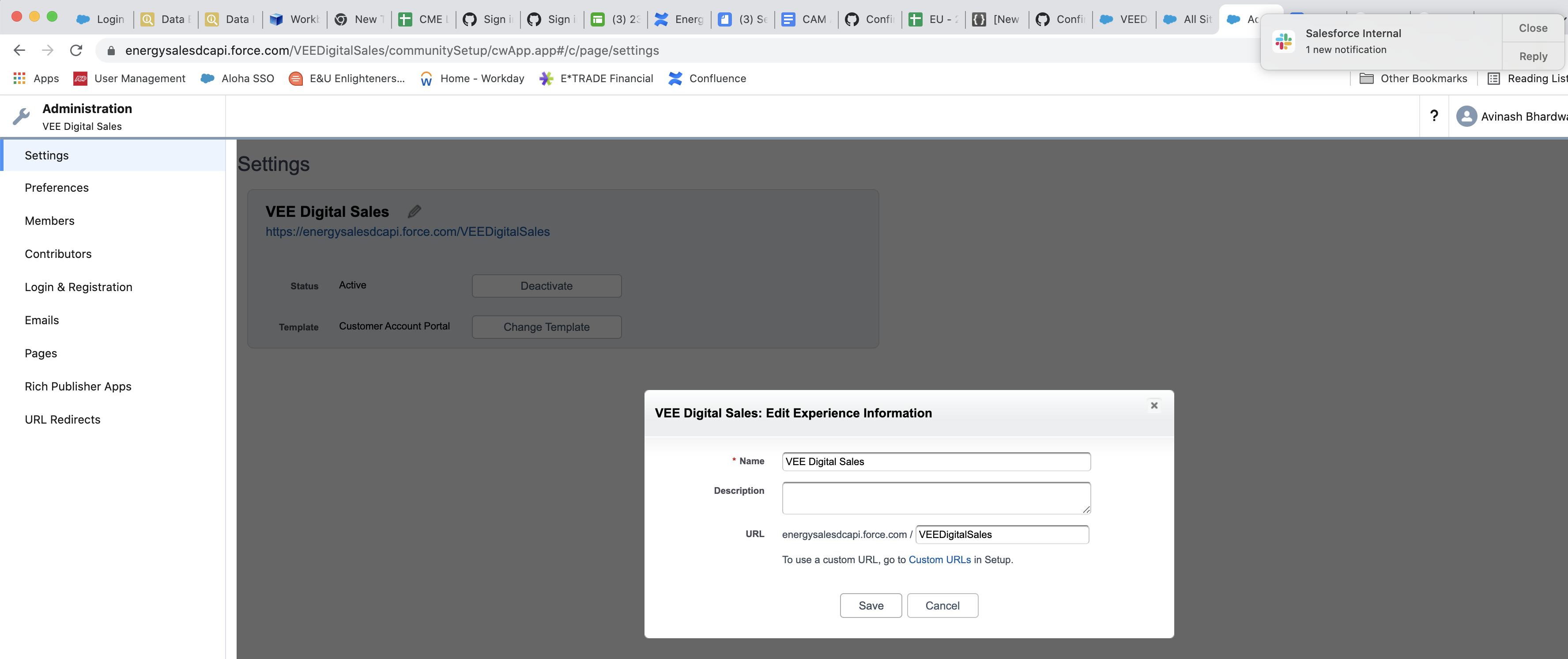
Refused to apply style from ‘https://camdigitalprocess.force.com/null/resource/1603954111000/newport_nds/assets/styles/vlocity-newport-design-system.min.css’; because its MIME type ('text/html') is not a supported stylesheet MIME type, and strict MIME checking is enabledIn the site, click Administration and add some text in URL.
Currency Code Isn’t Shown on the UI of the Target Org
-
In Products, under the Pricing tab change the currency code.
-
Delete and regenerate Cached API response records for them.
-
Clear the platform cache to avoid stale cache records being picked by the Vlocity Integration Procedure (VIP).
The Newly Added Product Doesn’t Appear in Customer Acquisition Management
-
From the App Launcher, search for Product, and click Vlocity Product Designer.
To add a new product in the Products tab, follow the steps in Add Product Specification to the Reference Product Model.
-
If the product is listed in the Products tab and isn’t visible in Customer Acquisition Management, follow the steps in Refresh Product Cache for Customer Acquisition Management.
Calculation Matrix Returns the Wrong Rate Tier
If a quote or basket shows a price from the wrong rate tier, the calculation matrix data or its cached results are out of date.
-
Open the calculation matrix and check that the active version has the correct tier ranges, with no gaps or overlaps between the start and end values of each row.
-
If you changed the matrix, delete and regenerate the Cached API response records, and then clear the platform cache.
-
If the matrix runs for unauthenticated guest users, check that a sharing rule gives the unauthenticated guest user access to it. See that the "Error message mentions access issues in the JSON Payload" section in this topic.
Tariff Plans Don't Appear When You Add Products to a Quote
If tariff plans are missing from the product list when you add products to a quote, check the product setup and the cache.
-
In Vlocity Product Designer, check that the tariff plan product is active, is in the price list that the quote uses, and has a price for the quote's currency.
-
Run the Create Pricing Variables and Bundles job and the Populate API Cache jobs. See Run Maintenance Jobs and Refresh the Application Cache for Energy & Utilities.
-
If the product still doesn't appear, refresh the product cache. See Refresh Product Cache for Customer Acquisition Management.
Issue in DC APIs
Try to reproduce the issue in Workbench or Postman before going to DC team.
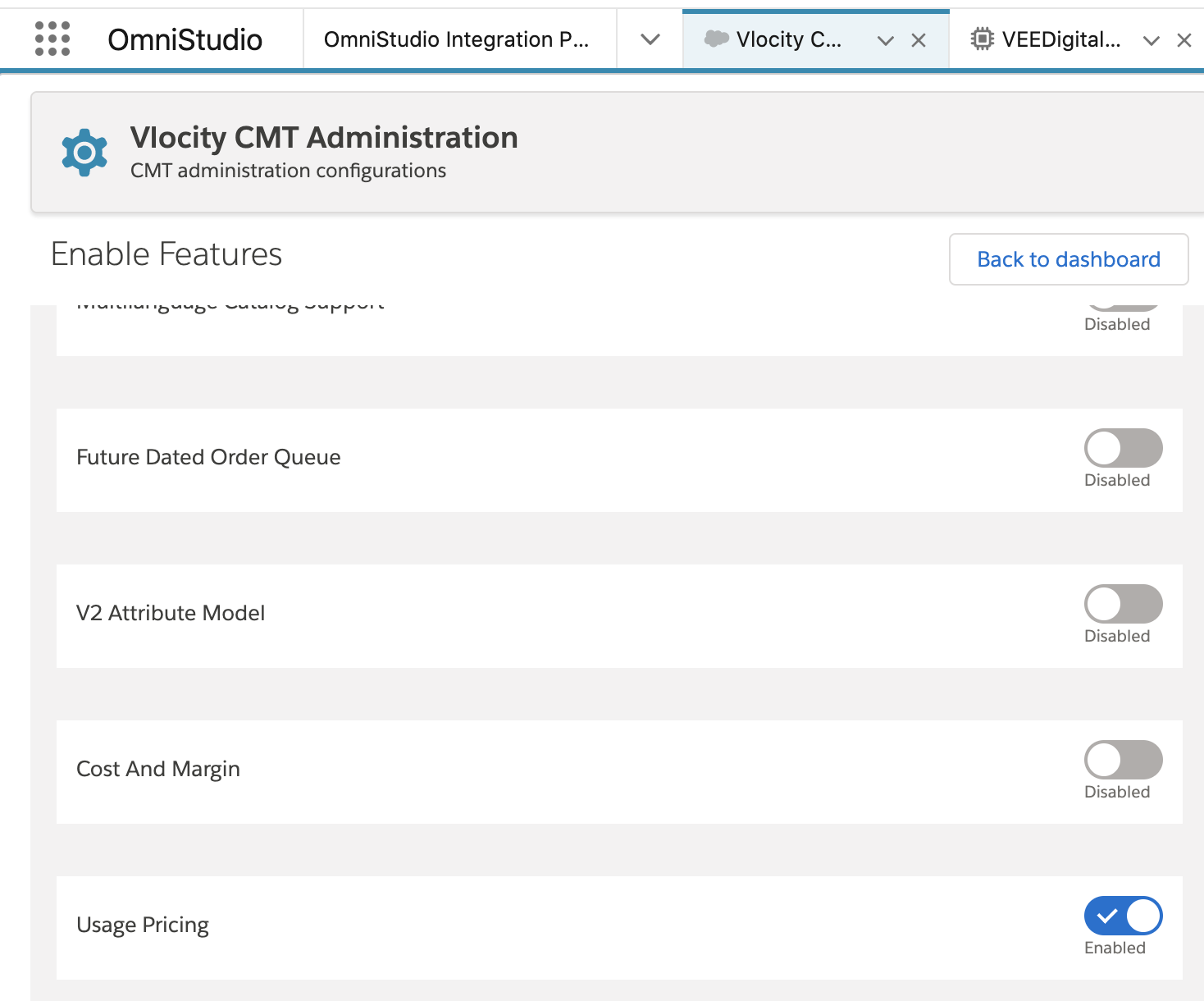
- In App Launcher, type Vlocity CMT Administration.
- Under Enable Features , ensure that V2 Attribute model is disabled and Usage Pricing is enabled.
Page layout modification does not display the pricing on the order
If the page layout modification does not display the pricing on the order, follow these steps.
- From Setup, open Object Manager.
- In Order, click Page Layout, then click Page Layout Assignment.
-
In the layout, add the fields below and save your changes:
-
Usage Price Total
-
Effective Total: Monthly Charges
-
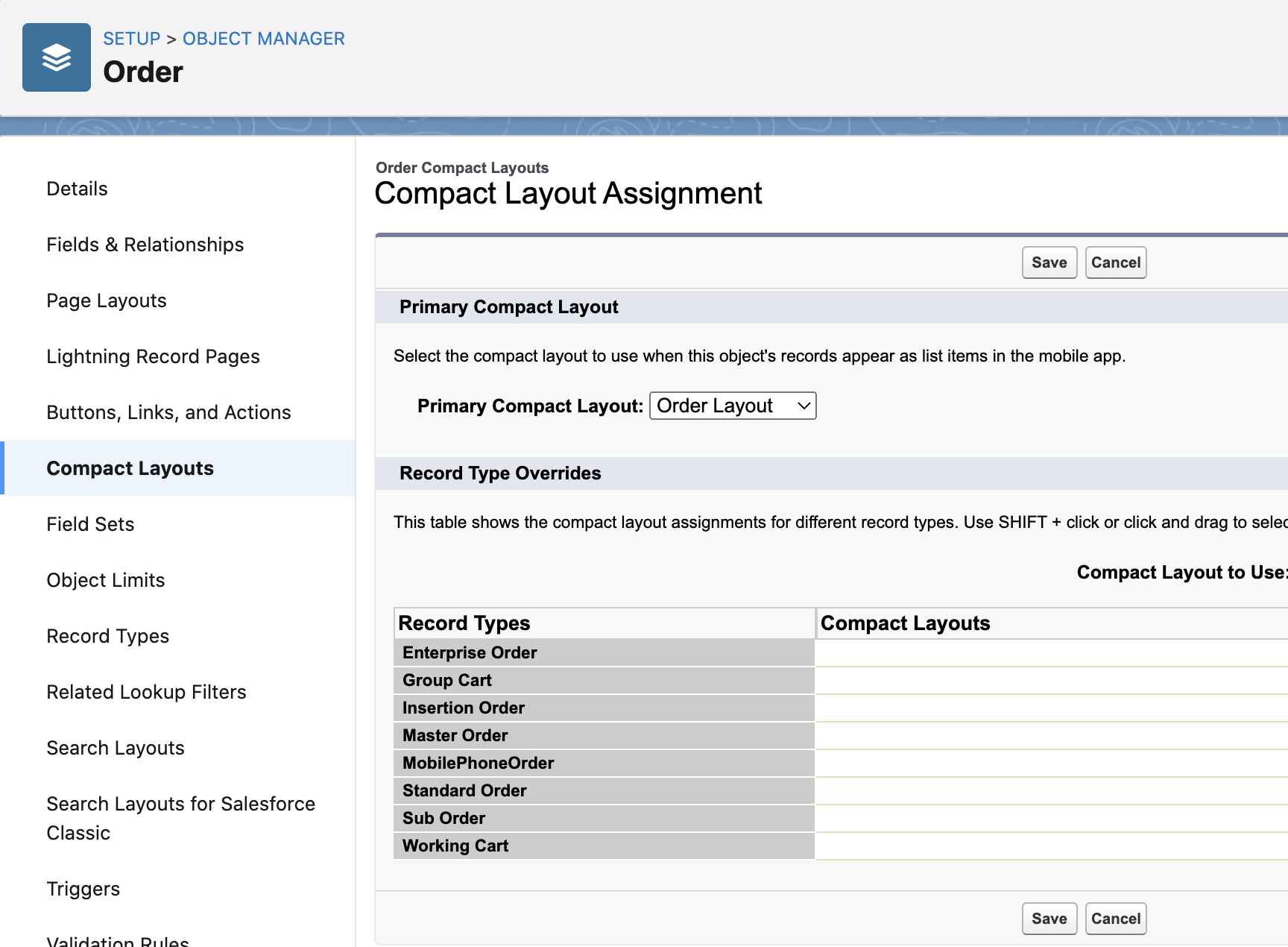
- Click Compact Layout, then click New. Optionally, you can edit an existing custom compact layout.
-
Add the new fields below and save your changes:
-
Usage Price Total
-
Effective Total: Monthly Charges
-
- In Compact Layout Assignment, under Primary Compact Layout, select the updated layout from the dropdown.
Error When Getting Personalized Quote in Digital Experience
If the product offers are not listed after you click Get Personalized Quote, perform these steps.
In the Digital Experience site, if you click Get Personalized Quote, enter the details and then click Next, the list of products should be displayed. If the requested criteria does not generate a CachedApiResponse record, it may display an error message: Sorry, we have encountered a technical issue. Please contact your system administrator.
- From the App Launcher, type Omnistudio Integration, and select OmniStudio Integration Procedures.
- Select the VEE/DigitalGetBasket Integration Procedure.
- Open the active version of the Integration Procedure.
- Click the Preview tab.
-
Click the arrow on the right side of the Response section.
The Debug Log, Errors, Options sections are displayed.
-
Under the Options section, set
"queueableChainable"to true.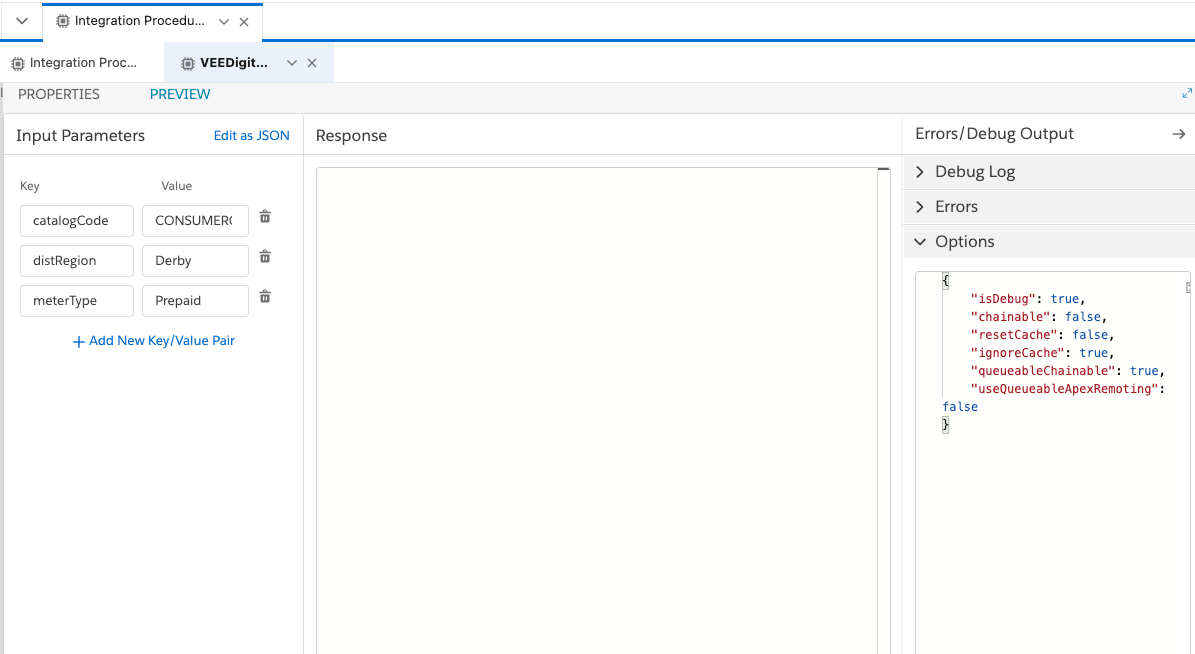
- Click Execute, then follow the steps in Use the Reference UI for Customer Acquisition Management to get a personalized quote.