
The Overall Energy Savings chart shows the overall energy savings achieved by the program, and the distribution of energy savings across the products associated with the program. Some products such as Electric Vehicles may have benefits that cannot be measured by energy savings data.
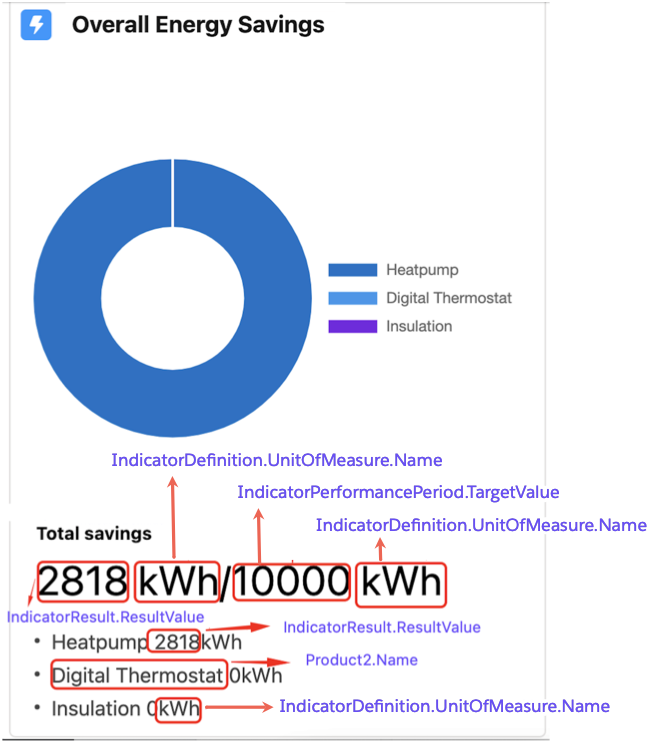
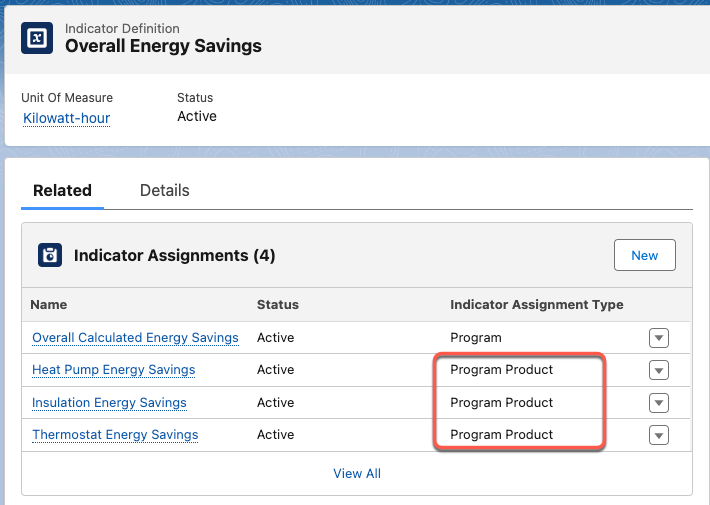
The Overall Energy Savings Chart shows data from the Indicator Definition object associated with ProgramProduct objects. The sample data includes two Indicator Definition Records:
| Field | Name | Unit Of Measure | Status |
| Data | Overall Energy Savings | Kilowatt-hour | Active |
| Incentive Budget Spent | US Dollars | Active |
The chart shows Overall Energy Savings because the Indicator Assignments Type fields in the associated Indicator Assignment objects are set to Program Product.
If multiple Indicator Definition records were configured, the FlexCard shows only one of them.
Suppose you have a Program Product called Insulator. To create a chart, you must:
-
Create an Indicator Definition record. For example:
Object: Indicator Definition Field Name Unit Of Measure Status NewDefinition BTU Active -
Create an Indicator Assignment record, and then set the Indicator Definition to the one you created and the Indicator Assignment Type to Program Product. In the Program Product field, enter Insulator. For example:
Object: Indicator Assignment Field Name Indicator Definition Indicator Assignment Type ProgramProduct Status NewAssignment NewDefinition Program Product Insulator Active -
Create an Indicator Performance Period, and then set the Indicator Assignment field to the one you created. For example:
Object: Indicator Performance Period Field Name Indicator Assignment NewPerformancePeriod NewAssignment -
Clone FlexCard EnergyUtilitiesPMCProgramSummary and edit the datasource to include the new data. The Integration Procedure EnergyUtilitiesPMC/RetrieveDashboardData is the datasource for the Overall Energy Savings Chart FlexCard. The integration procedure contains
-
An Integration Procedure EnergyUtilitiesPMC/GetProgramOutcomeData which fetches all the outcome data. You must configure the associated Data Mapper component.
-
TransformationApplicationData component that ensures that all the data is in a format that is expected by the FlexCard.
-
-
Drop the cloned FlexCard in the parent FlexCard EnergyUtilitiesPMCProgramSummaryCharts.
For more information on working with OmniStudio components, see: