
The Customer Acquisition Management application uses on-platform caching to offer best-fit products and services to customers with the ability to scale with demand together with speed and reliability.
When you add or modify the offered products and services, you must regenerate the product cache to reflect the changes in your customer experience portal.
The Customer Acquisition Management application optimizes the cache refresh process by regenerating the cache only for the delta products which have been newly added or modified. This reduces the time to refresh the cache, and there is no impact on unmodified products. For example, if you have added a new product Home Electricity Saver, and have modified the cost of the existing product Prepaid Energy. The cache is refreshed only for these two products, there is no impact on the rest of the offered products.
Here is the high-level cache regeneration process displaying the sequence in which the Vlocity Scheduled Jobs and associated Integration Procedures are invoked.

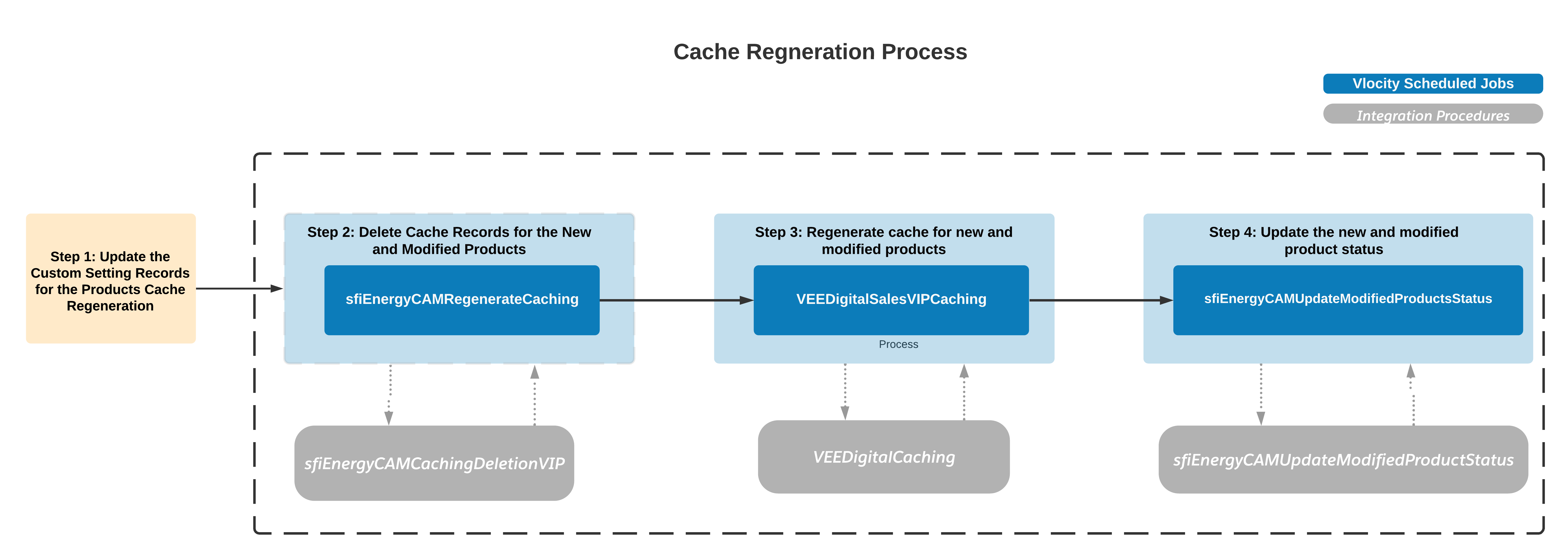
- Step 1: Update the Custom Setting Records
To differentiate the new and modified products from the non-modified products, the application uses the Custom Setting
sfiEnergyCAMModifiedProductsCode. Each of these custom setting records has two fields -Product CodeandisProcessedflag. Only the product codes which haveisProcessedset to false are picked up and the associated cache records are regenerated.NoteAs an administrator, you are responsible for maintaining the records for the custom setting
sfiEnergyCAMModifiedProductsCode. You can add records for the new products and edit records for the modified products. - Step 2: Delete cache records for the new and modified products
The existing cache records for the new and modified products are deleted.
- Step 3: Regenerate cache for new and modified products
The cache is regenerated for the products which have
isProcessedflag set to false. These products are not visible on your portal during the cache refresh. - Step 4: Update the product status
After the cache is refreshed, the
isProcessedflag is set to true for all the products for which the cache was regenerated.
The graphic above is only a pictorial representation of the steps involved in cache regeneration. Use the steps given below for an end-to-end procedure for refreshing cache in your org.