---
schema_version: "1"
id: 61f86ac55e64ef7c66a878317f1acabaaccc5604b3708a2053911b827413f03a
title: View Fulfillment Step History
collection: admin
version: current
locale: en-us
portal_url: https://docs.salesforce.com/admin/current/en-us/ind/264-0-0/dro_view_fulfillment_step_history.md
canonical_url: https://help.salesforce.com/s/articleView?id=ind.dro_view_fulfillment_step_history.htm&release=264.0.0&type=5
source_site: help.salesforce.com
content_type: documentation
content_hash: 260efb222ced1621bd5b70654159257cf981101bd4e73fcfd757947219baeaf5
description: Monitor the changes to a fulfillment step, such as status modifications, on its detail page by using the Fulfillment Step History related list.
products:
- Revenue Cloud
release: "264"
---
# View Fulfillment Step History
Monitor the changes to a fulfillment step, such as status modifications, on its detail page by using the Fulfillment Step History related list.
### Required Editions
Available in: Enterprise, Unlimited, and Developer Editions
User Permissions Needed
To view the fulfillment step history:
Fulfillment Designer
OR
DRO Admin User
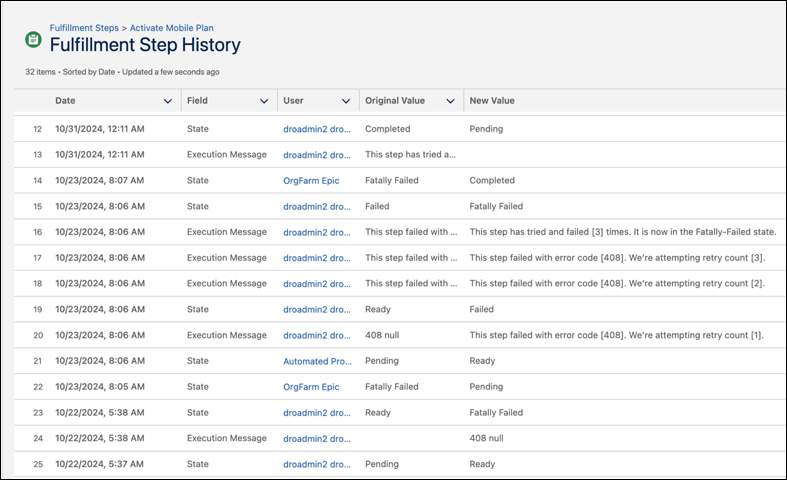
Whenever a user changes a standard or custom field, the system logs an entry in the Fulfillment Step History related list, irrespective of the order's status. Each entry captures the date and time of the change, the affected field, the user who made the change, and the specific details of the change.
1. From the App Launcher, find and select **Fulfillment Steps**.
2. Select a step to view its details and history.